


When you send a quote to a customer abroad, you often need one sheet that is bilingual — Chinese and English side by side — and that can also list how to pay. Laying out a Chinese version in Word and then an English one is a good way to break the formatting. On November 20, 2026, in desktop Chrome, we opened Twinform. We did not create an account, and we did not buy a license. We exported three PDFs: one from the site’s own fictional sample, and two from fictional data we typed ourselves. We then used pdfinfo to check the page count and paper size, and rendered each page to an image to inspect the text and the watermark.
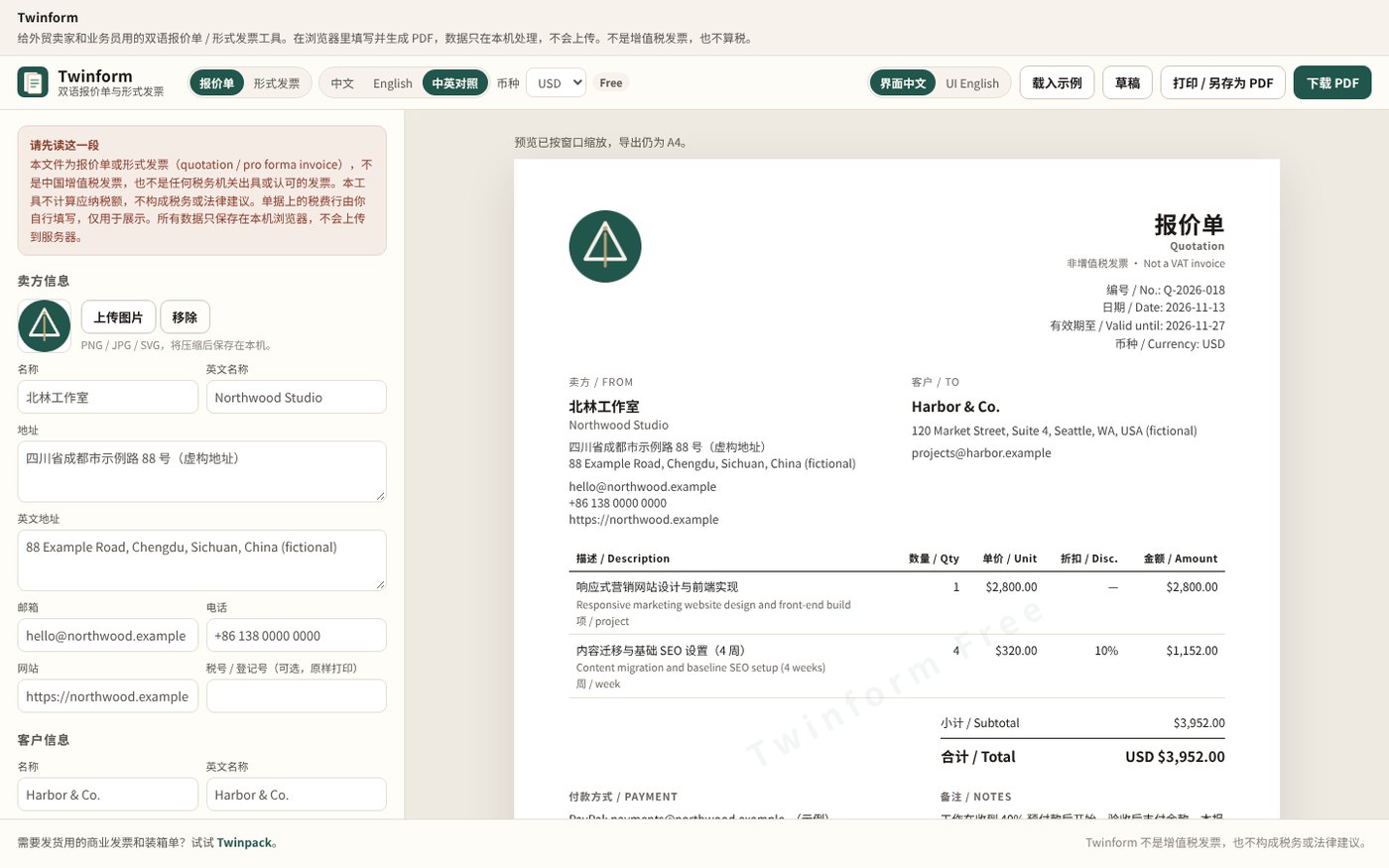
The page title is “Twinform — Bilingual quotation / Proforma invoice” (the Chinese heading is 「双语报价单 / 形式发票」). When it opened, we did not see a cookie banner, a login wall, or a pop-up ad. At the top you can switch between Quotation and Proforma invoice, and between Chinese, English, and a bilingual layout; the default is bilingual. The currency list includes USD, EUR, CNY, GBP, JPY, HKD, SGD, AUD, and CAD, and it defaults to USD. The interface itself can also be set to Chinese or “UI English.” In the top right we saw Load sample, Drafts, Print / Save as PDF, Download PDF, and a badge that said Free.
On the left there is a fixed notice: this is not a Chinese VAT fapiao (the official tax invoice used in mainland China), the tool does not compute tax, and any tax line is filled in by you for display only. The same bilingual statement also appeared at the bottom of the preview and of every PDF we later opened. The tool has a public GitHub repository. The root contains a README and DISCLAIMER.txt, and there is no LICENSE file. The README describes a usage permission (you may use it to produce your own documents; you may not resell, redistribute, or repackage the tool itself), so this article does not present Twinform as an open-source project.
Who it is for, and what you can fill in
It is a good fit if you occasionally need a Chinese–English quotation or proforma invoice for a customer abroad and do not want to lay it out in Word first. It does not collect payment, and it does not issue a Chinese VAT invoice. If what you want is to fill in a list in the browser and export files, but the job is event invitations rather than a quote, we have written about Tsudoi.
The form can take Chinese and English names, addresses, emails, and phone numbers for the seller and the client. The seller can also add a website and a tax ID, which are printed as entered. You can upload a PNG, JPG, or SVG logo; the page says it is compressed and stored on this device. You can add several line items, each with a bilingual description, quantity, unit, unit price, and a discount percentage. Below that there is an order-level discount amount, and an optional tax row (you type both the name and the rate; the page says it only multiplies, and is not a tax-filing result). For payment you can tick PayPal, Wise, Payoneer, or a bank transfer, and you type the account details yourself. There is also a notes field.
The templates are Classic, Modern (previewable), and Minimal (previewable). The purchase page said Pro is $15 on Gumroad, and that it can also be bought in China on Mianbaoduo — a Chinese storefront for digital goods, similar to Gumroad — at ¥79, to remove the “Twinform Free” watermark and unlock batch export of drafts. Without a license, Modern and Minimal can still be previewed, but the export still has the watermark. The tool can be used for free. We only read these prices as a visitor; we did not pay, and we did not try to activate a license.
Adding ?demo=1 to the address loads a fictional sample. The seller is “北林工作室 / Northwood Studio,” the address is marked “虚构地址 / fictional,” and the payment details are also labeled as a sample. We used this sample for the first PDF, and we did not treat it as real customer information.
What the three PDFs actually contained
The test was on November 20, 2026, in desktop Chrome, without signing in and without activating a license. After we clicked Download PDF, the browser started a download directly; it did not first send us to a PDF URL.
The first file was the default bilingual quotation from ?demo=1. The suggested filename was Twinform-Quotation-Q-2026-018.pdf, 411,677 bytes, 1 page, with a page size of 595.28 × 841.89 pts, which is A4. After rendering that page to an image, we checked: the Chinese and English labels and body text were present, and there was no mojibake. The document number was Q-2026-018, the date was November 13, 2026, it was valid through November 27, 2026, and the currency was USD. The two line items were one item at $2,800.00, and four weeks at $320.00 with a 10% discount, amounting to $1,152.00, for a total of USD $3,952.00. There was a light diagonal watermark in the center of the page, and another at the lower right; both read Twinform Free. The footer had the bilingual disclaimer, including “非增值税发票 · Not a VAT invoice.” The PDF’s Producer was jsPDF 2.5.2. When we ran pdftotext on it, the result was empty: the file is really an embedded image, so you cannot select or search the text the way you would in an ordinary text PDF. To confirm that the Chinese is intact, or that the watermark is there, you have to look at the page.
We also switched this sample to Chinese-only and English-only. In Chinese mode, the title, column names, and Chinese wording such as the seller name 北林工作室 were still there, and the English column names and the word “Quotation” were no longer shown side by side. English mode did the reverse, and the seller appeared as Northwood Studio. Both previews still showed the “Twinform Free” watermark. For these two modes we only took screenshots of the preview; we did not export a separate PDF for each.
The second file used fictional data we entered ourselves, still as a bilingual quotation in USD. The seller was “枫厅图文(虚构) / Maple Hall Prints (fictional),” and the client was “西岸贸易有限公司(虚构) / West Pier Trading Ltd. (fictional).” The address, email, and phone used example domains and 555 numbers, and we uploaded a homemade test logo. There were two line items: a 40×50 cm canvas giclée print, 12 pieces at $28.00, amounting to $336.00; and a 40×50 cm solid-wood frame, 12 pieces at $15.00 with a 5% discount, amounting to $171.00. There was an order-level discount of $20.00, and we also ticked a tax row named “VAT(自行填写,仅展示)” — “VAT (filled in by us, for display only)” — at 8%. The preview total was USD $525.96 (a subtotal of $507.00, $487.00 after the discount, then 8% of that as $38.96, which adds up). We checked the arithmetic on the page, and we did not treat that multiplication as a tax calculation. The suggested filename was Twinform-Quotation-Q-TEST-20261120.pdf, 384,551 bytes, also 1 page of A4. After rendering, the homemade logo, the bilingual body, the 555 numbers, the tax row, and the “Twinform Free” watermark were all there, and the Chinese was not garbled. pdftotext again extracted no text.
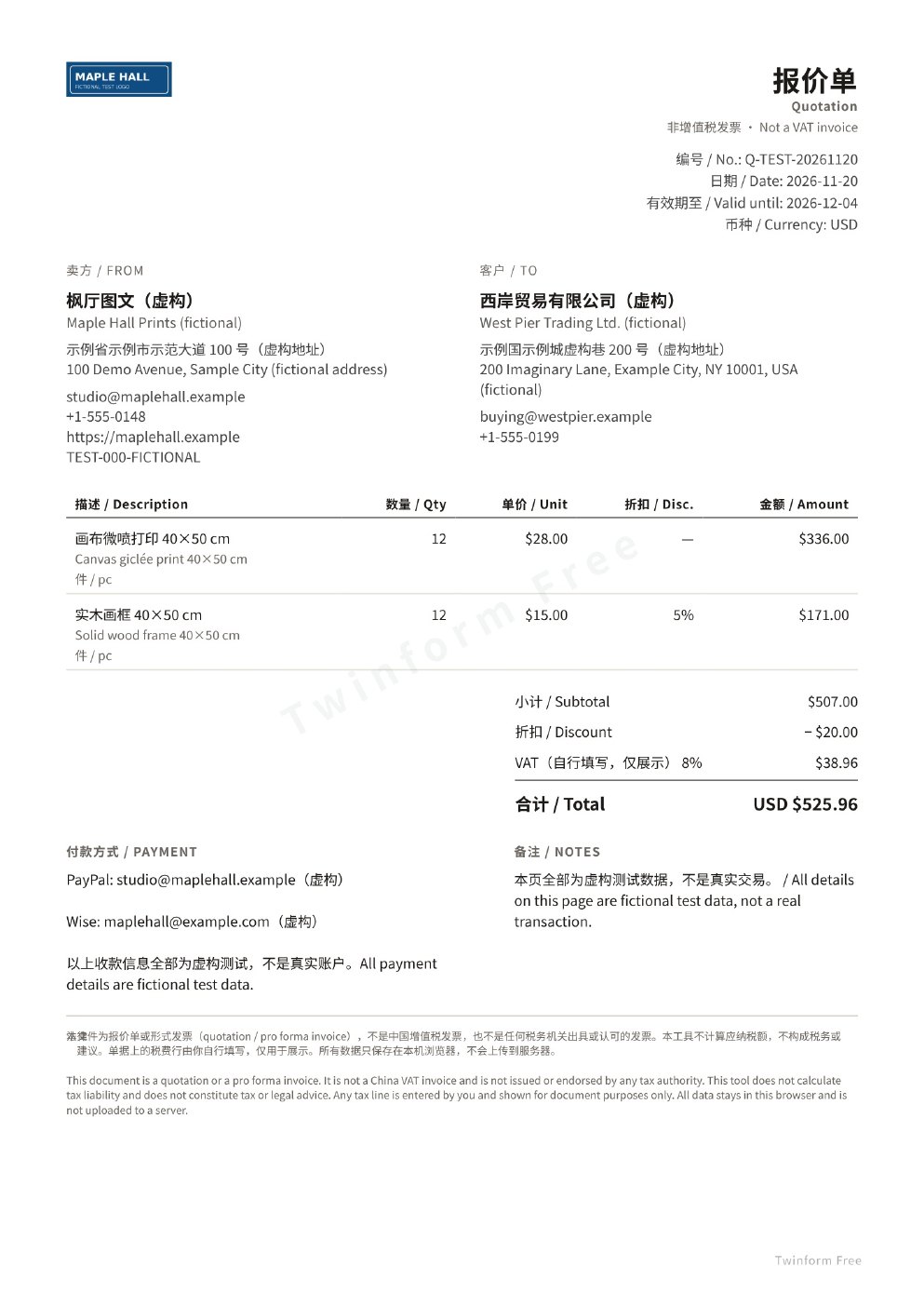
The third file used the same form, with only the currency changed from USD to EUR, then exported again. The amounts in the preview and in the PDF did not change; the currency symbol became €, and the total was written as EUR €525.96. The file was 383,983 bytes, still 1 page of A4, and the watermark was still there. So after you change the currency, the preview and the newly exported file follow, but the free-version watermark does not go away just because you changed a setting.
One small glitch: while we were filling in the line items, a “subtotal / total” hint in the left-hand form once failed to update and still showed $0.00. The preview on the right and the exported PDF were correct. Treat the preview and the exported file as the source of truth for the amounts.
We also opened a preview of the Modern template. The layout changed; the watermark was still Twinform Free. We did not export a PDF with that template. The Batch export button was disabled, which matches the purchase page’s note that the feature is locked until a license is activated. We saw Print / Save as PDF, but we did not actually open the system print dialog, and we did not connect a printer.
If you want to inspect the exported PDF itself — how many pages it has, and whether anything extra is in the file — we have written about AnyRedact. The job is different, but both are about looking at the file, not only at what the download button says.
What we saw on the network while generating the files
The tool’s own description is that the data stays in this computer’s browser and is not uploaded. That is its statement, not an audit conclusion.
While we opened the homepage, loaded the sample, filled in the form, downloaded three PDFs, and browsed the purchase page, we did not see a POST that sent the form contents or a PDF to a server. Every request went to xiaoyangge1993.github.io (the page, scripts, styles, fonts, and images). We did not see another host. The download was received directly by the browser. We are not writing this as proof that the tool never goes online.
The drafts note says they are saved in the current browser. We did not specifically test whether a draft was still there after switching browsers or clearing site data. If what you care about is “the whole job stays in the browser, without uploading a file,” a similar approach is keeplocal, which strips location data from photos, not quotations. If you only want to export a PDF in the browser without signing up first, you can also look at MakePaperFast, which is for printable graph paper, not documents.
Common failures and limits
- The free-version PDF has a “Twinform Free” watermark. We saw it in the preview and in all three files we exported. Removing it requires buying and activating a license; we did not buy one, and we did not test whether activation works.
- The export is an image-based PDF made from the on-page preview (Producer jsPDF 2.5.2). The Chinese and English are readable, but you cannot select or search the text, and the files are larger than a text PDF. These three were about 375–402 KB.
- This is not a Chinese VAT invoice, and it is not tax or legal advice. The tax row only multiplies the name and rate you type, for display.
- The sample data, and the names, addresses, and payment accounts we typed, are all fictional. Do not use them as a real transaction document.
- The subtotal hint on the left may briefly stay at $0.00. Trust the preview on the right and the exported file.
- For the Proforma invoice type, we only saw the switch; we did not export a separate file. We also did not test the Minimal template, currencies other than USD and EUR, the browser’s own Print / Save as PDF, a physical printer, or whether a draft survives a browser change.
- The purchase page’s wording that Mianbaoduo was “coming soon” did not fully match the ¥79 purchase entry already on the same page. We only recorded the listed prices; we did not place an order to verify them.


