


If you want a personal homepage that other people can actually open, it is easy to get stuck before any of the writing is done: renting a server, picking a static generator, then wiring up a build and a domain. If the introduction is already in your GitHub profile README, and your repositories and Gists are public, you do not have to stand up a site first just to see a simpler option.
ClassyGit renders a public GitHub profile README, repositories, and Gists as a retro-styled personal homepage. The author’s pitch is: no deploy, no login, no server to rent; visitors just open a link. On November 17, 2026, in desktop Chrome, we used a headless browser to open the official site, the author’s demo page, the config generator, and the webring, then checked two public accounts to see what you actually get if you only type a username. We did not create a ClassyGit account, and we did not fork the repository, so we did not personally wait to see how long a configured page takes to appear after you change the settings.
The same day, we checked the public repository Dnevend/classy-github: the license file is MIT (Copyright 2026 Dnevend), the language is TypeScript, and the homepage is listed as https://classygit.dev. The GitHub API showed 10 stars. The repository was created on April 24, 2024, and it still had updates that day. The star count is only the number we saw at the time. An older address, classygit.pages.dev, still showed the same demo when we opened it; the official site now uses classygit.dev, and the rest of this article follows the official domain.
Who it is for, and what to check first
It is a good fit if you already have a public GitHub profile README, or if you already keep notes and short posts in public Gists, and you do not want to rent a server or set up CI just yet. To preview the result, you do not have to fork: type a public GitHub username on the official site. To claim the page as your own, the official instructions are to fork the repository, put the generated classy.config.json at the repo root, then wait up to about five minutes. We did not fork, and we did not wait for that delay.
It is not a traditional blogging backend. There is no separate post editor; blog posts come from public Gists that follow a naming rule. Private repositories and secret Gists, according to the official docs, are not shown; we did not try this with private data. It also does not seek search-engine indexing by default: the author’s demo HTML includes noindex, follow, and “Allow search engines to index my profile” is unchecked in the config generator. Guestbook comments live on GitHub, so leaving a note requires a GitHub account.
If your main goal is to get Markdown such as a README or notes into good shape, we have a Chinese write-up of MarkText on this site. ClassyGit is not an editor; it puts a swappable skin over content that is already public on GitHub. If you only want to browse projects that are trending on GitHub, that is a different job; we also have a Chinese write-up of HotRepo.
| Item | Details (reviewed and tested on November 17, 2026) |
|---|---|
| Official site | https://classygit.dev/; source is on GitHub |
| License | The repository LICENSE is MIT |
| Account and price | Browsing and previewing do not require a login. We did not see a paywall this time. Claiming a page requires you to fork; we did not do that. |
| Preview | Type a public username. /Dnevend, /torvalds, and /octocat returned 200; /github returned 404, with the page saying “User not found.” |
| Themes | The footer can switch among nes, win98, mac, and tui. We opened all four; the content was the same, only the skin changed. |
| Config | https://classygit.dev/setup can generate the JSON. With /setup?u=Dnevend, the form and the preview on the right picked up that user’s existing config. |
| SEO | The demo page has <meta name="robots" content="noindex, follow">. The config option to allow indexing is off by default. |
| Webring | https://classygit.dev/webring then listed 2 sites: Dnevend and ziheng (@shadowzzh). The page says footer ring links appear only once there are at least 3 members. |
Type a username first, and see what appears
The official homepage is a simple box. The heading is “Your GitHub, a different way,” and the copy says: Type a username to get a personal homepage, code snippets and notes. No deploy, no login. Below that are a GitHub username field and a View button, plus three links: Build your config, ClassyGit Webring, and Random site. The footer has theme switching. There was no cookie banner, and nothing asked us to register.
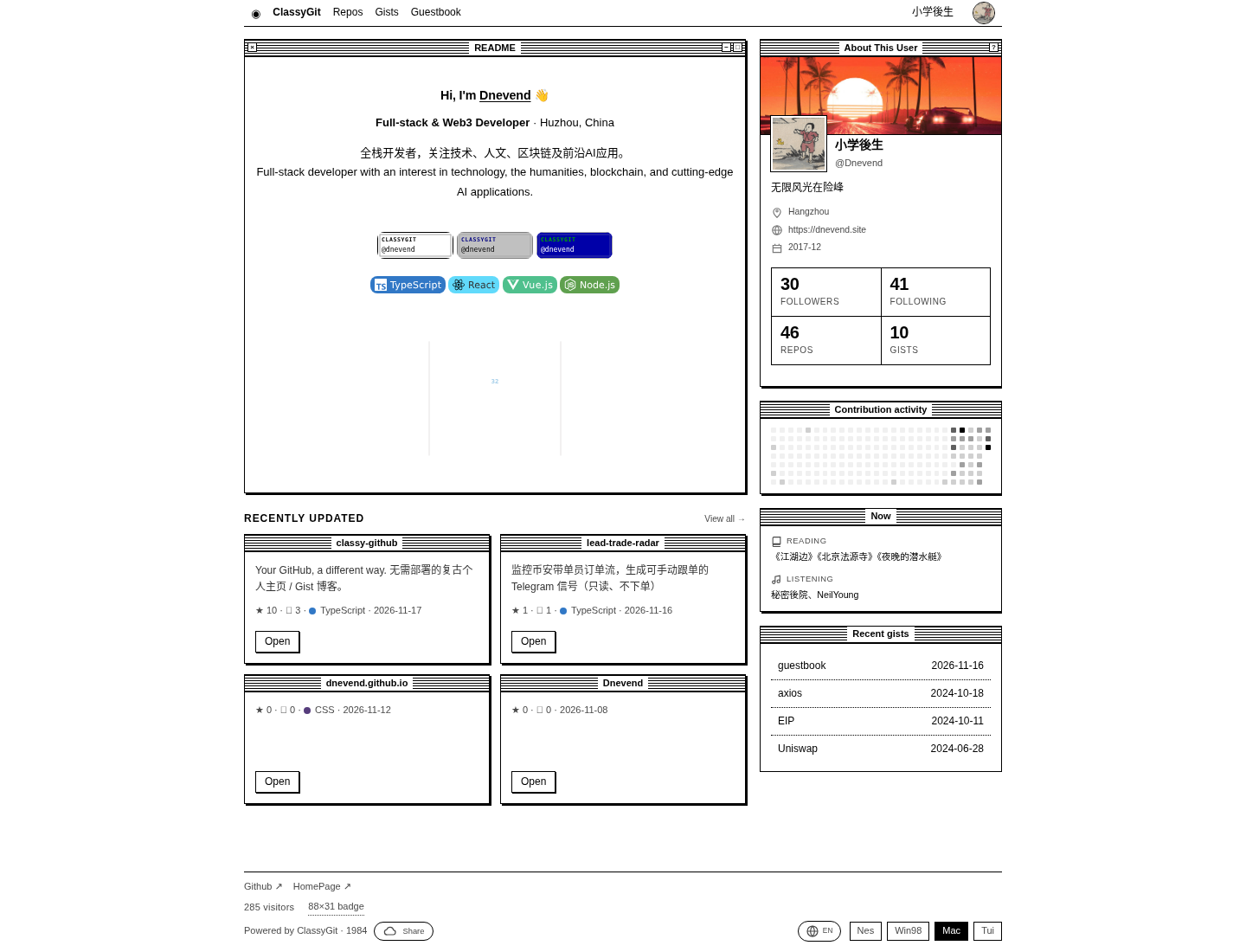
We did not submit the homepage form by hand. Instead we opened the already-configured demo at https://classygit.dev/Dnevend. The default was the mac theme. Inside the retro window we could see:
- The window title was README. The body started with “Hi, I’m Dnevend” and a bilingual Chinese and English introduction.
- In recently updated repositories, the first item was classy-github itself, described as a retro personal homepage / Gist blog that needs no deploy. The star count then showed 10, the language TypeScript, and the date November 17, 2026.
- The profile card on the right read “小学後生 @Dnevend,” with the location Hangzhou, a personal site at https://dnevend.site, and the counts 30 followers, 41 following, 46 Repos, and 10 Gists. (小学後生 is the Chinese display name on that profile.)
- The Now section listed a book being read and music being listened to, matching
classy.config.jsonin the repository. - The footer showed Github, HomePage, an 88×31 badge, and “285 visitors.” That counter is the number on the page; we did not verify how it is counted.
In the mac theme, there was a noticeable blank area in the middle of the README. After we switched to the win98 or nes theme, the same spot showed “3,091 Total Contributions” and a stat card with the number 32. A comment in the site’s own script says third-party images in the README (stat cards, badges) often 404 or time out, and that failed images should be hidden instead of leaving a blank. In the mac theme this time, the blank was still there and had not been fully cleaned up. This is not a complete asset audit; it is only the difference we saw, on the same day, in the same README under different themes.
After switching among all four themes, the repository list, the profile card, and the Now section were still there; only the skin changed. win98 is a teal desktop with classic windows; nes is a dark pixel look. The Nes / Win98 / Mac / Tui buttons in the footer switch directly, and ?theme= appears in the address bar.
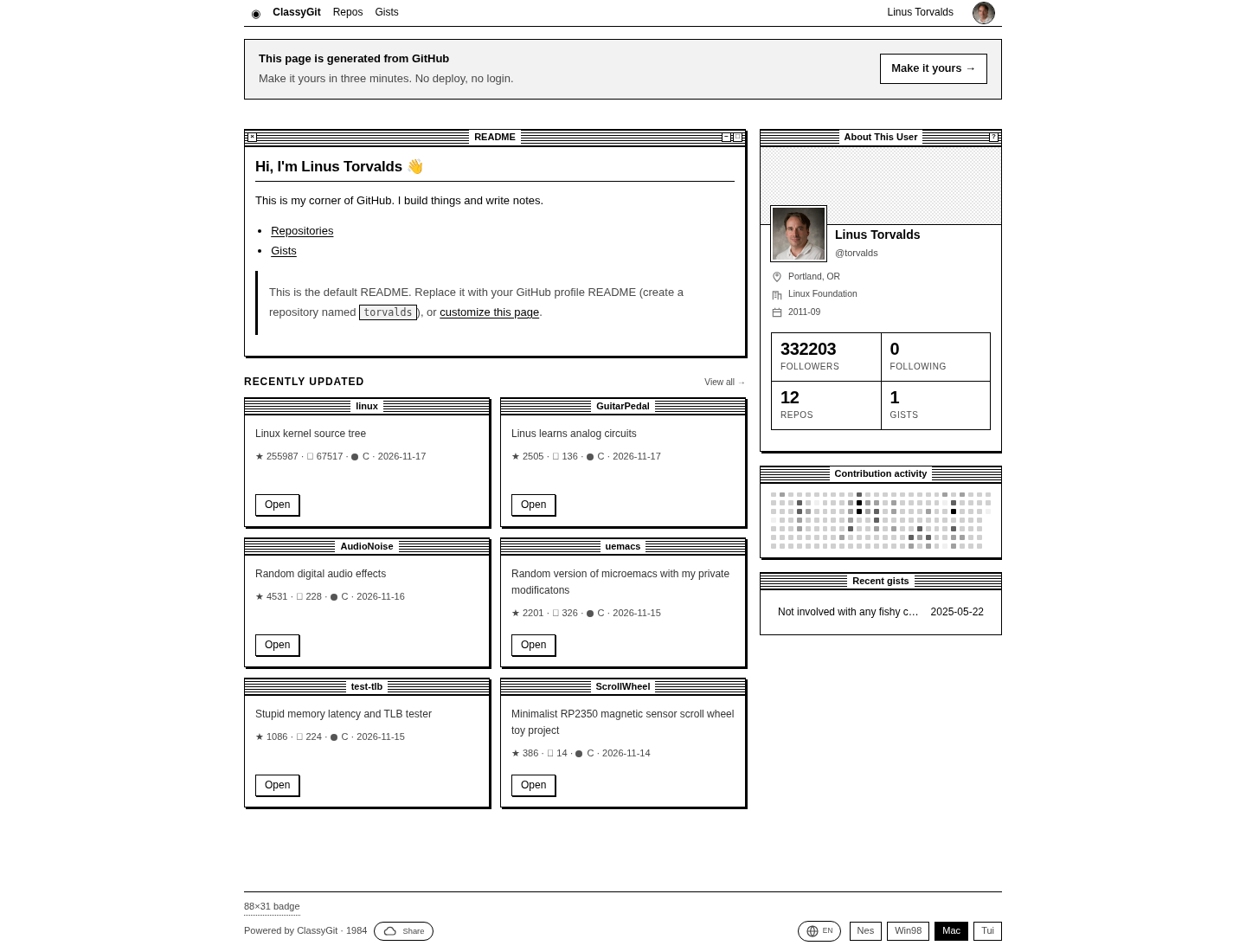
To check whether any public user can be previewed first, we opened https://classygit.dev/torvalds. The status was 200. A banner at the top said: “This page is generated from GitHub / Make it yours in three minutes. No deploy, no login.” On the right was a “Make it yours” button. The README window showed a default introduction, including “This is the default README,” and said you can replace it with a GitHub profile README or customize this page. Below that, “Recently updated” listed repositories such as linux, GuitarPedal, and AudioNoise, and the profile card showed 332,203 followers and 12 repos. So even if someone has never forked ClassyGit, a public profile can already be rendered. Claiming it as your own site still takes a further step.
We also opened https://classygit.dev/octocat, which likewise returned 200. Opening https://classygit.dev/github returned 404. The body said “User not found,” and: There is no GitHub user “github”, or the account has no public data. Lookups are by user; you cannot assume an organization account will open.
The footer’s Random site, when we visited /random, landed on ziheng’s homepage (@Shadowzzh).
When you want to claim the page, the config is generated in a form
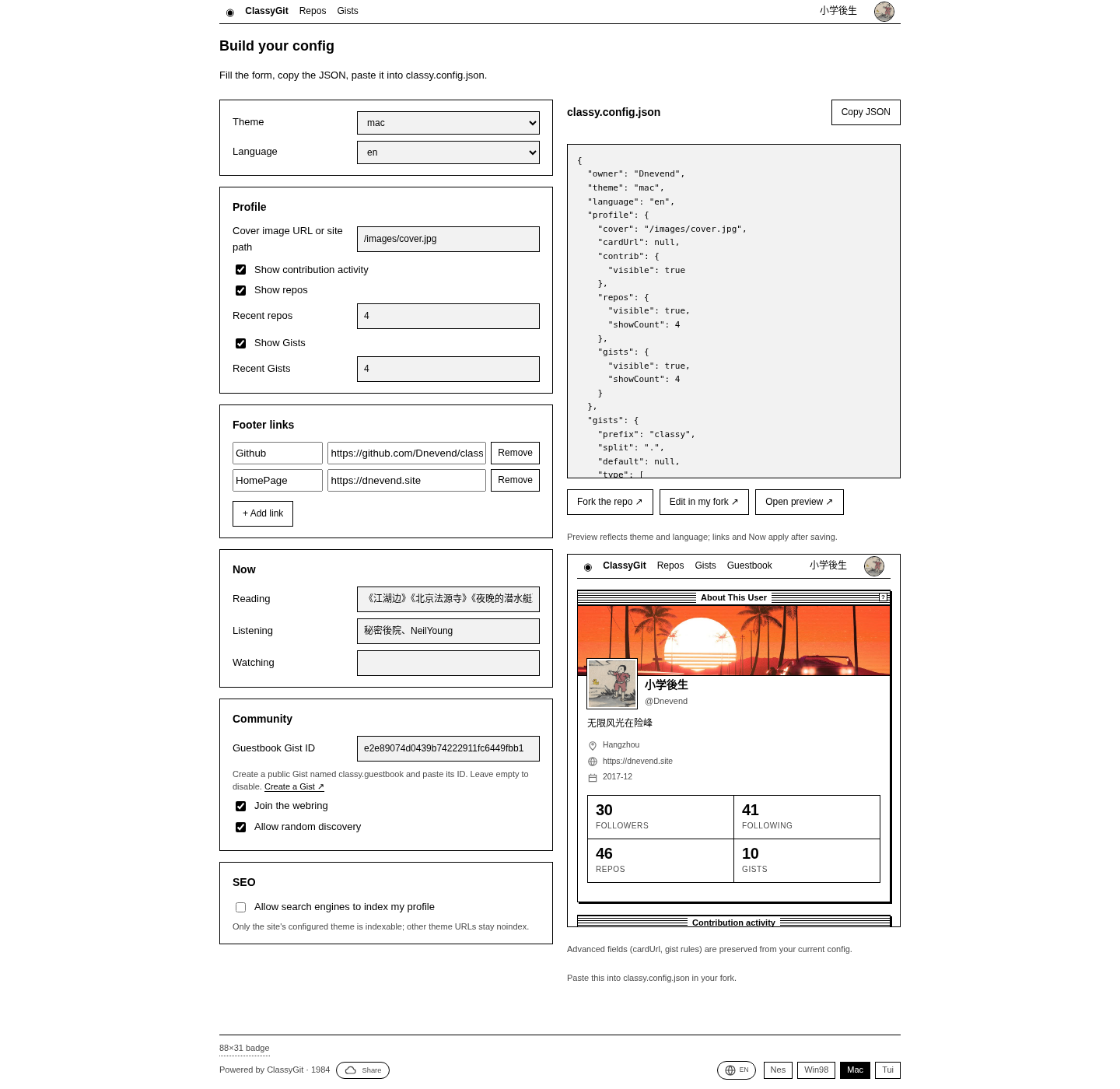
“Build your config” lives at https://classygit.dev/setup. With no username filled in, there is only one field and a Start button. Opening https://classygit.dev/setup?u=Dnevend showed a full form on the left and, on the right, a live classy.config.json plus a page preview. The fields we saw included:
- Theme (mac / nes / win98 / tui) and language (en / zh)
- A cover-image path, whether to show contribution activity, and how many recent repositories and Gists to list
- Footer links; the demo config used Github and HomePage
- Now: Reading, Listening, Watching
- Community: a Guestbook Gist ID (the demo was e2e89074…), Join the webring, and Allow random discovery
- SEO: “Allow search engines to index my profile,” unchecked by default. Under it was this note: Only the site’s configured theme is indexable; other theme URLs stay noindex.
On the right there were also Fork the repo, Edit in my fork, Open preview, and Copy JSON. We only looked at the generated result; we did not click Fork, and we did not change the repository. The official README’s steps are: fork and keep the repository name classy-github, put this JSON at the root, change owner to your username, then open https://classygit.dev/your-username and wait up to five minutes. We did not time that five-minute claim.
Gists, the guestbook, and the webring
The demo’s Gists page was titled “小学後生’s gists 10.” The list included a guestbook and entries tagged [blog], [code], and [weekly], for example EIP, Uniswap, and Test marked as blog. Filter chips included Web3, EIP, and UniSwap. The path /Dnevend/blog returned 404; there is no separate “blog home.” Posts are individual Gists. We did not open one and read it through, and we did not create a classy.blog.title Gist ourselves to verify the naming rule. The README says that if a Gist description is written as classy.blog.title #tag, it becomes a category, title, and tags. That is documentation, not something we created.
The guestbook at https://classygit.dev/Dnevend/guestbook then had 1 comment, from @Dnevend, dated Nov 16, 2026, saying “Hi there, Welcome to ClassyGit.” The page says: Leave a note. Comments are hosted on GitHub, so the owner can moderate them there. The button is “Leave a message on GitHub.” We did not sign in, and we did not leave a message.
The webring page says: “A ring of retro personal homepages. Hop from one to the next.” At the time it listed 2 sites. You join by adding "webring": { "enabled": true } to classy.config.json. The page says: Your page joins after the next refresh. The footer links appear once the ring has at least 3 members. With only two sites then, the footer ring would not yet appear under that “at least 3 members” rule. That point is taken from the page text at the time.
How to check that a preview works
You can follow the same sequence we used, and you do not have to fork first:
- Open https://classygit.dev/, type your GitHub username, or go directly to
https://classygit.dev/username. - Check whether the README, recent repositories, and profile card match the public information on GitHub. If you have never written a profile README, you may first see a default explanation and a “Make it yours” banner, as we did with torvalds.
- Switch themes in the footer and confirm that only the skin changes, while the content stays.
- If you are ready to claim the page, open
/setup?u=username, checkowner, the theme, and the SEO checkbox in the JSON, then decide whether to fork. We did not finish a fork. - Look at the robots meta tag in the page source or in the browser developer tools. The demo defaults to noindex, follow. If you want search engines to index the page, you have to turn that on in the config, and you should confirm it on the page after it has taken effect.
Common failures and limits
- An organization account, or a name with no public data, may 404. The message we saw was: there is no such GitHub user, or the account has no public data.
- Search-engine indexing is off by default. To be indexed, you have to turn it on in the config. Even then, the official text says only the site’s configured default theme is indexable; other theme URLs with
?theme=stay noindex. - Third-party stat images and badges in the README may fail to load. We saw a blank placeholder in the mac theme; under win98 and nes, the same README showed the contribution numbers.
- Private repositories and secret Gists are not shown, according to the docs. Comments have to be written on GitHub, and the site owner also moderates them there. We did not test private content, and we did not leave a comment.
- The webring then had only 2 sites, so the footer ring was still one member short of the minimum of 3. Random site can jump to a site that has already joined.
- We did not fork, did not bind our own domain, did not self-host an instance, and did not verify the “up to five minutes” claim. If the public instance later becomes unavailable, the official README says your content is still on GitHub, the code is MIT, and you can switch instances or self-host. That is the project’s statement, not an environment we set up.
Bottom line
ClassyGit can render a public GitHub profile as a retro homepage before you fork anything or rent a server. On November 17, 2026, the official demo, torvalds, and octocat all returned 200; the organization-style path /github returned 404. Indexing is off by default, and we did not fork the repository or time the “up to five minutes” claim.


