


When the same invitation has to be printed for dozens of guests, the layout usually stays the same and only the name and table number change. Editing and exporting each card by hand is slow, and it is easy to miss someone. If the guest list is already in a spreadsheet, can you set the layout once and export a PNG for every row?
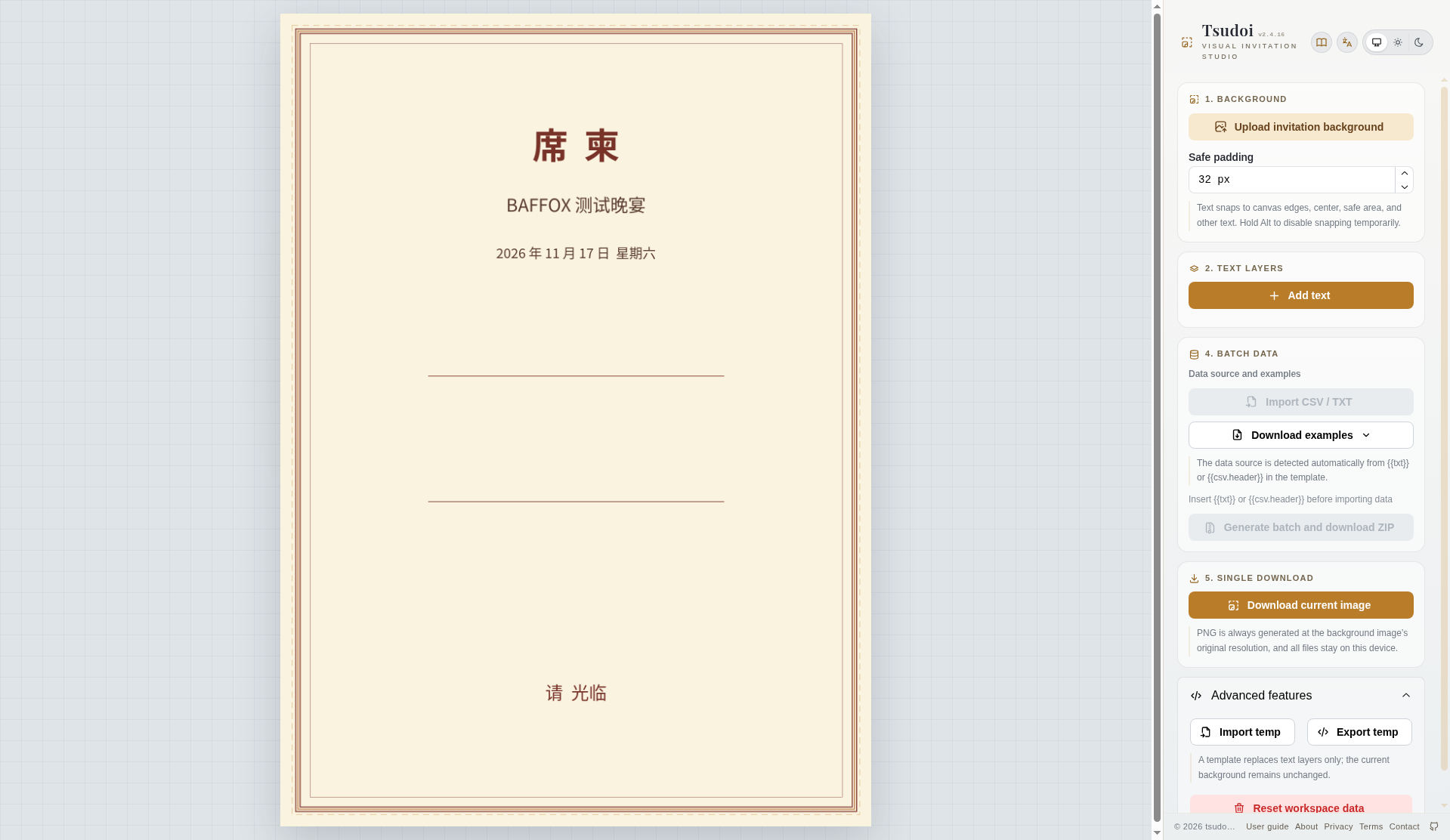
Tsudoi is a web editor that opens straight onto a canvas — there is no separate landing page first. The version we saw was v2.4.16. The title reads “Tsudoi | Visual layout and batch image generation,” and the badge says VISUAL INVITATION STUDIO. On November 17, 2026, in desktop Google Chrome, we used a homemade invitation background and a three-row CSV of Chinese names, walked through “upload background → insert variables → import the list → preview → download one image / batch into a ZIP,” and checked the exported files. We did not create an account, change the interface language, or install the PWA. What follows is only what we actually saw.
The About page calls the product “free, open-source, privacy-first.” That is the site’s own wording. The same day, we checked the public repository dofy/invite-maker through the GitHub API: it had 0 stars, an empty license field, and a last update dated October 9, 2026. We did not find a license file in the repository metadata, so this article does not present Tsudoi as a verified open-source project. We are treating it as a batch image tool you can use in the browser.
Who it is for, and what to check first
It is a good fit if you already have a finished invitation, poster, or greeting-card background, and the guest names and table numbers are already in a spreadsheet: you want to drop that layout onto each row in the browser and export many PNGs in one pass. It is not a design tool that will draw a complete template for you. On first launch the canvas shows a random floral image; the instructions say, “The random illustration shown on first launch is a placeholder.” You have to upload the real artwork yourself. The official guide also says there is currently no undo/redo, no layer reordering, and no preset template library. We ran into the same limits: a new text layer appears in the center of the canvas and has to be dragged into the reserved blank band, and if you drag it to the wrong place there is no undo.
If what you need is “one design, exported at many sizes” — favicons, social images, print files — that is a different job. We have a Chinese write-up of Logo Export on this site. Tsudoi keeps a single size and a single layout, and only swaps in fields from the guest list.
If you care more about keeping the original image in the browser and not sending it to someone else’s server, we have written about keeplocal (stripping location data from photos) and Puff.ee (dropping a screenshot into a device mockup in the browser, then exporting). Tsudoi’s privacy page (published August 26, 2026; last updated August 27, 2026) says materials are processed on the device, that there is no upload API, and that there is no server-side compositing. It also says web fonts are served by Google Fonts, and that static assets are hosted on Cloudflare Pages. Those are the site’s statements, not an audit by us.
| Item | Details (reviewed and tested on November 17, 2026) |
|---|---|
| URL | https://tsudoi.yahaha.net/; see also the guide, About, and Privacy pages |
| Version | The page showed v2.4.16 |
| Account and price | No sign-in required. We did not see a paywall this time. |
| Input | Upload your own background. In a text layer, type {{csv.header}} or {{txt}}, then import a CSV or a TXT file. We used CSV only and did not test TXT. |
| Export | A single PNG, or a batch packed into a ZIP. The page says PNGs are generated at the background’s original resolution. |
| Batch limit | The guide says at most 200 records per batch. We exported 3 and did not try a 201st row. |
| Languages | The menu lists Simplified Chinese, Traditional Chinese, English, Deutsch, 日本語, 한국어, Español, and Français. We stayed on the English interface and did not switch. |
As for whether files leave the machine: when we uploaded the background, request monitoring only showed GET requests to blob:https://tsudoi.yahaha.net/… (HTTP 200). In the window covering upload, import, and export, we did not see the image or the CSV being POSTed to a third-party host. After we imported the Chinese guest list and exported, there was a GET for a Noto Serif SC woff2 file from fonts.gstatic.com; clicking the batch-ZIP button loaded the site’s own jszip.min-….js. That is not a full developer-tools audit, and it should not be written up as proof that the tool never talks to a network. Opening the page and loading scripts and fonts still contacts the network.
How to set up an invitation that can be exported from a guest list
- Open https://tsudoi.yahaha.net/. No account is needed. Use “Upload invitation background” to add the artwork. Ours was a homemade 1600×2200 cream invitation. The heading read, in Chinese, 席柬 / BAFFOX 测试晚宴 / 2026 年 11 月 17 日 星期六 / 请光临 — an invitation to a BAFFOX test dinner on Saturday, November 17, 2026 — and we left a blank band in the middle for the name and table number.
- Add text layers. The sidebar prompts you to insert
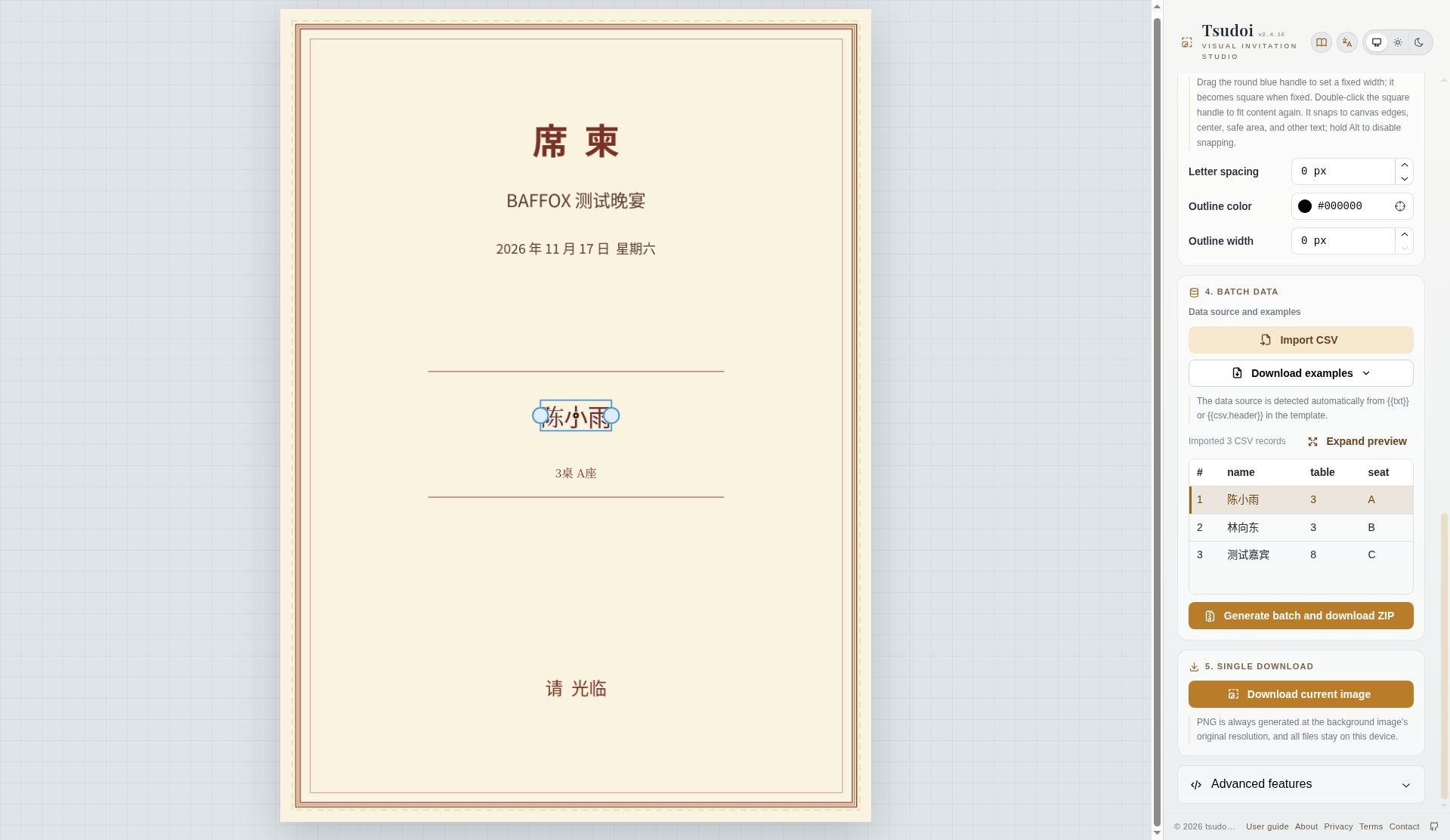
{{txt}}or{{csv.header}}in the template, then import data; the data source is inferred from those variables. We added two layers, with the exact contents{{csv.name}}and{{csv.table}}桌 {{csv.seat}}座(桌 and 座 are the Chinese words for table and seat). Both layers used Noto Serif SC, color#783228, at 64 px and 32 px. Both appeared in the center of the canvas and had to be dragged into the blank band. - The font-size field carries a “px” suffix. If you select the whole field and type a number, our attempts jumped to 440 or 442. Using the arrow keys, or deleting one digit first and then editing, was more reliable.
- After we entered
{{csv.name}}, the button became “Import CSV,” with the status “Waiting for a CSV file.” The example is “Example: Dear {{csv.name}}, date {{date}}, number {{index:3}}.” Our CSV was UTF-8 with a BOM, with the headername,table,seat, and three rows: 陈小雨 (Chen Xiaoyu), 3, A; 林向东 (Lin Xiangdong), 3, B; and 测试嘉宾 (Test Guest), 8, C. - A successful import showed “Data imported / Imported records: 3,” and the sidebar read “Imported 3 CSV records.” On row 1, the canvas showed 陈小雨 and 3桌 A座 (table 3, seat A). Switching to row 2 changed it to 林向东 and 3桌 B座.
- Use “Download current image” for the row you are on, then “Generate batch and download ZIP” for the whole set. When the batch finished, the message was “Batch generation complete / Packaged images: 3.” The page says: “PNG is always generated at the background image’s original resolution, and all files stay on this device.”
Deleting a layer warns: “Delete text layer? This removes the layer. If it contains data variables, the current imported data will also become invalid.” We saw that message and did not use layer deletion to clear the data in this test.
What we checked in the exported files
The test was on November 17, 2026, in desktop Chrome, on the English interface, without signing in.
With the preview on 林向东, the single download was invitation.png, 117,251 bytes, showing 林向东 / 3桌 B座. The ZIP that followed was invitations-1794875358787.zip, 357,933 bytes. It unpacked into three PNGs:
001-陈小雨.png, 117,624 bytes, 1600×2200, 陈小雨 / 3桌 A座002-林向东.png, 117,251 bytes, 1600×2200, 林向东 / 3桌 B座; the SHA-256 matched the single download exactly (756d595f99845ac2a77989ea9e61a44996d167841fa4b123ba6fe7bf4be9c75b)003-测试嘉宾.png, 122,490 bytes, 1600×2200, 测试嘉宾 / 8桌 C座
All three were 1600×2200 RGBA, matching the original background. Chinese characters in Noto Serif SC, including 桌 and 座, rendered correctly, and no leftover {{csv.*}} text remained in the files.
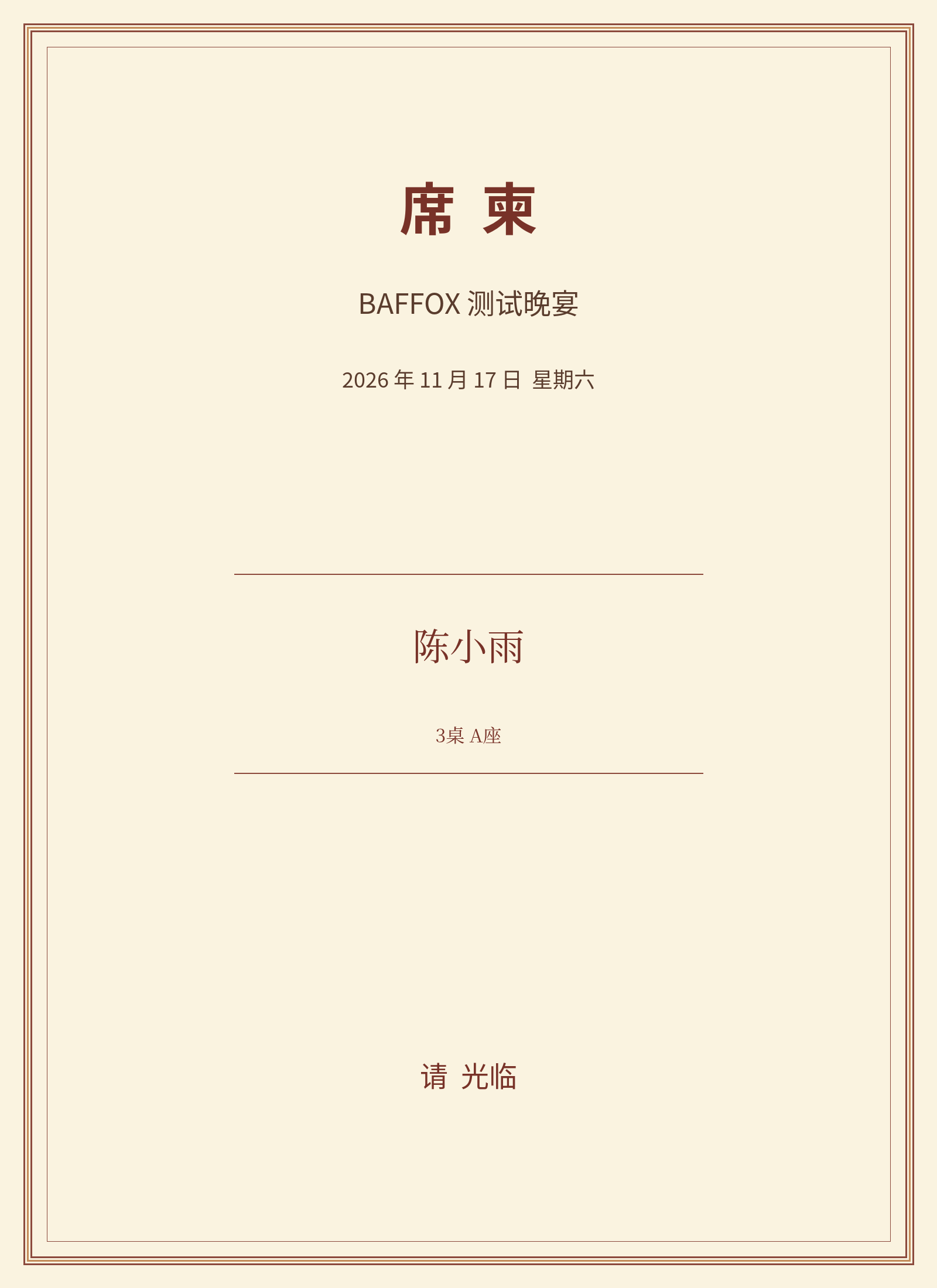
A reasonable check is to open every file in the ZIP, confirm that the name, table, and seat match the spreadsheet, confirm that the pixel size equals the background, and spot-check for any unsubstituted variable text. All three of our rows matched. We did not go up to the documented 200-row limit, and we did not test TXT import.
Common failures and limits
- A new text layer appears in the center of the canvas and has to be dragged into place. The official guide says there is currently no undo/redo and no layer reordering, so a bad drag means adjusting again or deleting the layer and starting over.
- The font-size field includes a “px” suffix. Selecting the whole field and typing can produce odd values such as 440 or 442. Watch that field when you change the size.
- The guide’s 200-row batch cap is documentation. We only exported 3 rows, so we do not know how a 201st row would be rejected.
- We did not test language switching, the PWA or offline use, the expanded preview, downloading the sample, template import/export, Reset workspace data, the dark theme, stroke and tracking tweaks, or a phone layout.
- The About page describes the product as open source, but we did not find a license in the public repository metadata, so this article does not call it a verified open-source project.
- The privacy page’s “processed on this device, no upload API” wording is the site’s statement. In the window we watched, we did not see the image or CSV being POSTed out, and we did see Google Fonts and the site’s own JavaScript requests. That is not a full audit, and it should not be written up as proof that files never leave the machine.
Bottom line
Tsudoi is useful when you already have an invitation background and a spreadsheet of names, and you want a PNG for each row without editing the cards one by one. With a 1600×2200 background and a three-row Chinese CSV, the three exported PNGs matched the list, kept the original resolution, and the single-image download was byte-for-byte the same as the corresponding file in the ZIP. Text layers start in the center and there is no undo; the font-size field is easy to typo; and we did not verify an open-source license. We also did not test the 200-row cap.


