


Before you install a Chrome extension, the Chrome Web Store often shows a long permissions explanation that is hard to match with the names in the extension’s manifest. On November 19, 2026, in desktop Chrome, we opened CRX8. We did not create an account, and we did not install any extension in that browser. We read the permission reports for Privacy Badger and uBlock Origin Lite, looked each one up by its official extension ID, then used the site’s own CRX to ZIP tool to download both packages. We only opened the manifest.json inside each ZIP and compared it with the permissions listed on the page.
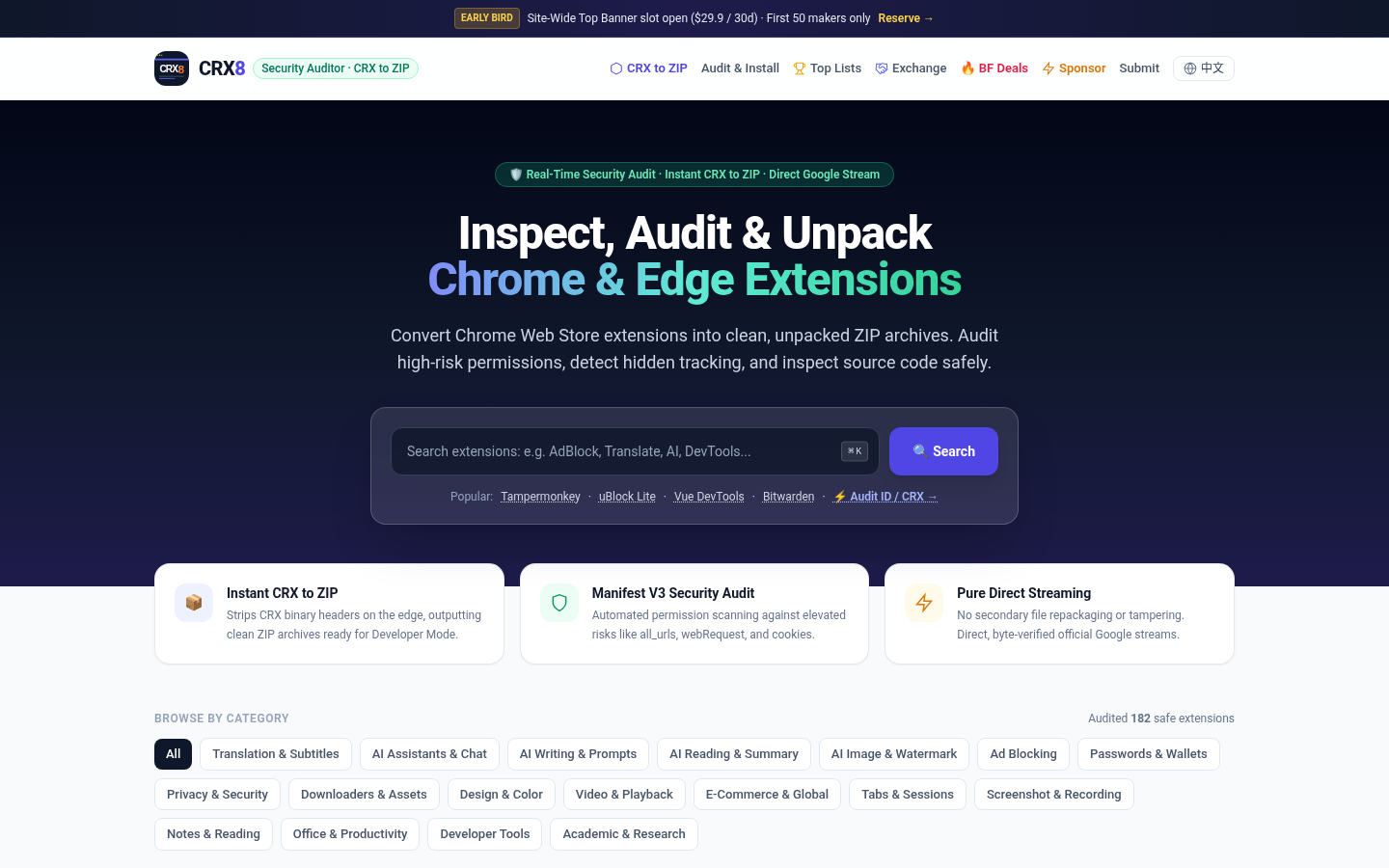
The homepage title is “CRX8 – Extension Security Auditor & Online CRX to ZIP Converter.” The interface defaults to English; there is a Chinese link in the top bar, which we did not use. There is no login wall: opening the catalog, reading a report, and downloading a ZIP all worked without an account. A top banner advertised EARLY BIRD and “Site-Wide Top Banner slot open ($29.9 / 30d).” That is the site’s own ad slot; during the test we did not see a separate interstitial pop-up. Categories include Ad Blocking, Privacy & Security, Passwords & Wallets, Developer Tools, and about 18 in all. The footer lists [email protected]. We did not find a verifiable public license for the site itself, so this article does not present CRX8 as an open-source project.
It is a good fit if you want a first look at an extension’s permissions before installing it, or if you want to turn a store package into a ZIP and decide later. It is not antivirus software, and the on-page “Safe” score is not a substitute for opening the list yourself. If you are actually choosing a translation extension, we have written about mewCat and Aside. Those articles are about using a specific extension; this one is only about checking permissions first.
Catalog size: the page says 182; we counted 186 links
The homepage says “Audited 182 safe extensions.” At first it also showed “Load More Extensions (158 remaining),” and the page already had 28 unique links that began with /ext/. 28 plus 158 is 186, which does not match 182. We clicked Load More seven times. After the button disappeared, we de-duplicated the /ext/ links then on the page and got 186. That total still includes popular entries such as Tampermonkey and uBlock Lite at the top; after de-duplication it remained 186. We did not recount every card by hand, and some aliases look irregular, such as /ext/--ai-pdf and /ext/-ai. The conclusion only goes this far: the site claims 182, we counted 186 links, and we did not verify that every link is a distinct extension.
The permission report lists only some items, and it does not match the manifest in the ZIP
This is the result that matters most in this test. On an extension page, CRX8 shows a table of Permission, Scope & Explanation, and Risk Level, plus a Safety Score. The homepage also says it scans high-risk permissions such as all_urls, webRequest, and cookies. The page text describes an automatic decompile of the Manifest declarations, looking at API permissions, storage, and remote-host interception risk. From that wording, this is a comparison against the manifest, not an analysis of runtime behavior.
We first opened the already-listed Privacy Badger page. It named the developer as the Electronic Frontier Foundation, the extension ID as pkehgijcmpdhfbdbbnkijodmdjhbjlgp, version v2026.9.15.2, Manifest V3, a 9.9/10 Safety Score, and the label “Verified Safe · Low Risk.” The permission table listed only two items:
declarativeNetRequest, explained as intercepting or redirecting requests with declarative rules, marked Moderate Riskstorage, explained as storing preferences locally or through sync, marked Low Risk
We then pasted the same ID into CRX to ZIP and downloaded extension-pkehgijcmpdhfbdbbnkijodmdjhbjlgp.zip, 3,308,989 bytes, in about 0.99 seconds. The archive contained 230 files, including manifest.json. That manifest also said version 2026.9.15.2 and Manifest V3, but the permissions were not two items:
permissions:alarms,declarativeNetRequest,privacy,scripting,storage,tabs,webNavigation,webRequesthost_permissions:<all_urls>
In other words, while the page scored the extension 9.9 and Low Risk, it did not list webRequest or <all_urls>, the very kinds of high-risk items the homepage uses as examples. scripting, tabs, webNavigation, privacy, and alarms were also missing from that table. We did not install the extension, and we did not analyze what it does at runtime. The comparison above is only between the CRX8 page and the manifest in the ZIP the site itself provided.
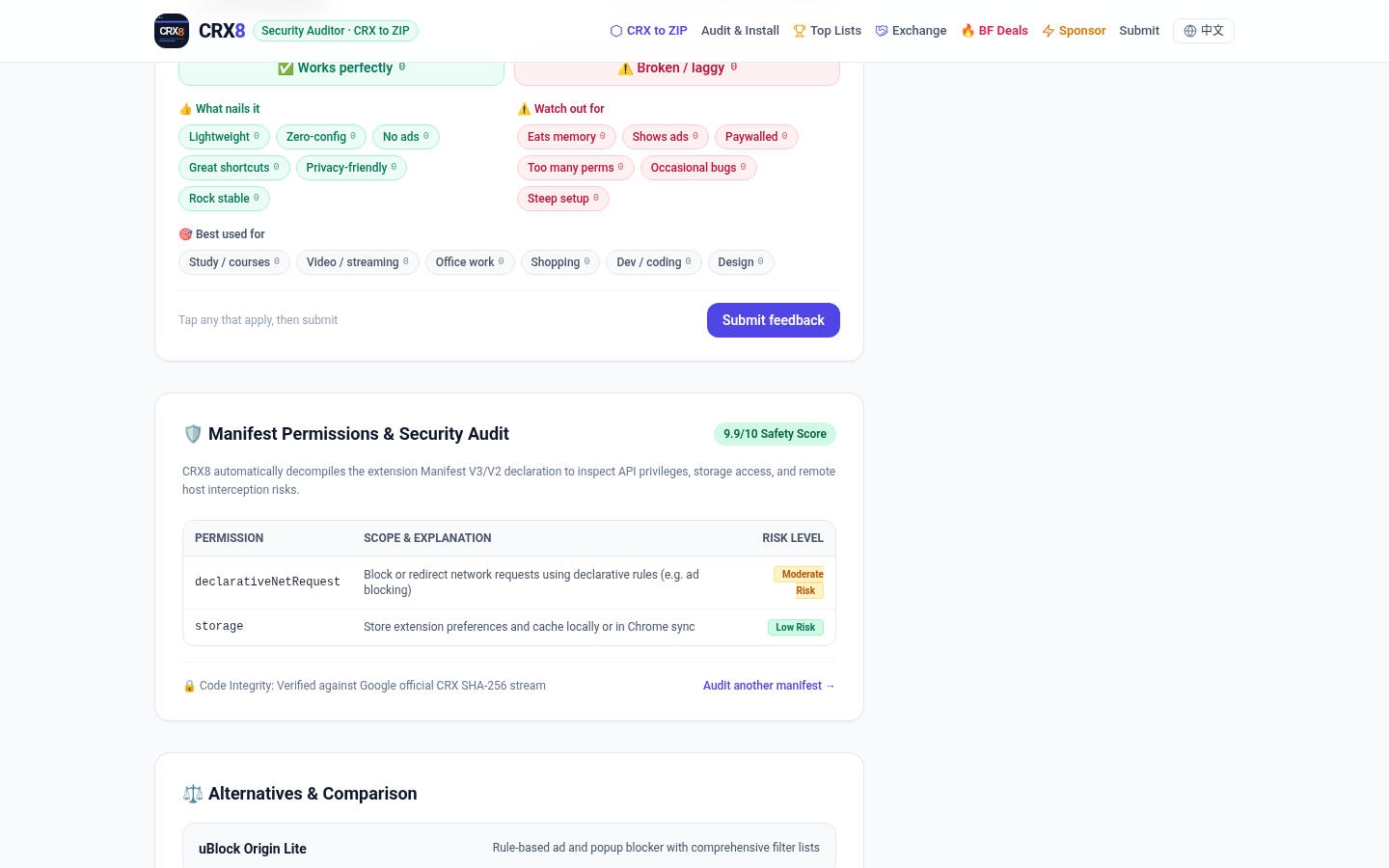
uBlock Origin Lite followed the same pattern. The list and detail pages said v2026.1110.1816, ID ddkjiahejlhfcafbddmgiahcphecmpfh (matching the Chrome Web Store link in the uBOL-home repository README), a 10/10 Safety Score, and “Verified Safe · Low Risk.” The permission table listed only declarativeNetRequest, marked Moderate Risk. The FAQ also says it uses declarativeNetRequest and, by default, does not need access to page content.
We downloaded a ZIP with the same ID: 9,096,067 bytes, 1,032 files. This manifest.json was version 2026.1116.1650, newer than the 2026.1110.1816 shown in the catalog, and the permissions were:
permissions:activeTab,alarms,declarativeNetRequest,offscreen,scripting,storage,unlimitedStorage,userScriptshost_permissions:<all_urls>
The page still showed only declarativeNetRequest. It did not list <all_urls> or the other items, yet the score was 10/10. The version on the list was also already behind the ZIP we had just downloaded. We likewise did not install the extension, and we did not verify its filtering.
If what you care about is whether an extension judges images while you browse, we have written about Hikaku. That is a different kind of extension, one you should also inspect before loading; in our test it both false-flagged and skipped images. It is not the same kind of tool as a catalog site like CRX8.
Looking up an ID, and converting a CRX to a ZIP
The search box on the homepage accepts an extension ID or a keyword, with no login. After we pasted the 32-character ID for uBlock Origin Lite, the address became https://crx8.com/?q= plus that ID, the catalog read “Audited 1 safe extensions,” and the matching card appeared, with Audit Details and Unpacked ZIP underneath. It did not open the full permission table by itself; we had to open the detail page. An unknown ID of 32 z characters, zzzzzzzzzzzzzzzzzzzzzzzzzzzzzzzz, first changed the catalog to “Audited 0 safe extensions” and showed “Searching Chrome Web Store live for ….” We waited about 35 seconds; the same sentence was still there, with no clear failure message. Pasting the same fake ID into CRX to ZIP and clicking Download .ZIP produced no file within 20 seconds, and the page body we captured also had no clear error. So a listed ID can be looked up without logging in; for an unlisted or invalid ID, we did not get a clean failure this time.
The CRX to ZIP page accepts a store link or an ID, and it also lets you drop a local .crx file. The drop option is described as processing the file in browser memory, without uploading it. We did not have an official .crx file and did not test drag-and-drop; we only pasted the public Privacy Badger and uBlock Origin Lite IDs. Both downloads came from https://crx8.com/download/id/<extension-id>.zip. The browser did not contact Google’s update servers directly. The site advertises a “Direct Google Stream” and says it strips the CRX header at the edge. In the network log from this session, the files were received from crx8.com. After we opened the ZIPs, we saw a manifest and assets with the official extension structure, but that is not proof the transfer was unmodified, or that the bytes match Google’s source file. We did not load the unpacked folders into Chrome.
As for tracking scripts: while we had CRX8 open, the browser loaded Microsoft Clarity (www.clarity.ms, scripts.clarity.ms, and POSTs to *.clarity.ms/collect), plus Cloudflare Insights and cdn.tailwindcss.com. Extension icons and similar images were fetched from lh3.googleusercontent.com. Looking up an ID or opening a permission report is not something that stays entirely on your computer.
Common failures and limits
- The permission table is not a complete security audit. For both Privacy Badger and uBlock Origin Lite, the pages omitted several permissions that appeared in the ZIP, including
<all_urls>. The Privacy Badger page also omittedwebRequest. Seeing Low Risk, 9.9/10, or 10/10 is not a green light to install. - The version on the list can lag behind the ZIP you just downloaded. The uBlock Origin Lite page showed 2026.1110.1816; the manifest in the same-day ZIP was 2026.1116.1650.
- Treat the catalog count as whatever the page showed at the time. It said 182; we counted 186
/ext/links and did not check them one by one. - For an unlisted or invalid ID, we did not get a clear failure message this time. Do not assume that a search will always produce a conclusion.
- The page loads third-party scripts such as Microsoft Clarity. Checking permissions is not an offline process.
- We did not test dropping a local
.crxfile, did not install any extension, did not check whether the ZIP matched Google’s source file byte for byte, and did not review how developer submissions, cross-promotion, or paid placements are moderated. - “Safe” and “low tracking surface” are the site’s own labels, not findings from our test.
Bottom line
CRX8 is handy if you want to look up a Chrome extension and download a ZIP before installing it, and you do not need an account to do that. In our November 19, 2026 check, the permission tables for Privacy Badger and uBlock Origin Lite were incomplete compared with the manifests in those ZIPs, and they left out high-risk items the homepage itself highlights. Treat the Safety Score as a site label, not a green light, and open the manifest yourself.


