


You have just learned the rules of Go — the board game also called Weiqi — and the first time you play someone, your stones get captured, and you still cannot say which move went wrong. That is where a lot of beginners get stuck. A rulebook can tell you what a liberty is, and what a capture is, but it is harder to find a place where you can play a move and then match it against “why that move did not help.”
The Go Room is a Go website written for complete beginners. It breaks the lessons into “try a move first, then see why.” You can follow a prompt, place a stone, watch how the opponent answers, and, when you get it wrong, see the local result of that move. On November 17, 2026, in desktop Google Chrome, we did not create an account. We went from the homepage demo board through Lessons 1 to 3, deliberately clicked a wrong point once, and then checked whether the completion record was still there after a refresh. The pages stayed in Chinese throughout. We did not see a sign-up, a paywall, or a cookie banner from the site itself.
The same day we looked at the public repository Minjia-Hu/the-go-room: the language is TypeScript, the license file is MIT (Copyright 2026 Minjia-Hu), and the homepage is listed as https://minjia-hu.github.io/the-go-room/. The star count on the GitHub API was 7, and the repository was created on November 14, 2026. The star count is only the number we saw at the time; it does not prove the quality of the lessons. Below we only write down what we actually clicked.
Who it is for, and what to notice first
It is a good fit if you already know the rules of Go but still often get captured without understanding why: you want to practice placement, liberties, and capture in a browser, lesson by lesson, and you want to see an explanation when you get it wrong. It is not a full online-play platform, and it does not offer a rating. The repository README is clear about this: the computer is a simple heuristic opponent; the hints explain local consequences, and they do not give the best move, a win rate, or a reliable long-term life-and-death judgment; before scoring, you have to mark dead stones yourself, and a wrong mark will affect the result. We did not verify those points with a full game. We are treating them as the project’s own stated limits.
You can use it by opening the page. There is nothing to install, and no account is required. The README says the learning record is stored in the current browser, that clearing site data will erase it, and that there is currently no account sync and no SGF import or export. The footer says something similar. This test used desktop Chrome; we did not try a phone or Safari. Because the interface is in Chinese, the quotes below are our translations of what the page showed.
If you would rather do a different kind of hands-on practice in the browser, and not learn Go, we have written about KeySprint (paste in a piece of your own text and practice typing) and Ductus (write letters on the page and download them as a font). The Go Room is about “why this move did not save the group.”
| Item | What we saw (checked and tested on November 17, 2026) |
|---|---|
| URL | https://minjia-hu.github.io/the-go-room/, source on GitHub |
| Account and price | No login required; we did not see a paywall in this test |
| License | The repository LICENSE is MIT |
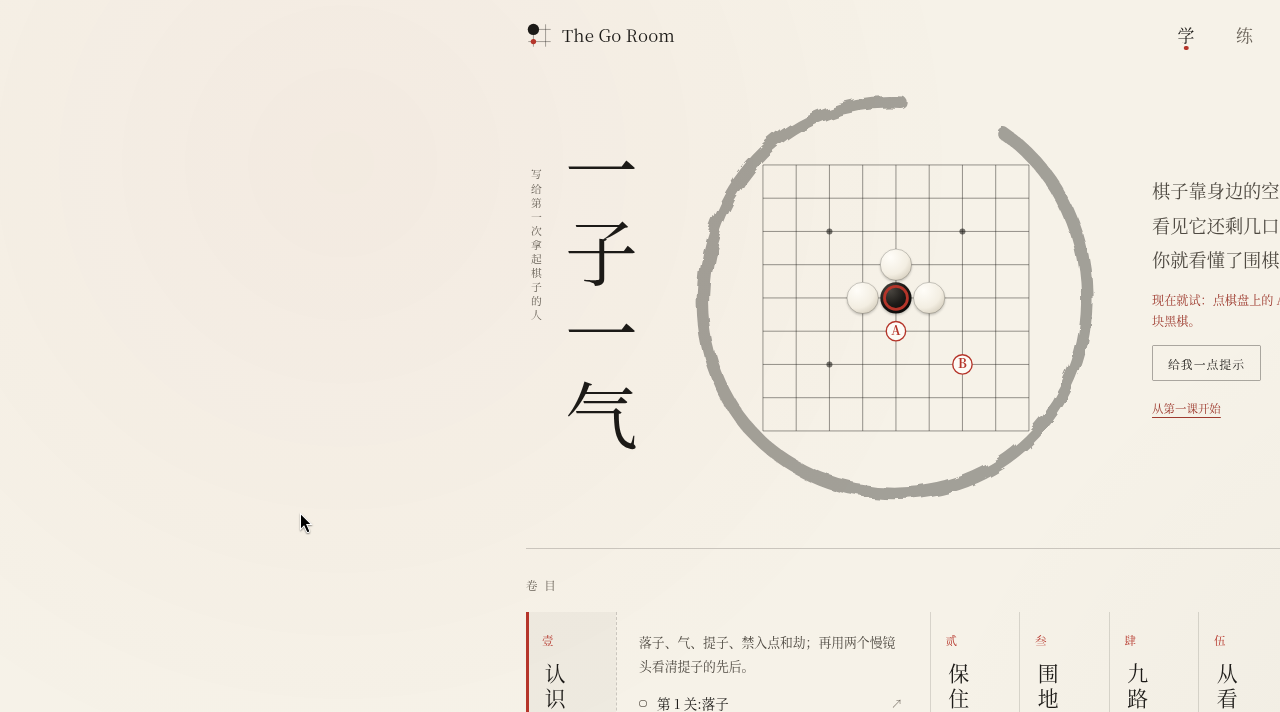
| Homepage demo | Save the circled black group in the center: click A or B |
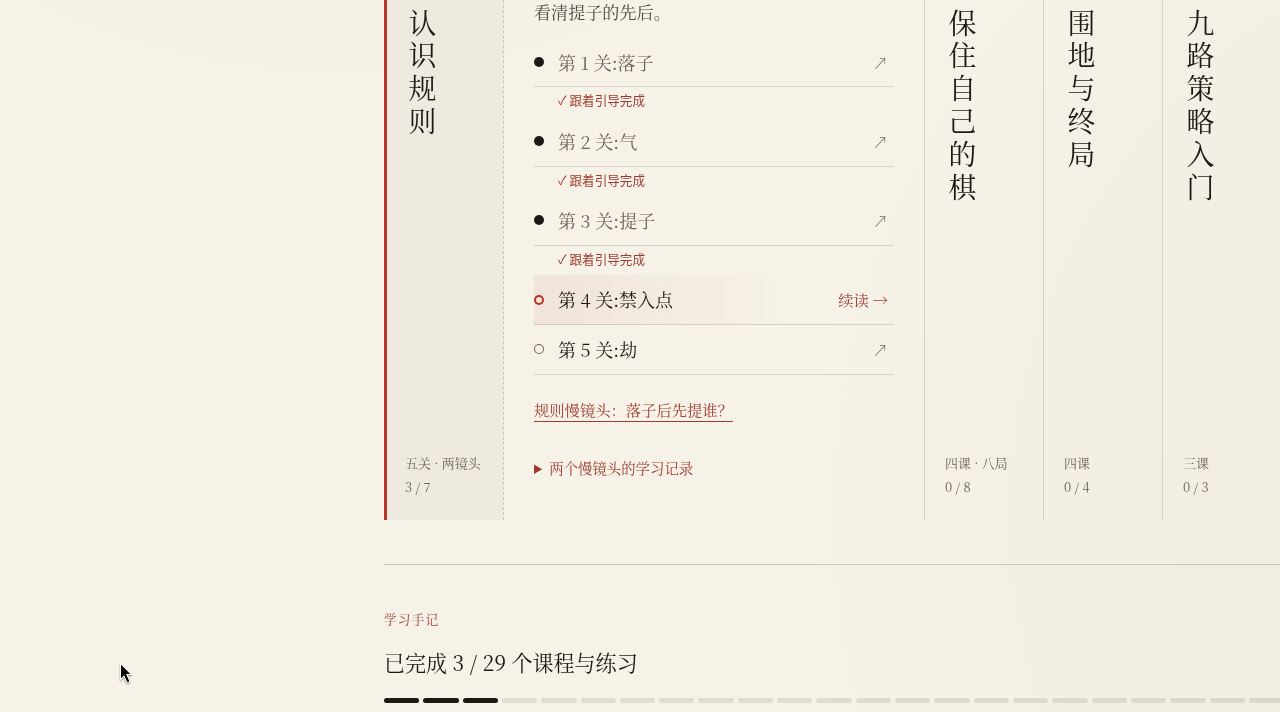
| Lessons | The footer said “Completed 0 / 29 lessons and exercises”; the syllabus is six volumes. We finished Lessons 1–3, started Lesson 4, and did not complete the remaining items |
| Practice / Play | The Practice page said 22 positions and 6 skills; Play is a 9×9 board, Chinese rules, White gets 7.5 points of komi. We only opened the interfaces; we did not finish a practice problem, and we did not play a full game |
| Record | Completion is stored in the current browser. After a refresh, you return to the problem you still need to finish, starting from the beginning of that problem; a board in mid-solution is not saved |
First, try to save a stone on the homepage
When we opened the site, the main title was “One stone, one liberty” (一子一气), with a vertical line beside it: “For people picking up the stones for the first time.” The navigation is Learn / Practice / Play / Review (学 / 练 / 弈 / 复). The body text said: “A stone breathes through the empty points beside it. Once you can see how many liberties it has left, you have understood the first lesson of Go.” Right after that was a prompt you can act on at once: “Try it now: click A or B on the board, and save the black group in the center.” On the right there were also “Give me a hint” and “Start from the first lesson.” Below was the syllabus, labeled “Contents,” with “Six volumes · click a spine to open.” Before we started, the progress was “Completed 0 / 29 lessons and exercises.”
In the center of the board was a black stone with a red circle, with a white stone pressing on it from each side. A was marked on the intersection directly below that black stone, and B was farther down to the right. We first clicked A (intersection 4,5). The black group lived. The page said: “Connected — three liberties!” and “Black connected at A. The two stones became one group and share three liberties. White cannot capture them in one move, so they are temporarily out of atari.” The point it wanted to make was: “When you are surrounded, first play in the direction that adds liberties.”
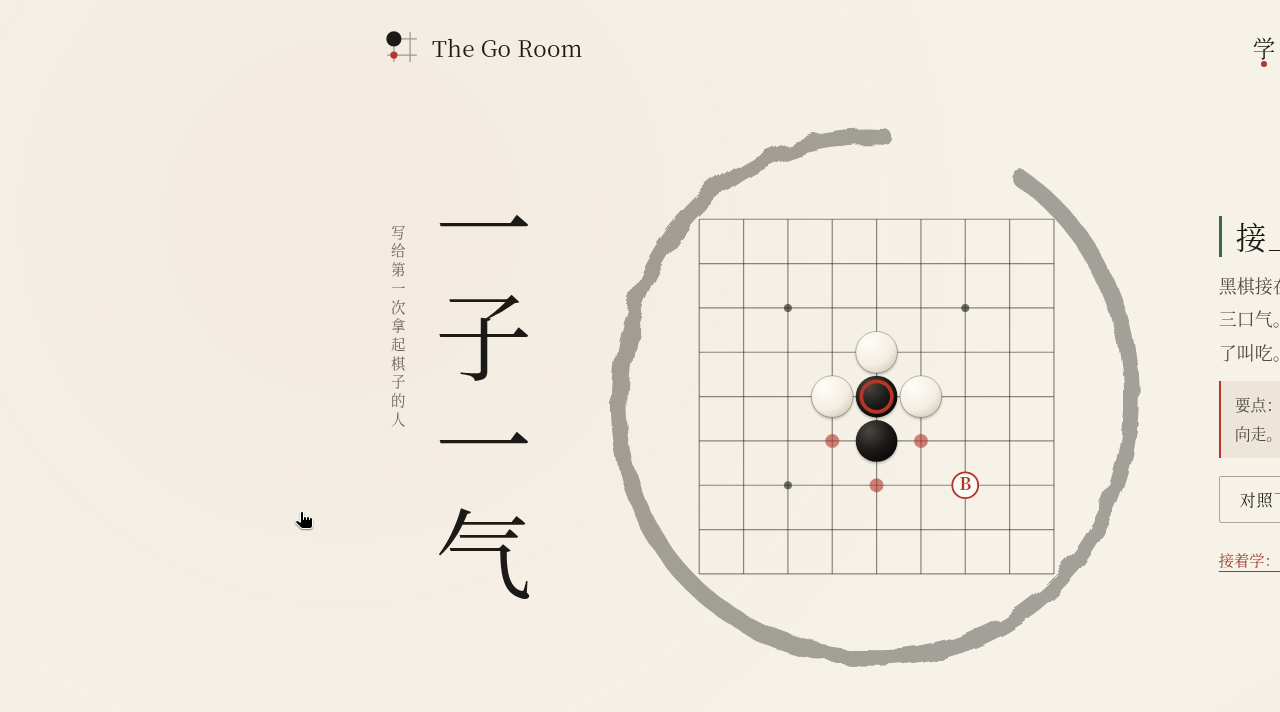
We then clicked “Try again,” and this time we clicked B (intersection 6,6). That move did not save the group. The page said: “Still only one liberty” and “B is too far from the target, and it did not add any liberty to the circled black stone. It is White’s turn — what will White do?” After we clicked “See White’s reply,” the result was: “White plays at A, and the black stone is captured” and “White played at A, filled the circled black stone’s last liberty, and took it off the board. The distant move did not help.” That is the same idea the later lessons teach — add liberties first — only here it is placed on the homepage so you can fail once first.
We did not click “Give me a hint” or “Compare with before” in this test.
Walk through placement, liberties, and capture, lesson by lesson
From the syllabus we opened “Lesson 1: Placement.” The instruction was: “Place a black stone on any intersection of the board.” The explanation said: “In Go, stones are placed on the intersections of the lines, not inside the squares. Black plays first, and once a stone is placed it cannot be moved.” The board was an empty 9×9, labeled “Figure 01 / Learn the rules.” We played at tengen, the center point (intersection 4,4), and passed with that one stone. The completion prompt was: “This lesson is done. Look at the reason, then continue.” “That is placement. Next, learn a stone’s ‘liberties.’” It also said: “Recorded: completed with guidance. You can try again; the best record is kept.”
“Lesson 2: Liberties” asked: “Click every liberty of this circled black group. A point occupied by a white stone does not count.” The explanation said that the empty points directly above, below, left, and right of a stone are its liberties, that diagonal points do not count, and that connected stones of the same color share liberties. On the board were two circled black stones (4,4 and 5,4), with a white stone occupying 4,3 above them. We first deliberately clicked several points that were not liberties: 2,4, 3,5, the point 5,4 already occupied by Black, and the point 4,3 occupied by White. Each time the prompt was: “This point is not a liberty of this group. Liberties are the empty points directly adjacent to the stones; diagonal points, and points occupied by the opponent, do not count.”
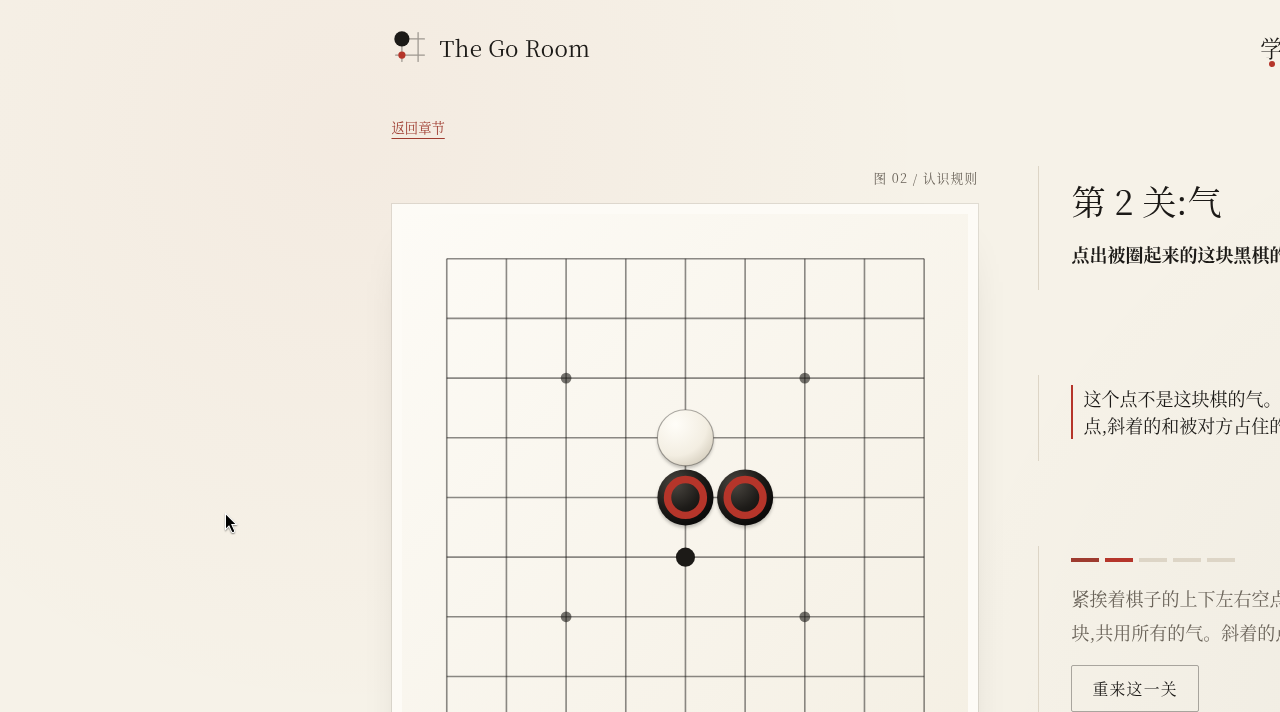
We then clicked the remaining liberties: 3,4, 6,4, 5,5, and 5,3. On passing, the page said: “This group has 5 liberties. White occupies one of them, so it is not 6. When every liberty is filled, the stones are captured.”
“Lesson 3: Capture” asked us to capture the circled white stone that had only one liberty left. We first mis-clicked 6,4, and the prompt was: “Look for the empty point directly adjacent to the white stone — it has only one left.” After we played at 5,4 (the liberty to the right of the white stone), we passed: “The white stone’s last liberty is gone, and it has been captured. Captured stones do not return to the board.”
After these three lessons, the syllabus marked Lessons 1–3 with “✓ completed with guidance,” Volume 1, “Learn the rules,” was 3 / 7, and the footer said “Completed 3 / 29 lessons and exercises.” Lesson 4, “Forbidden point,” was labeled “Continue →.”
We then opened Lesson 4. The instruction was: “Only one of the two marked points is a legal play. Try it.” We clicked the upper mark (intersection 2,2), and the page explained: “This is a forbidden point: if Black plays here, the stone would have no liberty, and it would not capture any white stone, so the move is not allowed. Try the other one.” We did not play the other marked point, and we did not open Lesson 5, “Ko.”
The footer also said: “Each problem keeps the best completion record. Guided lessons and independent practice are marked separately; finishing a problem does not mean you have mastered it.” “After a refresh, you return to the problem you still need to finish, starting from the beginning of that problem; a board in mid-solution is not saved. The record lives only in this browser, and it is lost if you clear the browser data.” There was a “Clear learning record” button; we did not click it.
After a refresh, the progress is still there; a board mid-solution is not
After we finished Lessons 1–3 and refreshed, the completion count was still 3 / 29, Volume 1 was still 3 / 7, and the first three lessons still had check marks. The first time we refreshed from the syllabus, the page went straight into the unfinished “Lesson 4: Forbidden point,” and it started that problem from the beginning, which matches the footer’s “after a refresh, you return to the problem you still need to finish, starting from the beginning of that problem.” The explanation that had appeared after we clicked the forbidden point in Lesson 4 was gone, and the board was back to “Only one of the two marked points is a legal play. Try it.” The mid-solution state was not kept. When we went back to the syllabus, it was still 3 / 29, and Lesson 4 was not marked complete.
We only opened Practice and Play to look around
Practice is at https://minjia-hu.github.io/the-go-room/#/practice. The title was “Practice · Judge it yourself,” and it said “22 positions · 6 skills” and “Problems that go with the lessons, plus new positions, grouped by skill. Doing these does not change your place in the lessons.” At the time it showed “Completed independently 0 / 22.” The six groups were: 1, Spot danger (3); 2, Find a way out (5); 3, Capture (4); 4, Connect (5); 5, Two eyes (1); and 6, Timing (4), all marked “Not yet completed.” We did not open any of those problems.
Play is at #/play. It showed an empty 9×9 board, with “You play Black · the computer plays White,” “Your turn — try a move,” “9×9 · Chinese rules · Black first · White komi 7.5,” and “0 moves played.” A checkbox, “Beginner practice · try a move, then confirm,” was on by default. Hints do not pop up automatically; there is a “Give me a hint” link. We did not place a stone, and we did not finish a game, so we cannot judge how the computer plays, and we cannot verify the scoring. The repository README says that at the end of a game you have to mark dead stones yourself, that the computer accepts the marks as agreed, and that it does not check them automatically. That is documentation, not something we tested this time.
If what you occasionally need to work out is “what does this dit-dah recording say,” rather than Go, we have written about a Morse code translator: it decodes a recording in the browser without uploading the audio. That is another “open a page and practice” tool, and it is not the same thing as The Go Room.
How to walk through the same checks
You can follow the same sequence we used:
- Open the homepage, click A first and then B, and see whether the explanations of saving the group and of being captured match what you understand.
- Do Lessons 1 through 3, and confirm that the syllabus shows “completed with guidance” and that the total progress becomes 3 / 29.
- Deliberately click a point that is clearly not a liberty, and see whether it explains that diagonal points, and points occupied by the opponent, do not count.
- Refresh once: the completion record should still be there, and a board mid-solution should return to the start of that problem.
“Completed” only means that guided problem is finished. The footer also says that finishing it does not mean you have mastered it. We did not go back and re-check with the new positions in Practice, and we did not test this with a 9×9 game.
Common failures and limits
- On the homepage, clicking B does not save the black group in the center; only A connects it. If you click B first, you have to watch White’s reply before you see the black stone captured.
- In Lesson 2, diagonal points and a point occupied by a white stone are not liberties. A wrong click gets an explanation; it does not fail the lesson and throw you out.
- The record lives only in the current browser. If you switch devices or clear the site data, the progress is gone. There is no account sync, and no way to export a game record. We did not test the “Clear learning record” button.
- We did not test the computer opponent, a full practice game, end-of-game scoring, Lesson 5 on ko, volumes 2 through 6, the 22 Practice problems, game-record review under Review, or a phone layout. The repository README also says the phone layout was checked in a browser simulation, and that touch on a real phone, and the Safari toolbar, still need to be tried on a device.
- The hints describe local consequences. Do not treat them as “this is the best move,” or as a win-rate judgment from a playing program.


