


Uploading rental contracts or ID scans to a random PDF site never feels great. pdf.iceai.cloud (IceAI’s “PDF Toolbox”; pdf.iceai.cloud) labels everyday tidy-up tools as browser-local: merge, split, page manage, compress, and PDF↔image — files stay on your device. Word / PPT conversion and encrypt / decrypt go through the site’s own servers; the site says files are deleted after processing with no retained copies. Free, no signup, no site watermark. Researched November 6, 2026 (against the site copy and tool labels).
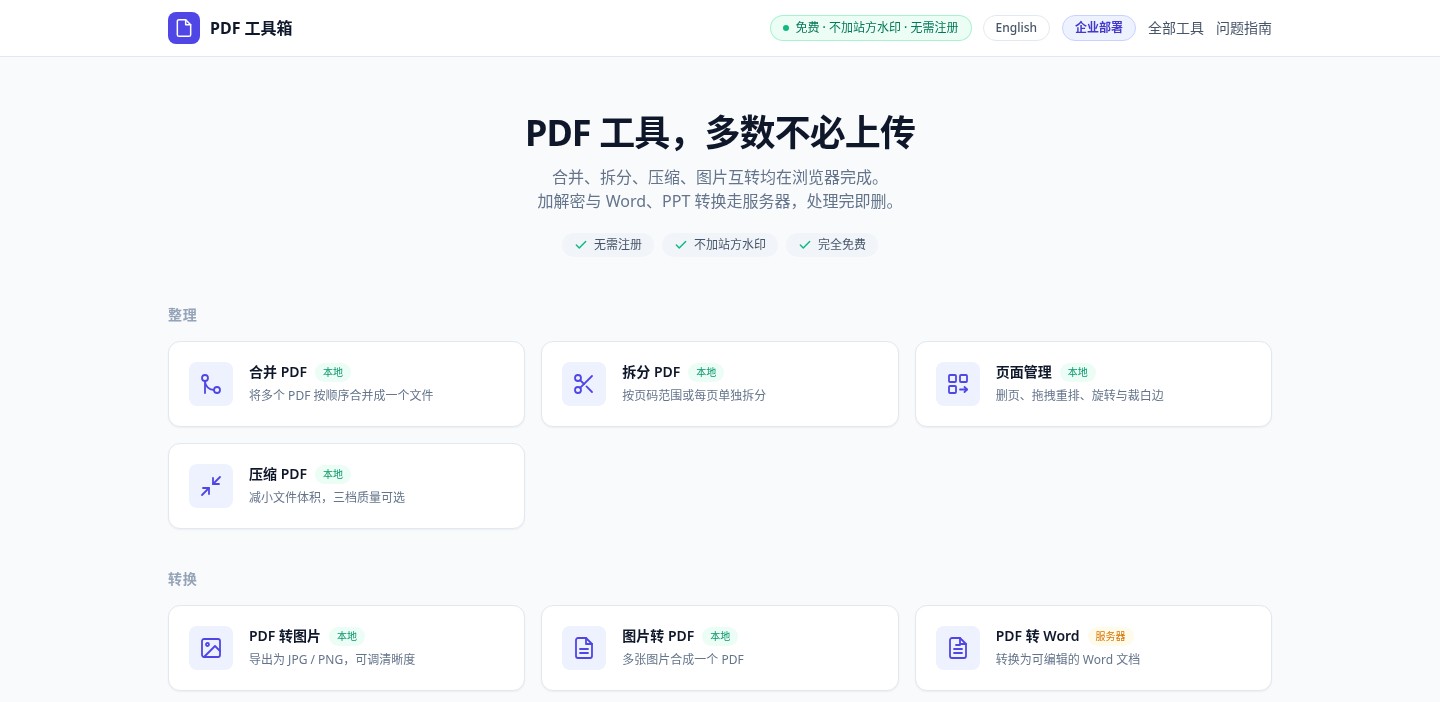
At a glance
| Item | Details |
|---|---|
| Type | Web PDF toolbox (~12 tools) |
| URL | https://pdf.iceai.cloud |
| Local (no upload) | Merge, split, page manage, compress, PDF↔image |
| Server | PDF↔Word, PPT→PDF / images, encrypt / decrypt |
| Cost & account | Free, unlimited uses, no signup; no site watermark |
| Size limits | Server tools ~50MB per file; local tools limited by device memory |
| Operator | Footer: indie developer IceAI, Shanghai, China; also offers enterprise deploy |
| Discovery | Discussed on V2EX (discovery only — trust the official site for features) |
What it actually does
- Local tidy-up: multi-file merge with drag reorder; split by page range or pack page-by-page; thumbnail delete / reorder / rotate / crop; multi-tier compress quality.
- Local image conversion: PDF→images and images→PDF, also labeled Local.
- Server conversion: Word / PPT paths and crypto need upload; FAQ says typical runs are seconds to ~20s, longer for big page counts.
- How to verify “local”: after the page loads, go offline and try the tool (common tip from the author and discussions); if it still finishes, it did not depend on upload.
- Mobile: responsive layout, but large files are better on a computer.

How it sits next to tools on this site
| You care more about… | Better fit |
|---|---|
| Desktop PDF reading (cross-platform installs) | Folio |
| Offline PDF annotation in the browser (unzip and run) | PDF Tool |
| Mac drag-to-radial menu for local file conversion | OpenShelf (EN pending) |
| A big set of browser-local developer / utility tools | KitVerse |
| Web merge / split / compress with clear Local vs Server labels | pdf.iceai.cloud |
In short: Folio / PDF Tool lean reading and annotation; OpenShelf is a Mac file wheel; KitVerse is a general toolbox. This site is for “open a page and stitch or shrink a few PDFs” — and seeing which steps upload.
Boundaries (read before you download)
- Good fit: quick merges of scans, shrinking email attachments, no signup; willing to keep sensitive files on Local-labeled tools, or accept short uploads for conversion.
- Caveats: pure front-end tools load files into memory — hundreds of MB can stall or fail on weak machines; server tools cap at ~50MB; access speed from mainland China varies (measure on your network). Deletion promises are the operator’s statements — judge risk yourself for important material.
- Not a great fit: fully offline desktop suites, heavy OCR pipelines, or air-gapped PDF↔Office conversion (those still need the server tools).
Bottom line
pdf.iceai.cloud puts “most jobs need no upload” in the headline and uses green/orange labels for Local vs Server — clearer than many nameless PDF sites. For daily annotation, pair with PDF Tool; for a system-level reader, see Folio. Prefer Local cards for sensitive files, and use the offline test when you want proof.


