


If you wanted to use an Android-only app on a Mac, you used to have two options: install an Android emulator and use the app inside a “phone window”, or pick up your phone and mirror its screen to your computer with a scrcpy tool such as FreeControl 2 (our review is in Chinese).
Mac.apk, open-sourced on October 19, takes a third route: double-click an .apk and it becomes a real Mac app. It shows up in your Applications folder and the Dock, gets its own window, and you can ⌘Tab to it. It reached the Hacker News front page soon after. Below is a Q&A walkthrough. Everything here comes from the GitHub repo, wiki and release notes, checked on October 20, 2026. We don’t have a Mac that meets the requirements, so this is not a hands-on test.
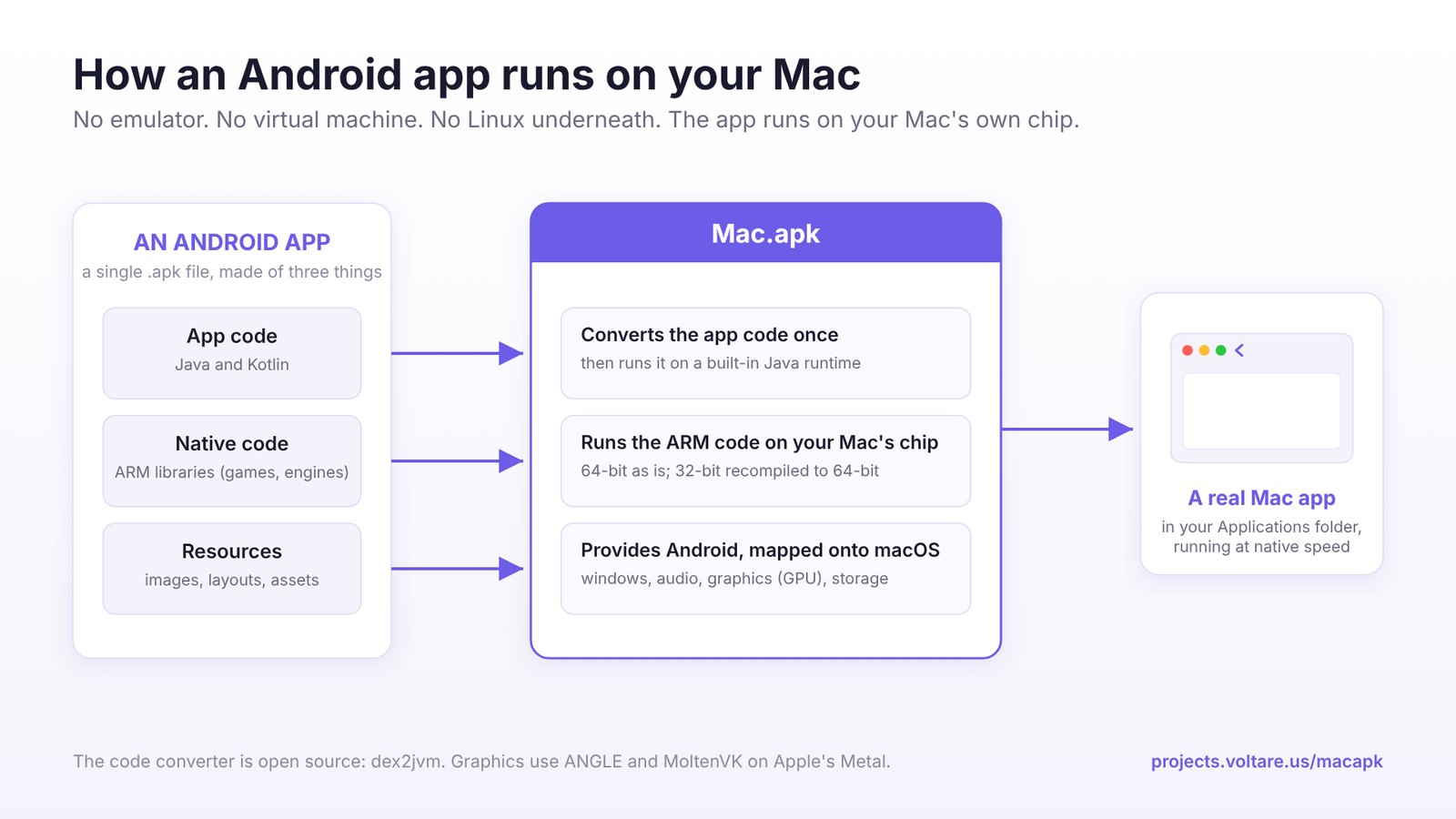
Is it an emulator or a virtual machine?
Neither. The author calls it a “compatibility layer”, in the same spirit as Wine on Linux or Steam’s Proton: instead of booting a whole Android system in the background, it implements the environment Android apps need directly on macOS. It works in three parts:
- Java / Kotlin code: on first launch, Android DEX bytecode is converted to standard Java bytecode and cached, then run on the OpenJDK runtime bundled with Mac.apk. The converter, dex2jvm, is open source on its own as well.
- Native code (almost every game has some): 64-bit ARM code runs directly on Apple silicon with no translation; 32-bit ARM code is recompiled to 64-bit once, ahead of time.
- Graphics: OpenGL ES goes through ANGLE and Vulkan through MoltenVK, both landing on Apple’s Metal and drawn directly by the GPU.
The upside is fast startup, no big chunk of RAM reserved for a VM, and windows that resize like Mac apps. The trade-off is that compatibility depends on the author filling gaps one by one: wherever his re-implementation of “Android” falls short, apps break.
Will it run on my Mac?
| Requirement | Details |
|---|---|
| OS | macOS 26.4 (Tahoe) or later, a hard requirement; macOS 27 is supported from v1.0.1702 |
| Chip | Any Apple silicon (M-series). Intel Macs aren’t supported, and the author says they never will be |
| Disk | About 280 MB for the app plus runtime; each installed app takes roughly 1.5–3× its APK size |
Why the hard 26.4 floor? According to the author, running Android native code relies on a system capability Apple only added in macOS 26.4. On older versions apps don’t fail cleanly; they crash now and then and corrupt their own data. So Mac.apk checks at startup and refuses to run native code if the capability is missing.
How do I install it?
- Download
macapk.dmgfrom GitHub Releases (latest v1.0.2237, released October 19, about 104 MB) and drag Mac.apk into Applications. It’s signed with an Apple Developer ID and notarized, so you can just double-click it, no right-click or Privacy & Security override needed. - Open it and click Install next to “Runtime:” in the top-left corner. This installs the runtime once, takes a few seconds, and doesn’t ask for a password.
- Open Settings (the gear in the top-right), and under File types click Make Default, so
.apkand the split-package formats.apkm,.xapk,.apksand.apkxall open with it. - From then on, double-click any APK or drag it onto the Mac.apk window, confirm, and it’s installed.
The first launch of each app is slow, up to a minute for large apps, because the code is being converted. After that it’s fast. Every time you upgrade Mac.apk itself, each app’s first launch is slow once more. Mac.apk doesn’t update itself (it only tells you a new version exists); to upgrade, download the new dmg and replace the old app. Installed apps and their save data are unaffected.
Where do I get apps? Does Google Play work?
Google Play itself doesn’t, but two third-party stores install and run fine:
- F-Droid: the open-source app store. Install the F-Droid APK and you can download and update apps from inside it.
- Aurora Store: an open-source client for the Google Play catalog that can download most Play apps. It needs one setting first: under More → Spoof manager → Device, choose Pixel Tablet, restart Aurora and sign in again, otherwise Google won’t let it download. The author stresses using only the Pixel Tablet profile, because its chip type matches Mac.apk and it’s the one they test with.
Every time a store installs or removes an app, macOS asks for Touch ID or your password, and you can’t turn that off. The author’s reasoning: no Android app should be able to install software on your Mac by itself.
Which apps work?
The author has hand-tested 65 apps (as of October 19): 51 work, 10 partly work and 4 don’t work yet. A representative sample:
| Category | Works ✅ | Partial ⚠️ / Broken ❌ |
|---|---|---|
| Games | Minecraft (multiplayer works), Subway Surfers, Crossy Road, Among Us, Asphalt Legends, Candy Crush Saga, Fruit Ninja | Geometry Dash Meltdown ⚠️ (breaks after a full-screen ad); Hill Climb Racing 1.71.1 ❌ (1.68.1 works) |
| Messaging | Telegram, Signal | — |
| Tools / content | VLC (needs “all files access”), Wikipedia, F-Droid, Aurora Store, Organic Maps, AntennaPod | Instagram ⚠️ (odd layout, choppy video, no sound), Reddit ⚠️ (no Google sign-in), Duolingo ⚠️ (can’t sign up or log in), Mastodon ⚠️ (shows only one post), Thunderbird ⚠️ (Thunderbird account login fails), AnkiDroid ⚠️ |
| Won’t run | — | Fortnite (blocked by Epic’s anti-cheat, which the author says he won’t try to bypass) |
Banking, payment and big social apps (WeChat, Alipay and the like) aren’t on the test list, and there’s no official word on them. We wouldn’t get your hopes up: these apps typically use code hardening, device-environment checks and fraud detection, while Mac.apk insists on honestly telling apps “I am a Mac.apk device”. It doesn’t pretend to be a certified Android phone and provides no hardware-backed integrity attestation like Play Integrity. Banking, payment and some games that rely on such checks will most likely fail. The safer bet is games, open-source tools and apps that don’t do strict device checks.
How do keyboard, mouse and controllers work?
- A click is a tap, and click-and-drag is a swipe; two-finger pinch on the trackpad zooms.
- ⌘C / ⌘V / ⌘A work as usual in text fields; Esc or ⌘[ acts as Android’s Back button. There’s also a Back button next to the window’s traffic lights, and ⌘R rotates the window.
- Every app’s menu bar has a “Controls” menu with options: arrow keys as a gamepad D-pad (Among Us needs this for keyboard movement), arrow keys to simulate tilting the phone (for Temple Run 2 and Asphalt), Space to tap the center of the screen (for one-button games), and key-mapping profiles.
- Xbox, PlayStation and other controllers macOS recognizes work directly; vibration isn’t supported yet.
Is it safe? Can apps read my files?
This is the part to pay most attention to, and the project is upfront about it:
- It is not a sandbox. Inside Mac.apk, an Android app is an ordinary Mac program with your macOS user’s permissions. Android’s permission rules only constrain an app’s Java code; apps with native code can read shared folders without asking.
- An app’s Pictures / Movies / Music / Downloads / Documents are the real
~/Pictures,~/Movies,~/Music,~/Downloadsand~/Documentson your Mac, shared by every app. The good news is that macOS’s own privacy prompts still apply: before reading Documents, Downloads, Desktop or your Photos library, the system asks you separately, and the Photos library is read-only, so apps can’t change or delete anything there. - Bottom line: only install APKs from sources you trust, the same as with any Mac program you download. Don’t install “cracked” or “modded” APKs of unknown origin.
It also doesn’t crack or bypass anything: Google Play license checks are verified against Google’s servers with your own Google account, so paid apps you haven’t bought still won’t pass; in-app purchases (Play Billing) aren’t supported at all, so you can’t buy anything; and in-app ads aren’t faked.
Any gotchas when uninstalling apps?
Never drag an installed Android app straight to the Trash. Each app’s save data lives inside its own .app bundle, so trashing it deletes the saves too, without any warning. Instead, right-click the app in the Mac.apk window and choose “Uninstall”: it tells you how big the save data is and sets it aside before deleting the app, so reinstalling the same version later brings it back (saves are kept per version; a different version starts fresh).
To update an app: if it came from a store, update it in that store; if you installed the APK yourself, right-click → “Get Info… → Update from APK…” and pick the new APK.
Is it free? Should I use it or an emulator?
The official signed build is a free download with no ads or in-app purchases. The source is AGPL-3.0, and companies that want to integrate it in closed-source products can buy a commercial license. The project is still in alpha, and the author himself says some apps run great, some run partially and some don’t run.
Our recommendations:
- You have an Apple silicon Mac on macOS 26.4 or later and want to play a few Android games or use a few Android-only tools: worth a try; it should feel much more like a native app than an emulator window.
- You need banking, payment or heavily protected social apps: keep using your phone, or mirror it to your computer with a scrcpy-based tool like FreeControl 2 (in Chinese). That’s the most reliable option.
- You do Android development and debugging: use the official emulator in Android Studio. It runs a full Android system and behaves closest to a real device.
- Intel Mac, or macOS older than 26.4: it won’t work, so don’t bother.
If what you actually want is for an AI coding assistant to drive an Android emulator or device for automated testing, that’s a different kind of tool: see Mobile MCP. And if you often plug your Mac into an external monitor, take a look at LayoutKeeper, which snaps your windows back after you reconnect.
Project info
- Latest version: v1.0.2237 alpha (October 19, 2026), open-sourced the same day
- Platform: macOS 26.4 or later, Apple silicon only
- License: AGPL-3.0 (commercial license available); officially signed and notarized by Apple; free
- Compatibility: 65 apps hand-tested: 51 work, 10 partly work, 4 don’t (2026-10-19)
- Repo and downloads: kksimp/Mac.apk | Releases | Compatibility list | Wiki


