


If you code with AI every day, you’ve probably hit this: your Claude Code quota runs out, you switch to Codex to keep going, and now you have to explain the project architecture all over again, plus which approaches you already tried and which ones were dead ends. Or you get halfway through something on your work machine, open your laptop at home that evening, and the AI remembers nothing.
ai-memory is built to fix that. It’s an open-source project by Brazilian developer Fabio Akita (AkitaOnRails) that gives AI coding assistants a layer of long-term memory that works across tools, across machines and across people. Quit Claude Code halfway through a task, open Codex in the same directory, and the agent taking over receives a handoff note: where things stand, what failed, and which questions are still open. It’s MIT-licensed, has more than 11,000 stars on GitHub, and hit GitHub Trending on October 20 with 600+ new stars that day. Details checked on October 20, 2026, from the GitHub README and the official docs.
Doesn’t Claude Code already have memory?
It does, but every vendor’s built-in memory has the same limits: it lives on one machine and belongs to one agent, so it’s gone the moment you switch tools or hand the work to a teammate. ai-memory is different in a few ways:
- Across agents: there are more than 20 first-party integrations, including Claude Code, Codex, Cursor, Gemini CLI, OpenCode, GitHub Copilot CLI, Kimi Code, Kiro and Grok Build CLI. Every agent writes to and reads from the same memory.
- Across machines: memory lives in a service you run yourself, on the same machine or on a home server. Point your desktop and laptop at the same service and they see the same project memory.
- Across projects: it remembers your personal habits (which package manager you use, how you organize tests and so on) and brings them into every new project, so you don’t repeat yourself in each repo.
- Team-ready: everyone points at the same server, project knowledge is shared, and personal handoffs stay private. Multi-user auth, per-person attribution and audit logs are built in, not a paid add-on.
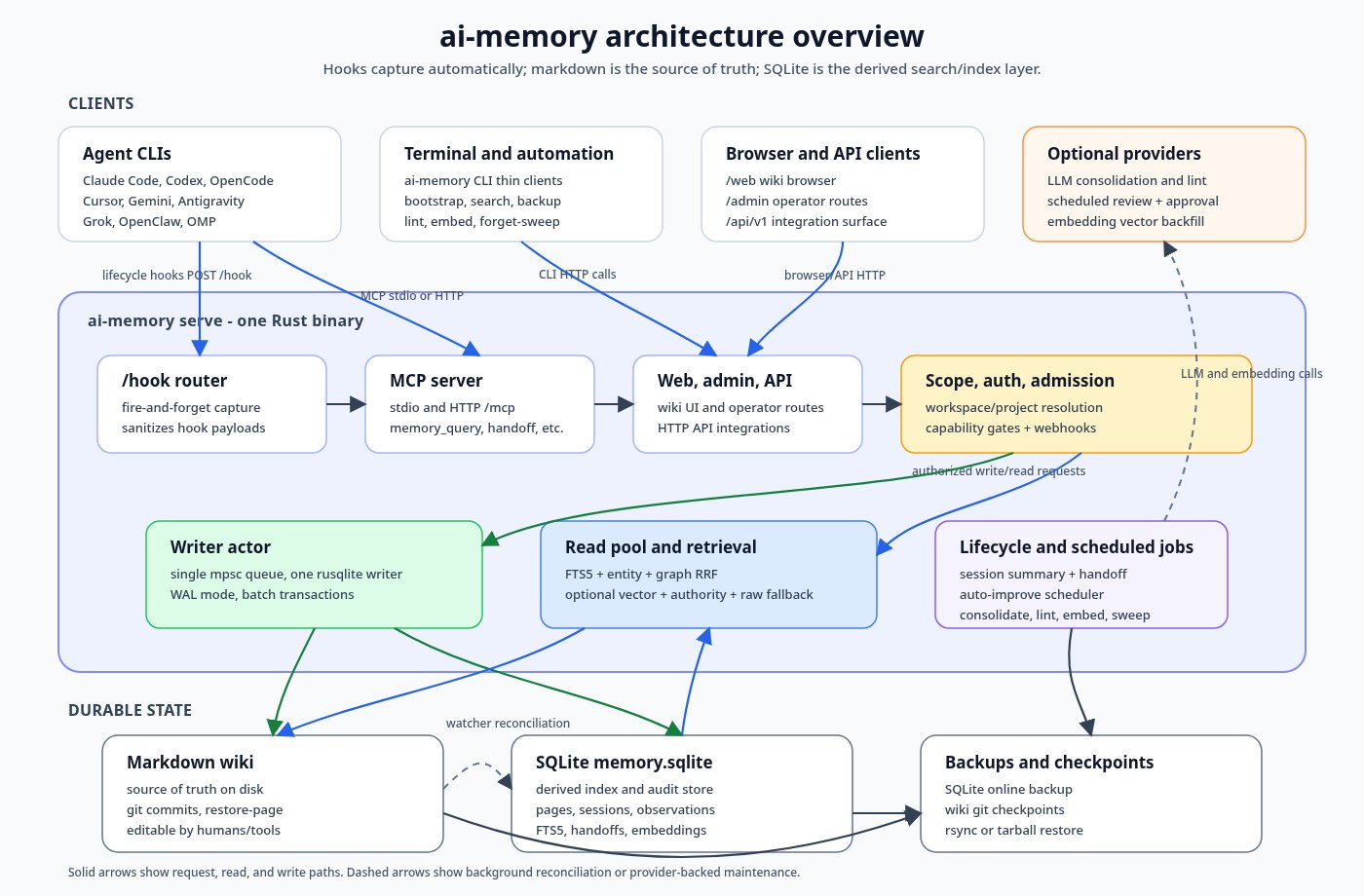
- Memory is plain Markdown: the source of truth is a git-managed wiki you can grep, open in Obsidian or edit by hand. The database is just an index derived from those files and can be rebuilt any time.
How does it remember?
There are four stages: capture → curate → recall → hand off.
- Capture: lifecycle hooks in each agent automatically record your prompts, tool calls, and session start and end. You never have to say “remember this”. Everything passes through a redaction step before it’s stored.
- Curate: when a session ends, those records are distilled into readable wiki pages.
- Recall: at the start of the next session, any agent on any machine gets a length-capped briefing and can search the entire memory (full-text, entities, links, and optional vector search).
- Hand off: cross-agent handoff is an explicit protocol. Every handoff has an owner and can only be claimed once.
The standout detail: the default path makes no LLM calls at all. Capture, search and handoff need no API key. Add a model and you get better session summaries plus semantic search. Old memories gradually “cool down” according to rules, with frequently used ones decaying more slowly, and the original versions always stay in git so you can recover them.
How do I install it?
Linux / macOS, two commands, no root needed:
curl -fsSL https://github.com/akitaonrails/ai-memory/releases/latest/download/install.sh | sh
ai-memory setup
The first command downloads the build for your OS and CPU, refuses to install if the SHA-256 checksum doesn’t match, and puts the binary at ~/.local/bin/ai-memory. The second, setup, creates the data directory (on Linux the user service defaults to ~/.local/share/ai-memory), generates an access token only you can read, registers a user service that starts at login (systemd --user on Linux, a LaunchAgent on macOS), then finds the agents installed on your machine and wires up MCP, hooks and Agent Skills for them. It shows you the plan first: answer y or type the numbers of the agents you want connected. Add --plan to preview without changing anything. Restart your agent afterwards and ask “What do you remember about this project?” to confirm it works.
Windows (PowerShell, no admin needed):
irm https://github.com/akitaonrails/ai-memory/releases/latest/download/install.ps1 | iex
ai-memory setup
Note that native Windows is still marked experimental in the official support table. WSL2 is the more reliable route.
If you only use Claude Code or Codex, you can also install it as a plugin (you still need the binary installed as above):
claude plugin marketplace add akitaonrails/ai-memory && claude plugin install ai-memory@ai-memory
codex plugin marketplace add akitaonrails/ai-memory && codex plugin add ai-memory@ai-memory
There’s also a Docker image (amd64 and arm64), an AUR package for Arch, an RPM for Fedora, and a macOS menu bar app (you build it yourself). To back out, ai-memory uninstall --apply removes everything setup wired up.
What does day-to-day use look like?
Once it’s installed you mostly forget about it and just talk to your agent:
| What you want | What to tell the agent |
|---|---|
| Pick up where you left off | “Where did we leave off?” |
| Check whether something came up before | “Have we discussed X?” / “search memory for Y” |
| Get up to speed after a few days away | “Catch me up” |
| Save a long-term rule | “Remember that we always use pnpm here” |
| Save context before you stop for the day | “Wrap up — save context for next time” |
To switch between agents seamlessly, the author recommends launching them through ai-memory run:
ai-memory run claude
ai-memory run codex      # takes over the same workflow and can see the local history of the Claude session
ai-memory continue       # resume the most recent workflow
ai-memory resume         # pick one of the workflows in the current directory
The first time run launches an agent, it installs any missing hooks and MCP config. On a switch, the incoming agent gets the shared memory plus a temporary copy of the previous agent’s local session history to fill in details. According to the docs, that session text is never sent to the server; the server only learns which agent and which session it was.
For a project you’ve been working on for months, run ai-memory bootstrap once to import its history. Start the service with --enable-web and you can browse the wiki read-only in a browser.
Is what it records safe?
It automatically records your prompts and tool calls, so this deserves a careful read. Here’s what the project says:
- Local by default, no telemetry: no usage stats, no crash uploads; all data stays in your own data directory. The default embedding model, all-MiniLM-L6-v2, also runs locally.
- Data leaves your machine in only three cases, all opt-in: switching embeddings to a cloud provider such as OpenAI, Voyage or Google (the full text of every memory page is sent, and after the switch all existing memory is re-sent too); turning on capture of AI replies (must be enabled on both server and client); and turning on LLM re-ranking of search results.
- Redaction only strips obvious secrets, and the project itself calls it “best effort, not a guarantee”. Data is not encrypted at rest; it relies on file system permissions.
- The service listens only on
127.0.0.1by default (port 49374). Native installs generate an access token automatically, but the Docker quick start has no authentication by default, so other programs and web pages on the same machine can reach it. Turn it on withai-memory auth enable. To share it across several machines from a home server, follow the docs to add tokens and put an HTTPS reverse proxy in front.
Our advice: if your project contains secrets or client data, first exclude sensitive paths with [capture] rules in the repo (or switch to allowlist mode), and keep embeddings on the default local mode.
Tips for non-English projects and slow networks
These are our conclusions from reading the docs and code, not hands-on tests:
- The default local embedding model is downloaded from Hugging Face on first launch. If Hugging Face is blocked or slow where you are, full-text search still works without it. The docs also describe an offline install: download the three model files yourself and put them in
<data dir>/models/all-MiniLM-L6-v2/. - Search quality may drop for languages without spaces between words, such as Chinese or Japanese. Full-text search uses SQLite FTS5’s unicode61 tokenizer, which segments those languages very coarsely, and all-MiniLM-L6-v2 is mainly an English model. Notes in those languages are stored and read fine, but recall may be weaker. If that matters, plug in a multilingual embedding service, or write rules and keywords in English.
- To have an LLM write summaries, point it at any OpenAI-compatible API. The official example calls
deepseek/deepseek-v4-flashthrough OpenRouter and recommends settingAI_MEMORY_LLM_COMPAT_STRICT=true, because DeepSeek and some other models occasionally wrap JSON in Markdown code fences and fields get lost. Local Ollama, LM Studio and vLLM work too.
What are the downsides?
- It moves very fast: about ten releases between October 7 and 17, and a jump to 3.0 on October 14. Read the official migration guide before upgrading from 2.x.
- Lots of concepts and lots of docs: workflows, handoffs, scopes, decay, multi-user… If all you want is to stop re-explaining your project when you switch agents, the default
setupis enough. Don’t start with the team deployment. - Native Windows is still experimental, and some agents (such as Claude Desktop, VS Code Copilot and Zed) support only MCP, not hooks, so there’s no automatic capture for them.
- Automatic capture means it stores a lot of session content. Review what’s in the wiki now and then.
How does it fit with other tools?
ai-memory handles what gets remembered, so it doesn’t overlap with these: Context Mode (in Chinese) keeps tool output from flooding the context window within a session; Magpie switches models for Claude Code and Codex from your menu bar; and Orca (in Chinese) runs several agents in parallel, each in its own worktree. For a map of how these tools relate, see our AI coding agent ecosystem overview (in Chinese).
Who is it for?
- Good fit: people who use two or three AI coding tools and switch between them because of quotas or results; people who code on both a desktop and a laptop; small teams that want a shared “project knowledge base”.
- Probably unnecessary: if you use one agent on one machine, its built-in memory is mostly enough. Also skip it if automatically recording every prompt makes you uneasy and you don’t want to spend time on exclusion rules.
Project info
- Latest version: v3.1.1 (October 17, 2026)
- Language / form: a single Rust binary with a built-in MCP / HTTP server; data is git-managed Markdown plus a SQLite index
- Platforms: Linux and macOS officially supported; on Windows, WSL2 recommended (native is experimental)
- License: MIT, free and open source, no API key needed by default
- Repo and site: akitaonrails/ai-memory | aimemory.sh | Install docs | Data handling


