


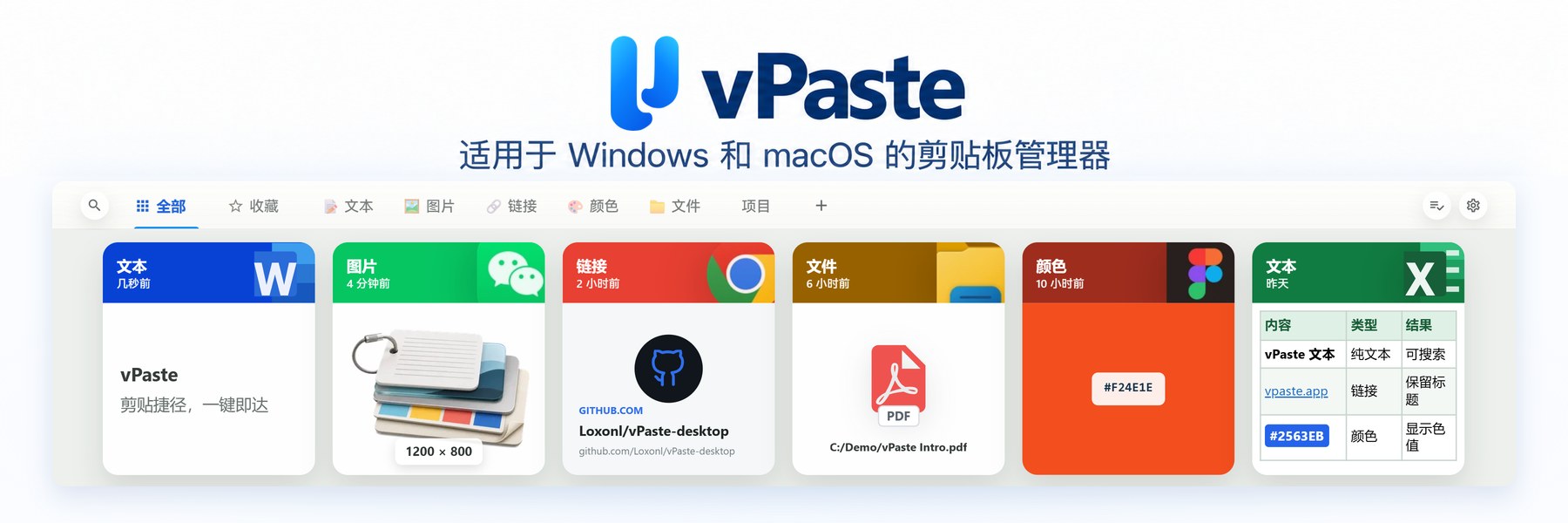
Copy enough times and you lose the trail: password fields, links, screenshots, color values, file paths — the system clipboard only keeps the last item. vPaste turns that stream into searchable cards: one shortcut on Windows / macOS, history stays on device, no account required.
Repo: Loxonl/vPaste-desktop; site: vpaste.app. Researched October 28, 2026.

At a glance
| Item | Details |
|---|---|
| Type | Visual clipboard manager (text / images / links / colors / files) |
| Version | v1.6.5 (released October 23, 2026; includes a Windows installer hotfix) |
| License | GPL-3.0-only |
| Platform | Windows 10 1709+ / Windows 11 (needs WebView2); macOS 11+ (Apple Silicon and Intel builds) |
| Stack | Tauri 2 |
| Price | Free open source; installer / portable zip on GitHub Releases |
| Stars | About 137 when checked |
| Site | vpaste.app (Chinese page vpaste.app/zh) |
| Repo | github.com/Loxonl/vPaste-desktop |
What it keeps — and how you paste
Copy as usual. On Windows press Alt + V, on macOS Option + V, to open the history panel; select a card and Enter pastes into the frontmost window; Shift + Enter pastes as plain text. Space previews long text, large images, page titles, or supported file contents.
- Content types: plain and rich text, images (including GIF recognition), links (optional page preview), colors (HEX / RGB / HSL convert), single file / folder / multi-file. File entries reference paths on disk — they are not a permanent backup.
- Search and tidy: search body, title, URL, filename, path, or source app; filter by type / app / date; favorites, tags, custom tabs.
- Paste queue: enable the queue, copy several items, then use the system paste key to fill multiple fields in order.
- Drag and multi-monitor: drag cards into compatible apps; the panel follows the screen you are working on.
How it sits next to other desktop productivity tools on this site
| Need | Better fit |
|---|---|
| Screenshot, pin, annotate | Snipaste (EN pending) |
| Expand short triggers into snippets | Espanso |
| Windows grab-bag of utilities (advanced paste and more) | Microsoft PowerToys |
| Desktop icon / widget grids | DeskBox |
| Clipboard history, card preview, local storage | vPaste |
If you are still building a fresh-install list, see also our 2026 Windows essential software guide (Chinese; EN pending). vPaste does not replace a screenshot tool or a text expander — it keeps what you already copied searchable.
Privacy and limits
History defaults to local storage — no account, no cloud upload. You can exclude apps and pause capture; where the platform marks sensitive content, vPaste skips it, but it will not auto-detect every password. Link preview may fetch a page for title and image by default — turn that off in settings. Manual export / import archives can move history between Windows and macOS; archives contain clipboard text, so treat them carefully — there was no official auto cloud sync when checked.
Good fit: dual-boot or Win + Mac clipboard history; often copy colors, links, screenshots; care about local-first and an open license.
Skip for now: need a native Linux package (official builds were Win / macOS when checked); require automatic multi-device cloud sync; expect file cards to paste after the original file is deleted.
Download: GitHub Releases (setup.exe, portable zip, per-arch dmg). Version and OS requirements follow the October 28, 2026 README / v1.6.5 check.


