


AI can spit out a character portrait for a 2D indie game in seconds — getting that character to idle, walk, and attack is the hard part: cut frames, key out the background, align feet, pack a sprite sheet, then wire per-frame timing into the engine. SpriteCanvas turns that finishing stretch into a workflow: describe a character or upload a reference → generate an action clip and slice frames → review → export a PNG sprite sheet + JSON (frame durations and foot pivots; Phaser / PixiJS confirmed). There is also a no-login browser toolkit that keeps files on your machine. Site spritecanvas.com. Researched November 1, 2026.

At a glance
| Item | Details |
|---|---|
| Type | AI sprite-sheet generator for 2D games (SaaS) + free in-browser tools |
| Platform | Web; free tools run locally in the browser — no upload, no credits |
| Export | PNG atlas + metadata JSON; Phaser / PixiJS verified; Unity / Godot import marked “not yet verified” by the author |
| Free quota | Welcome credits ≈40 (within 7 days); daily 3 credits, stack up to 12; standard quality only; ~1 GB storage |
| Paid | Starter from about $12/month (e.g. 500 credits); Pro / Studio tiers; credit packs |
| Caveat | Animation jobs queue — not instant; author is clear: not a per-pixel pixel-art editor |
| Site | spritecanvas.com · Pricing · Free tools |
What it does and how to use it
Paid generation path (email verify + credits): write a character description or upload a PNG / JPEG / WebP reference, lock the look, then pick built-in actions (idle, walk, run, jump, attack, …) or write your own; you can also follow a short live-action clip or a 2–6 beat storyboard. Credits needed show before you start; failed jobs with no output refund credits. Frames are background-removed and aligned to one cell/pivot; you can try the character in the site’s playable stage before exporting an engine-ready atlas. Also supports multi-direction (side / top-down / isometric), prop kits, recolor / outfit swaps, and budgeted “action × direction” batch matrices.
Free, no-login tools (files never leave the browser): grid-slice a sprite sheet, GIF ↔ sprite sheet, video → sprite sheet (optional green-screen / solid-color key). If you already have frames and only need slicing or format conversion, you do not need an account.
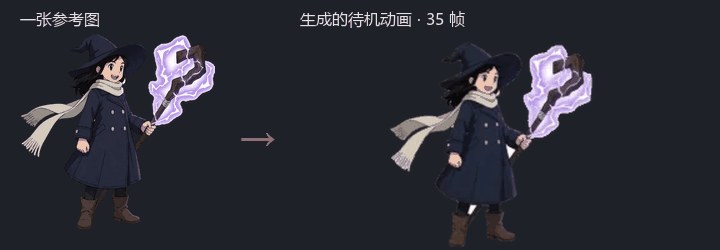
Treat it as one step in a “look → engine-ready sprite atlas” pipeline. Useful for indie 2D prototypes and also for China’s WeChat mini-game style projects — it is not an official WeChat tool; you still wire the export into your game. For per-pixel polish, the author still points you at something like Aseprite.
How it sits next to tools on this site
| Need | Better fit |
|---|---|
| Clean pose refs for AI image tools | Shisei |
| Run open diffusion models locally | FLUX.2 Klein local setup |
| More AI throughput on RTX 30 Ampere (Linux) | GPU Unlock |
| Shrink exported PNGs in the browser, no upload | pngdeer |
| Description / reference → pivoted sprite atlas | SpriteCanvas |
Who it is for (and caveats)
Good fit: indie 2D / small-game prototypes; need idle / attack frames fast; already have frames and only want free slicing or GIF/video conversion.
Caveats: free daily credits are few and standard-quality only; generation queues; not a pixel editor; trust the site’s “verified engines” list — Godot / Unity import needs your own tests. Pricing and credits follow the November 1, 2026 site check — live pages win.
Entry: Site · Free tools · Author intro on V2EX (Chinese developer forum).


