


You still run an RTX 3080 / 3090, and when ComfyUI or LLM prefill is busy the card feels “new enough, yet the tensor cores act half-throttled” — that is not just a feeling. The open-source project GPU Unlock targets an artificial rate limit on NVIDIA Ampere (RTX 30-series) consumer GPUs: when FP16 / BF16 tensor math accumulates into FP32, the issue rate is capped. After unlock, some workloads can approach roughly double the throughput. It does not modify the driver package and does not flash the VBIOS. The mainline path is a Linux kernel module; Windows is still experimental — do not treat this as a finished “one-click” tutorial.
This article is based on the GitHub README, compatibility notes, and coverage from Chinese tech outlet Ithome. Checked October 26, 2026. We did not run it on our own hardware; numbers below come from the project and community reports, and results vary a lot by setup. Experimental — your risk.
What GPU Unlock is
GPU Unlock (Zagitta/gpu-unlock, ~6.6k stars when this was written) combines earlier research on CMP mining cards with a timing trick before the stock NVIDIA driver binds the GPU: a Linux kernel module rewrites a rate-select register, then issues a function-level reset (FLR). After that the official driver initializes as usual.
What it unlocks is the instruction issue rate for FP/BF16 (and related TF32 paths) when accumulating into FP32 — so consumer Ampere can issue closer to professional-card rates on those paths. It does not:
- Raise memory bandwidth
- Add more CUDA cores
- Automatically speed up every game or every precision
So: matrix-heavy local AI (dense GEMM, diffusion image gen, some LLM prefill) is more likely to benefit; LLM decode, INT8, and bandwidth-bound stages often barely move.
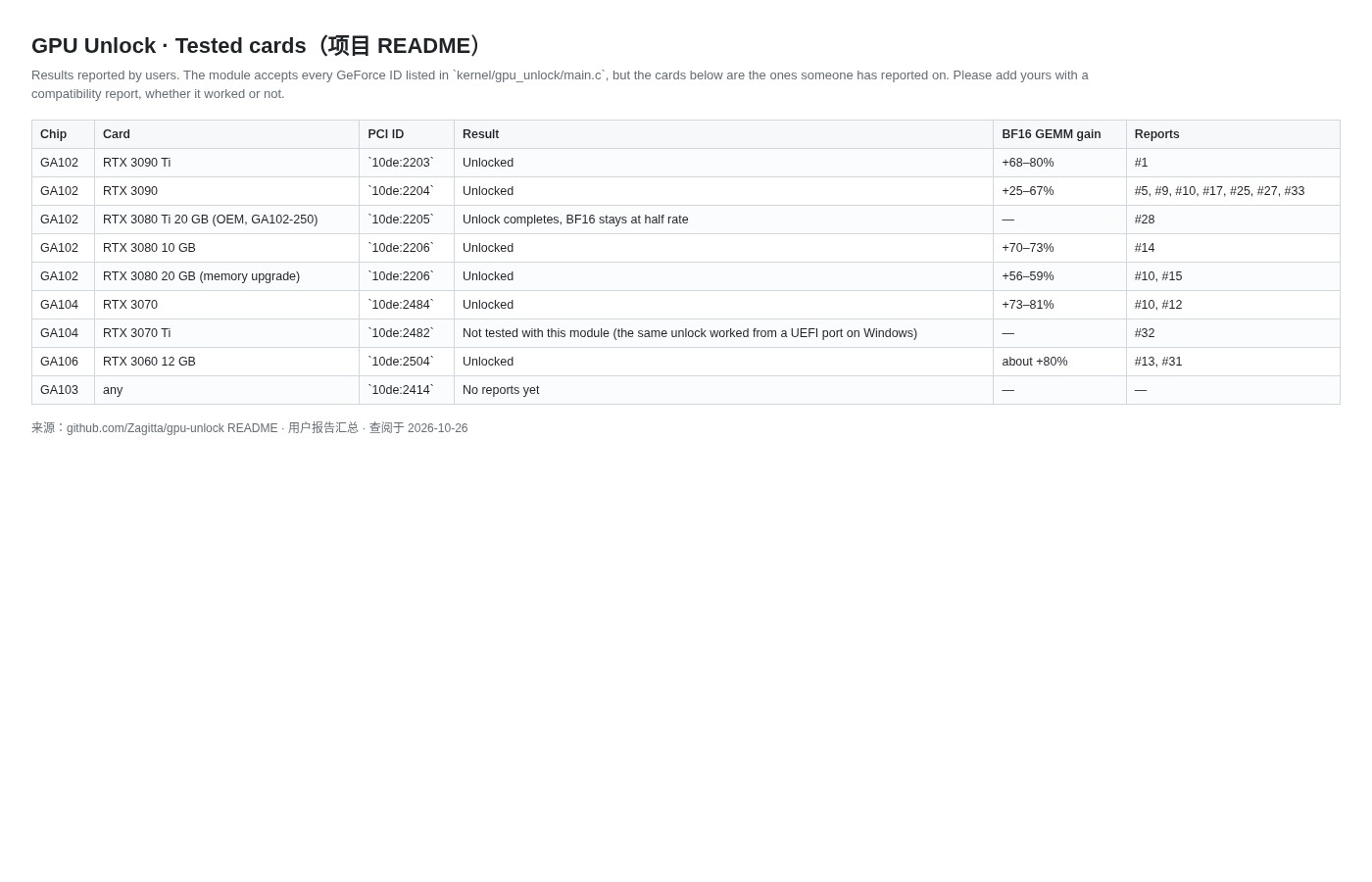
Officially listed chips: GA102 / GA103 / GA104 / GA106 — covering most RTX 30 models. The repo compatibility table is blunt: the module accepts GeForce IDs listed in main.c, but not every card succeeds, and success does not guarantee a score bump — at least one RTX 3080 Ti 20GB (OEM) report says the flow completed while BF16 stayed half-rate.
Who should read this
Good fit:
- Self-built Linux boxes on RTX 3060–3090 Ti running ComfyUI / diffusion / local LLM prefill
- Willing to read the official README, edit GRUB / kernel cmdline, and accept that experimental projects can break
- Want the theory and boundaries clear before deciding whether to try
Poor fit:
- Gaming-only users hoping for FPS miracles (no reliable evidence of meaningful game or DLSS gains)
- Windows-only users who will not touch experimental UEFI / third-party ports
- Anyone who will not accept stability, driver-conflict, or warranty-gray-area risk
Community gains (for reference only)
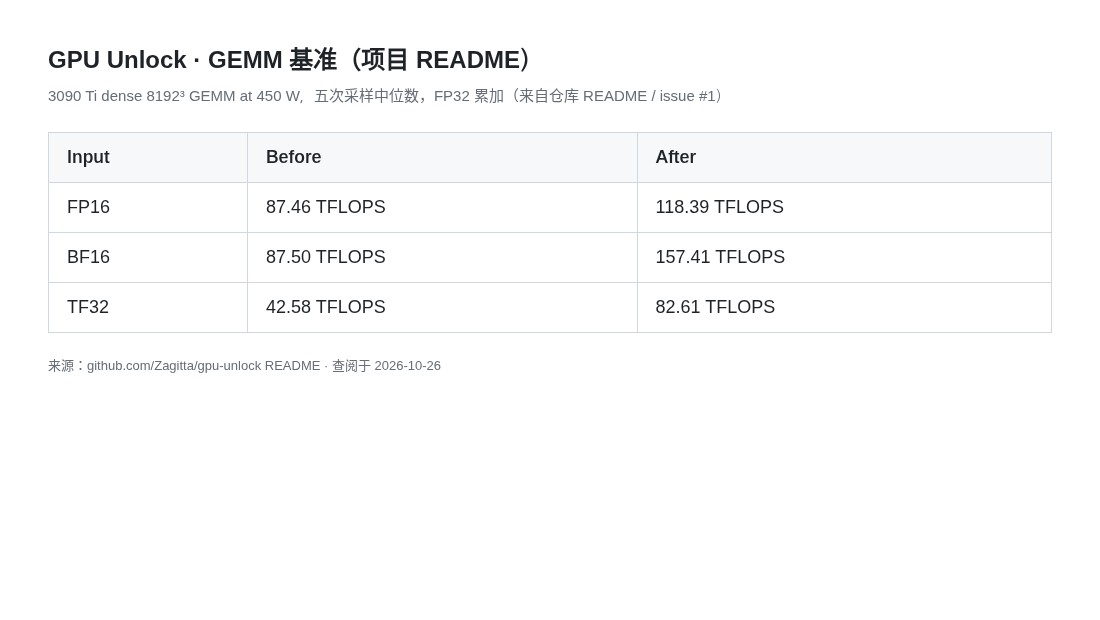
README example for a 3090 Ti (~450 W power limit), dense GEMM with FP32 accumulate (medians):
| Precision | Before unlock | After unlock |
|---|---|---|
| FP16 | ~87.5 TFLOPS | ~118 TFLOPS |
| BF16 | ~87.5 TFLOPS | ~157 TFLOPS |
| TF32 | ~42.6 TFLOPS | ~82.6 TFLOPS |
On real apps, Ithome summarizing Reddit 3090 Ti ComfyUI reports roughly: several BF16 image workflows gained about 56%–59% throughput; INT8 in the same scenes barely moved. On LLMs, one 3090 report showed vLLM prompt processing / throughput around +33% while token generation speed stayed flat — consistent with “decode is bandwidth-bound”. Lower power limits usually mean smaller gains (some reports bottom out near +25%).
Linux: mainline install (summary)
Mainline is a Linux kernel module. First install, per the repo:
git clone https://github.com/Zagitta/gpu-unlock
cd gpu-unlock
make install
make install tries to pull distro deps and package the module; there are also make install-arch / install-deb / install-rpm. Afterward put gpu_unlock.targets=all (or a specific PCI address) on the kernel command line (GRUB / grubby / systemd-boot, etc.) and update the bootloader. With no cmdline arg the module does not unlock anything by default.
Initramfs, resume-after-sleep, multi-GPU, and log checks belong in the repo README. After major driver upgrades you generally do not need to patch the driver again — that is one selling point versus “modify the driver” approaches.
Self-check after install (swap in your PCI address):
journalctl -k -b | grep gpu_unlock
lspci -nnk -s 0000:21:00.0
Windows: still experimental — not a finished product
Ithome and community posts mention a separate UEFI-based experimental Windows path; some 3090-class cards saw clear BF16 throughput gains, and there are third-party Windows port repos with 3070 Ti compatibility notes. None of that is the mainline Linux “follow the README once” path: hardware, motherboard BIOS, Secure Boot, and driver mixes diverge hard, and failure costs more.
If you mainly run ComfyUI on Windows: either wait until the project documents Windows as officially supported, or evaluate experimental paths yourself. This article will not walk step-by-step Windows unlocks — we refuse to ship that as a “babysitter” guide.
Risks and caveats (read first)
- Experimental: possible blank display, artifacts, broken sleep, driver install failures. Back up first; a iGPU or second machine to recover helps.
- Warranty / ToS: rewriting rate registers and loading an unofficial module may or may not affect warranty under vendor policy; NVIDIA and board partners do not endorse this.
- Not a universal accelerator: no extra bandwidth, no extra CUDA cores; INT8, decode, and many game scenes may feel unchanged.
- Per-card variance: same series can “unlock successfully” with zero score change. Read the repo compatibility reports first.
- Compliance / safety: take source only from the official GitHub; avoid mystery “one-click unlock” downloads. This is a public open-source project, not a cracked driver.
- Output consistency: some testers say image decode results match before/after unlock; still compare your critical workflows yourself.
Bottom line
GPU Unlock’s pitch is direct: without flashing VBIOS or permanently patching the driver, free the throttled slice of Ampere consumer tensor issue rate so local AI image gen / prefill can dig out more performance. Linux mainline is relatively complete; Windows stays experimental. It fits RTX 30 owners who already self-host local AI and accept risk; gamers or stability-first users can treat this as news and skip the install.
Related links
- Project: https://github.com/Zagitta/gpu-unlock
- Ithome coverage (Chinese): GPU Unlock may unlock hidden RTX 30 AI compute
- On this site: llmspeed before you buy a GPU for local LLMs · FLUX 3 Klein local AI image gen


