


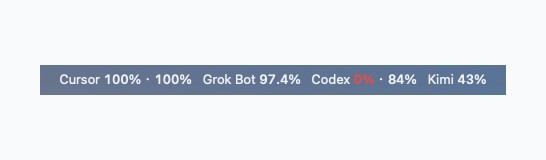
When you juggle Cursor, Grok Bot, Codex and Kimi in the same writing session, the annoying part is often having to open a web page just to see how much quota is left — or discovering mid-task that a window has already run dry. QuotaBar (Launchpad shows it as “AI 用量” / AI Usage; repo QinGeneral/ai-quota-bar) is a macOS menu-bar helper that pins the remaining quota percentage for those four services next to the clock. Click the icon to see each window’s remaining share and reset time. It turns orange below 40% and red below 15%. Researched November 8, 2026 against the README, Makefile, Info.plist and the Actions workflow build.yml (~0★, MIT, Swift; the repo was created on 2026-11-07). The project is brand new: on research day there were no GitHub Releases. Treat it as an early personal tool, not a finished product.
At a glance
| Item | Details |
|---|---|
| Product / repo | QuotaBar (display name “AI 用量” / AI Usage) / QinGeneral/ai-quota-bar |
| License | MIT; about 0★ and 0 forks on research day |
| Version | Info.plist says 1.0.0; no formal Release on research day. Each push uploads an Actions artifact named QuotaBar-macos (zip filename QuotaBar-macos.zip) with only a local ad-hoc signature |
| Platform | macOS 13.0+ (both the Makefile compile target and LSMinimumSystemVersion are 13.0); it lives in the menu bar and stays out of the Dock (LSUIElement) |
| Language | Swift |
| Data | Reads accounts already signed in on this Mac; it does not store extra tokens |
| APIs | The usage endpoints have no public stable contract. If the server changes a field, the menu reports a read failure instead of treating empty data as 0% |
What it actually does
- The menu bar shows what is left, not how much you have already used: the percentage is remaining quota. Cursor’s two numbers are “model · API”; Codex’s two numbers are “5 hours · 7 days”. When Kimi has several windows, they are listed together. Opening the menu shows reset times; the official screenshots also include “Refresh now” and “Open at login”.
- Where the numbers come from: Cursor and Grok Bot read Cursor’s local login, then query their own usage. Grok Bot uses its own weekly quota, separate from Cursor’s monthly quota. Codex reads
~/.codex/auth.json. Kimi prefers a Kimi Code login that has not expired; otherwise it uses the key already saved by the Kimi desktop app. Bonus quota is read separately from a not-yet-expired web login stored by the desktop app, and it only updates while Kimi is running. The README says QuotaBar will not refresh or rewrite those logins. - First launch: macOS asks whether to allow reading “Cursor Safe Storage” from the Keychain. Choose Always Allow so later refreshes do not prompt again.
- How to install: run
make installin the repo. That compiles the app, runs local checks, installs it to~/Applications/QuotaBar.app(Launchpad shows “AI 用量”) and opens it. You can also download theQuotaBar-macoszip from the matching Actions run. The artifact only has a local ad-hoc signature; if Gatekeeper blocks the first open, runxattr -cr QuotaBar.appand thenopen. To print the current numbers once in a terminal: aftermake, run./QuotaBar.app/Contents/MacOS/QuotaBar --once.
How it sits next to tools on this site
| You care more about… | Better fit |
|---|---|
| A web page or dashboard for remaining Claude, Codex, DeepSeek and Kimi quota | QuotaPanel |
| Switching models for Claude Code / Codex and similar agents from the menu bar (not watching quota) | Magpie |
| Cleaning Crashpad and Claude Code / Codex caches on a Mac (not watching quota) | Cleanzo |
| Remaining Cursor, Grok Bot, Codex and Kimi percentages in the menu bar | QuotaBar |
In short: QuotaPanel is more of a one-screen dashboard and covers a slightly different vendor mix (Claude / Codex / DeepSeek / Kimi). Magpie answers “which model should I switch to?” and Cleanzo answers “why did the caches eat the disk?” QuotaBar does one narrower job: glance at how much of these four quotas is still left.
Boundaries (read before you download)
- Good fit: you already sign in to Cursor, Grok Bot, Codex or Kimi on this Mac and want remaining quota pinned in the menu bar, with a color change when it runs low.
- Caveats: on research day it had 0★ and no formal Release. Installing means compiling it yourself or downloading a CI artifact with only an ad-hoc signature. Usage APIs are unstable — a field change can make reads fail. We did not run the app ourselves; the write-up follows the repo docs and official screenshots.
- Not a great fit: you are on Windows / Linux; you mainly want a web dashboard for Claude or DeepSeek (use QuotaPanel); or you want to switch models rather than watch quota (use Magpie).
Bottom line
QuotaBar puts remaining Cursor, Grok Bot, Codex and Kimi quota in the macOS menu bar. It is MIT and Swift, the install path is documented, and it is explicit that data comes from logins already on the machine — a failed read is not faked as 0%. It is very new, still at zero stars, and has no formal Release, so treat it as an early tool that happens to work. If you already use QuotaPanel as a dashboard or Magpie to switch models, this adds a lighter “glance at what is left” path.


