


If you pay for Claude, ChatGPT (Codex) and Cursor at the same time, and you’ve also topped up a few dollars on the DeepSeek, Kimi and MiniMax developer platforms, you know the routine: halfway through a coding session Claude tells you your 5-hour limit is used up, you want to switch to Codex but can’t remember how much is left this week, and the only way to see when your DeepSeek balance runs dry is to log in to its console.
QuotaPanel is built for exactly that. It’s a small open-source desktop app that pulls the remaining quota of all your AI subscriptions and API accounts into one window, with progress bars for usage, reset times and status, refreshed automatically every 5 minutes. It’s made by a Chinese developer (open-tecmz, mirrored on GitHub and Gitee); the interface defaults to Chinese but has a full English mode in Settings.
The project is still almost unknown on GitHub (single-digit stars at the time of writing), but it already covers 16 sources, including Chinese model platforms such as DeepSeek, Kimi (Moonshot), MiniMax, Zhipu’s Z.ai and Xiaomi’s MiMo. We installed version 0.2.0 on Linux, added a DeepSeek account to try it, and read through the source code to see where it keeps your keys and whether it sends anything out. Researched on October 22, 2026.
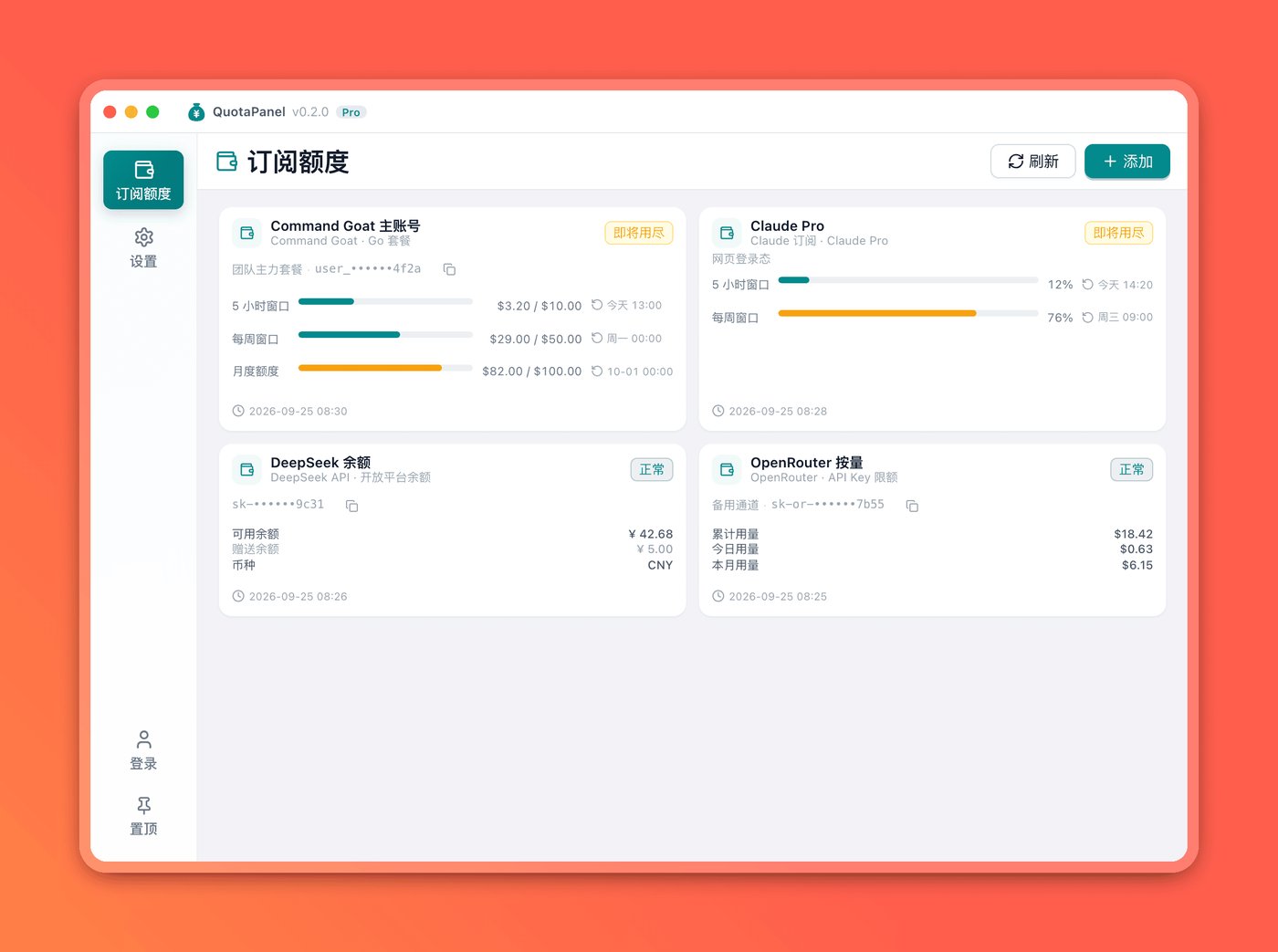
At a glance
| Item | Details |
|---|---|
| Developer | open-tecmz (website: open.tecmz.com/quotapanel) |
| License | Apache-2.0, free, commercial use allowed |
| Latest release | v0.2.0 (released October 10, 2026); v0.3.0-beta is in development on the main branch |
| Platforms | macOS (Intel and Apple silicon), Windows (x64 and ARM64), Linux (AppImage or deb, x64 and ARM64) |
| Built with | Go + Wails + Vue 3 |
| Data location | ~/.quotapanel/ by default; change it with the QUOTAPANEL_DATA_ROOT environment variable |
Which quotas it can track
QuotaPanel checks quotas in two ways.
Web login (4 sources): you sign in once in a separate browser window it opens, and from then on it reads your usage from the web page.
| Source | What you see |
|---|---|
| Claude subscription | The 5-hour window and the weekly limit |
| ChatGPT / Codex | Usage windows for your Codex subscription |
| Cursor | Usage in the current billing cycle |
| Xiaomi MiMo Token Plan | Plan credits and account balance (new in 0.2.0) |
API key (12 sources): it calls each provider’s own usage or balance endpoint.
| Source | What you see |
|---|---|
| DeepSeek API, Kimi API | Developer platform balance |
| Kimi Coding Plan, Z.ai Coding Plan, MiniMax Token Plan | Rolling-window and weekly usage |
| GitHub Copilot | Premium requests, chat and completion quotas |
| OpenRouter | Spend and limit for the current key |
| OpenAI API | API cost over the last 30 days (requires an organization Admin Key) |
| OpenCode Go, Devin / Windsurf, Grok CLI, Command Code | Usage for the current period of each plan |
The official website still says “15 sources”; that was the count in 0.1.0. With Xiaomi MiMo added in 0.2.0, it’s 16.
Hands-on: install it and add a DeepSeek account
Download the package for your system from GitHub Releases. We used the Linux AppImage (about 7.9 MB). The Linux build depends on WebKitGTK 4.0 (libwebkit2gtk-4.0-37), which is in the Ubuntu 22.04 and Debian 12 repositories. Our test machine runs Debian 13, which no longer ships that package, so we had to install the Debian 12 version before the app would open. Ubuntu 24.04 users will probably hit the same problem. Windows and macOS users generally won’t.
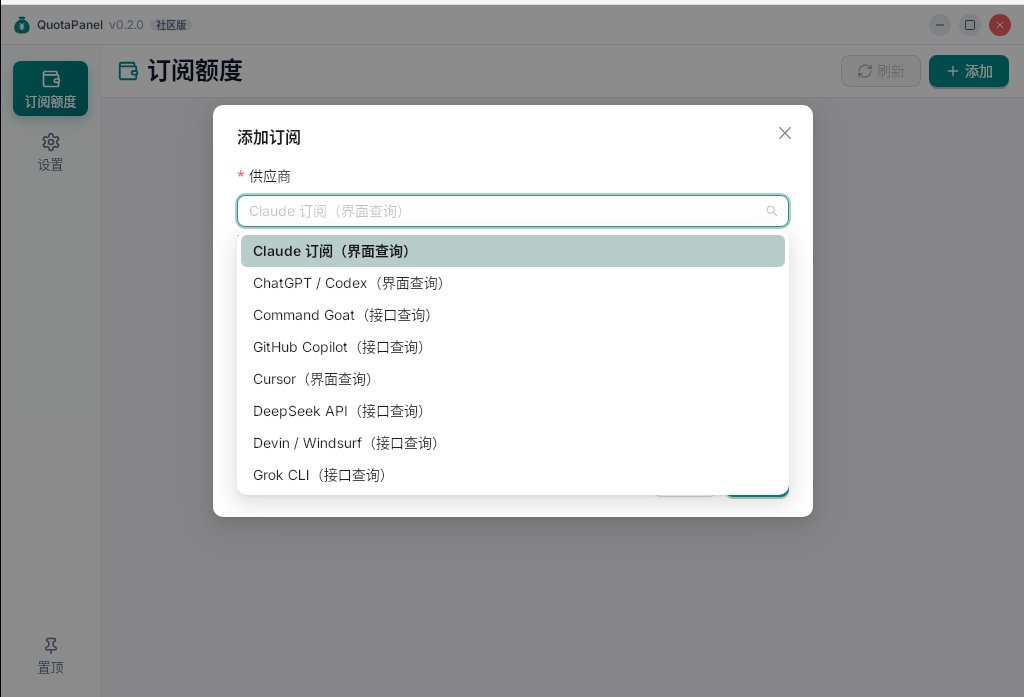
It opens to an empty quota page. Click Add in the top-right corner and pick a source from the provider drop-down. Each entry is labeled as either a web-login source or an API-key source, and you can type to search.
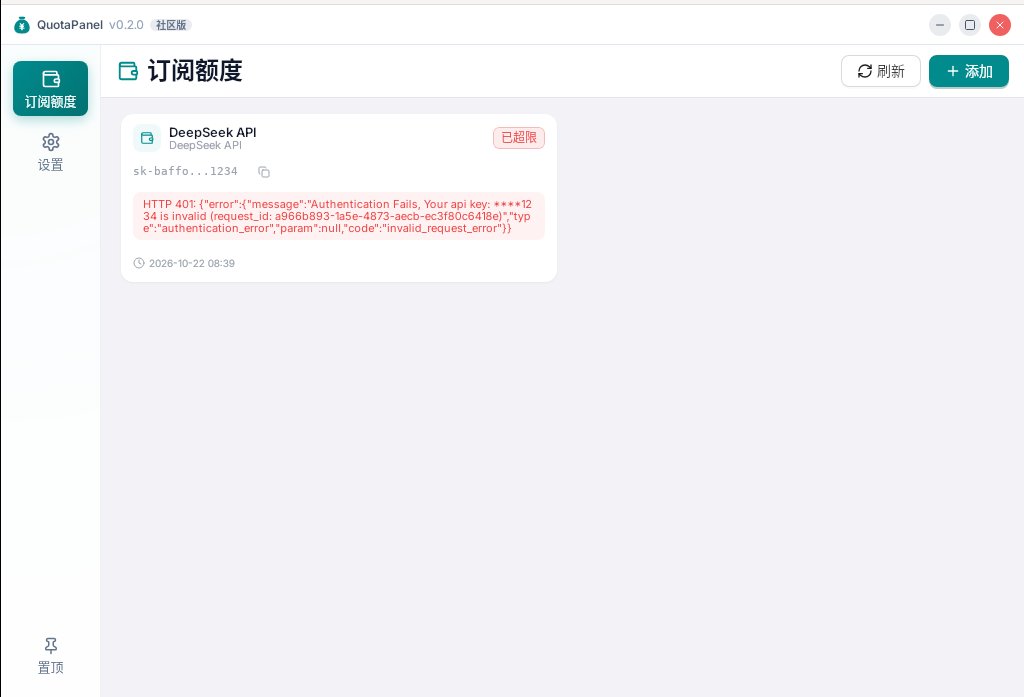
We picked DeepSeek API and deliberately entered an invalid key to see how errors look. The card showed the raw error returned by DeepSeek’s API (HTTP 401, Authentication Fails), so it’s immediately clear the key is wrong rather than the network. One small flaw: the status badge in the corner said “limit exceeded”. An invalid key and a used-up quota share the same red badge, so when troubleshooting, trust the error text underneath.
With a valid key, the card shows your available balance, granted (bonus) balance and currency. Subscription accounts show several progress bars, each labeled with its next reset time. As you use more, the status changes from a green “normal” to a yellow “running low” and finally a red “limit exceeded”. You can export any card as a PNG with one click, which is handy for sharing with a team.
In Settings you can switch between Chinese and English, light and dark themes, launch at login, and choose whether closing the window quits the app or hides it in the tray. On macOS, clicking the menu bar icon opens a mini panel so you can glance at every account without opening the main window.
Where your keys are stored, and what it sends out
“Local first” is its main selling point, so we checked the source code and the files it creates at runtime:
- Keys stay on your machine. Account details are stored in an SQLite file at
~/.quotapanel/db/database.db, and the web-login sessions for each account live in the same directory. When it checks quotas, the code only calls each provider’s official endpoints (such asapi.deepseek.com,api.moonshot.cnandopenrouter.ai). We found no code that sends your keys to the developer’s servers. - But keys are stored in plain text. Running
stringson the database file showed the test key we had just entered. In other words, anyone who can read your home directory can read these keys. The credential stealer in the LiteLLM supply-chain attack a few days ago was built to scan for exactly this kind of config file. Only add read-only or least-privilege keys that are enough to check a balance, and think twice before adding a high-privilege key such as an OpenAI Admin Key. - It contacts the developer’s servers for two things. According to the source, about 5 seconds after launch it checks for updates, sending a randomly generated device ID, the version number and system information to
open.tecmz.com. When the app hits an error or crashes, it reports the error message and stack trace tog.tecmz.com. Neither includes your keys, but if you mind, you can block both domains in your firewall. - Web-login sources need a browser. These sources open a separate Chrome or Edge window for sign-in, and later read the page with a headless browser in the background. That depends on each site’s page structure, and the README itself warns that a site redesign or a change in login policy can break a source.
One more thing: the title bar in the official screenshots says “Pro”, while the open-source build we downloaded says “Community Edition”. The source does contain both Pro and Community builds, but neither the website nor the repo mentions a price for Pro or how it differs. What you can download today is the Community Edition, and it works as described above.
How it pairs with other tools
- If you want to switch Claude Code or Codex to cheaper models such as DeepSeek or Kimi on the fly, pair it with Magpie: Magpie does the switching, and QuotaPanel tells you which provider still has quota left.
- MiniMax Token Plan users can watch the 5-hour rolling window and weekly limit in QuotaPanel too.
Who it’s for
| Your situation | Our take |
|---|---|
| You use two or more AI coding subscriptions and keep hitting limits | A great fit: you can see at a glance which one to switch to |
| You have balances on several developer platforms, including DeepSeek or Kimi | A good fit: it shows those balances too |
| You only chat in the ChatGPT web app | No need to install it |
| Work computer with compliance rules for credential storage | Evaluate first: keys are stored locally in plain text, and it contacts the developer’s server to check for updates |
The project is very young and has few stars, but it’s updated often (drag-to-reorder and other features were still being added on October 18). If you find it useful, give it a star on GitHub or Gitee, and open an issue if something breaks. The developer also welcomes new quota sources written in the style of backend/quota/provider_*.go.


