


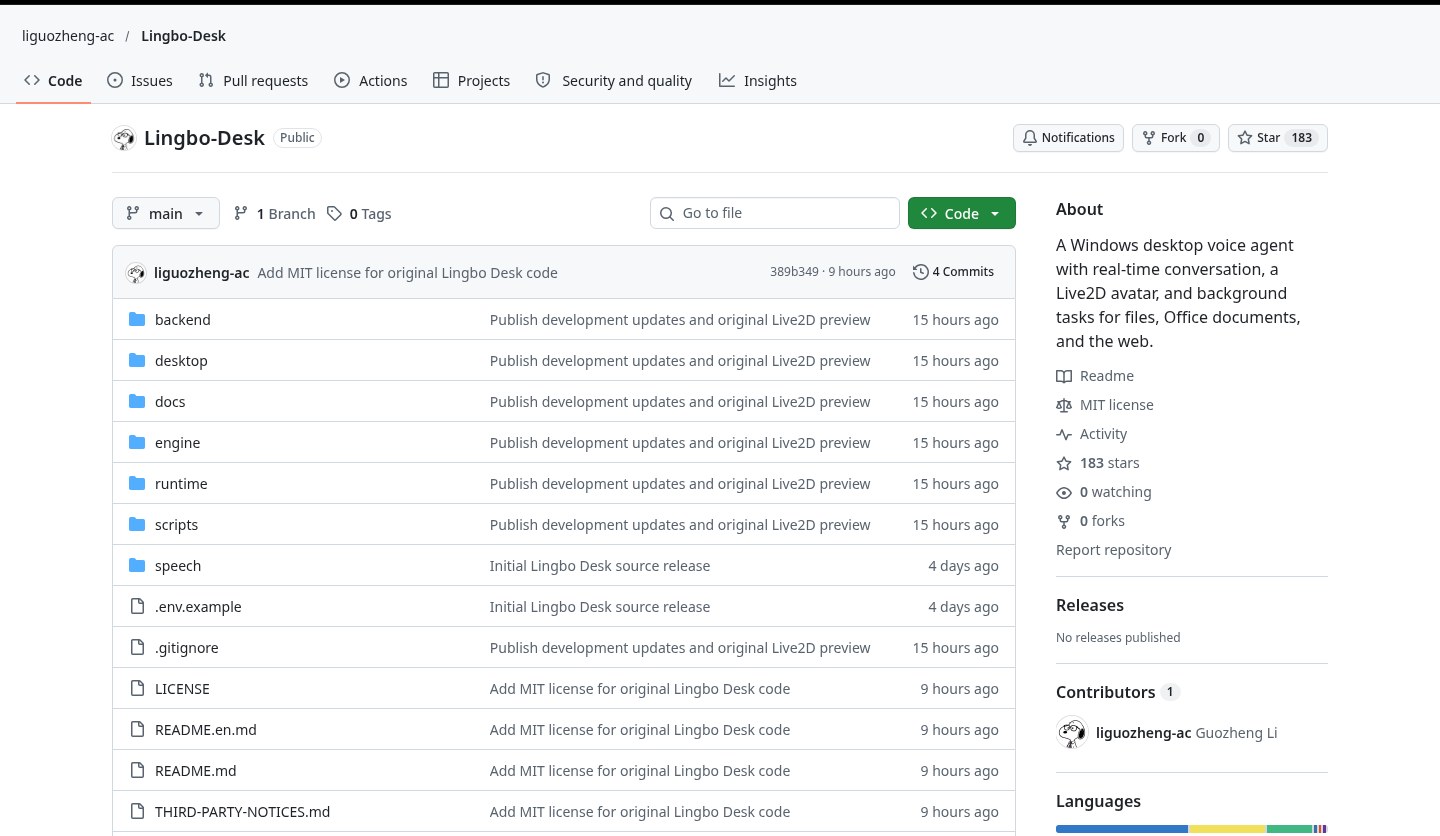
Want to keep a voice conversation going on the Windows desktop, and let the assistant work on files, Office documents or browser tasks in the background while you talk? Lingbo Desk (Chinese name 聆泊; repo liguozheng-ac/Lingbo-Desk) is a Windows desktop voice agent: continuous conversation, a Live2D avatar, and file / Office / browser jobs that can run while you chat. Speech recognition and synthesis cover Chinese, Japanese and English. Models can go through DeepSeek in the cloud or a local Ollama instance. Researched November 8, 2026 against the README, the setup guide and the Windows portable test-package notes (~183★, 0 forks, original code MIT, TypeScript; the repo was created on 2026-11-03).
Two easy misunderstandings first. On research day GitHub Releases was empty — there is no click-to-download installer. The README lists the daily install baseline as 0.3.0 and the portable candidate as 0.3.4-test, but the test-package doc says it is “not installed, does not replace the stable build, and is not published on GitHub.” We did not find a public download URL. Build from source per the docs, or ask the author where the test package lives; do not read the package filename below as a ready-made download link. Also, the original Live2D Character B shown in the repo is still in editor validation (appearance assembly, independent blinking and basic mouth binding are done; the preview is a native export of the t008 model). Do not treat it as a finished, commercially ready digital human.

At a glance
| Item | Details |
|---|---|
| Product / repo | Lingbo Desk (聆泊) / liguozheng-ac/Lingbo-Desk |
| License | Original code that the project rights-holder is authorized to license is MIT; third-party code, fonts, icons, models and SDKs follow their own terms |
| Stars | About 183★ and 0 forks on research day |
| Version & install | README: daily install baseline 0.3.0, portable candidate 0.3.4-test. Releases was empty on research day. The test package is assembled locally with steps such as pnpm run package:desktop (the docs name the artifact Lingbo-Desk-0.3.4-test-win-x64.zip); it is not published on GitHub |
| Platform | Windows x64; file and browser work need a local copy of Edge |
| Environment | The docs ask for Node.js 24, pnpm 11 and Python 3.12 |
| Models / speech | DeepSeek in the cloud or local Ollama; the speech docs specify Alibaba Cloud ASR and Doubao TTS (ByteDance) (you can verify Ollama alone, but voice still needs its own ASR/TTS setup) |
| Live2D | Character B is still in editor validation. The source repo does not include Cubism SDK binaries or character model packs — obtain a license yourself and import them |
| Default addresses | Dev/production backend defaults to http://127.0.0.1:3850. The test build’s default data directory is %LOCALAPPDATA%/LingboDesk-Test, on ports 39850 / 39851, isolated from the stable build |
What it actually does
- Continuous voice conversation: speech recognition and synthesis in Chinese, Japanese and English, with continuous listening, natural barge-in, and the ability to stop an old playback.
- A Live2D avatar: basic motion tied to speech mouth shapes. The preview image is original Character B, still being validated in the editor — not a finished character that has already shipped.
- Background work: query progress, pause, edit, cancel, and resume after a check. It can process files and Office documents and keep a separate browser session. Conversation and background work are scheduled separately, so you can keep talking while a job runs.
- Memory and skills: long-term memory has to be saved explicitly. The README says automatic extraction and vector search are not implemented yet. Skills can be imported and versioned.
- How keys are stored: on Windows you can enter DeepSeek, Alibaba Cloud ASR and Doubao TTS keys under the workbench’s “first use and service setup”. They are encrypted into
.local/services.dpapiinside the personal data directory (Windows CurrentUser DPAPI) and are not echoed back in the UI. If you only use Ollama you can skip the DeepSeek key, but speech still needs ASR/TTS. An older.envfile still works; it is not migrated or deleted automatically. - How to run from source: follow setup.md to install the three pnpm dependency trees, create a Python virtualenv, copy
.env.exampleto.env, then runpnpm start. A desktop build also means obtaining the Cubism SDK from official channels, reading and accepting its terms, pointingLIVE2D_CORE_PATHat your locallive2dcubismcore.min.js, and then preparing and building the desktop app per the docs. Without importing a model you can still verify a source build, but built-in character preset assets will not be available.
How it sits next to tools on this site
| You care more about… | Better fit |
|---|---|
| Pick a folder and handle office files in plain language | PawWork (EN pending) |
| A desktop office AI that reads files, runs commands and writes documents from one prompt | Abu |
| Local-first multi-model switching, with hooks for WeChat / Feishu (Lark) | AnyModelBot |
| Fully offline speech-to-text that pastes into the focused field when you finish speaking | Handy (EN pending) |
| Speaking practice / mock interviews in the browser | Moss-Live |
| Desktop voice conversation + Live2D + background file / Office / browser tasks | Lingbo Desk |
In short: PawWork, Abu and AnyModelBot are all desktop office agents, but their main path is typing and picking a workspace. Handy is offline dictation only; Moss-Live is speaking practice in the browser. Lingbo Desk is trying to be “talk to a desktop avatar while work happens in the background” — at the cost of preparing the environment, credentials and Live2D assets yourself.
Boundaries (read before you download)
- Good fit: you can set up Node.js 24 / pnpm 11 / Python 3.12 on Windows x64 yourself, you already have DeepSeek or Ollama plus the ASR/TTS credentials in the docs, and you want to try a desktop voice agent.
- Caveats: there was no official Releases installer on research day, and the test package is not published on GitHub. Live2D Character B is not finished. The independent worker process is not an OS sandbox; Skills scripts run with the current user’s privileges. A local model also does not automatically make cloud speech offline. The docs say complex Office documents, long-running sessions, sleep/wake and cross-device deploy still need more verification.
- Not a great fit: you want a one-click installer and do not want to configure environments or keys; you plan to treat the preview image as a finished digital human; or you only need offline dictation (use Handy), speaking practice (use Moss-Live), or folder-level office-file work (use PawWork / Abu).
Bottom line
Lingbo Desk puts continuous voice, a Live2D avatar and background file / Office / browser tasks into one Windows desktop agent. On research day it had about 183 stars, and the original code is MIT. It is not a “download an exe and start chatting” product: Releases is still empty, the setup bar is high, and Character B is still in editor validation. If you are already looking at PawWork (EN pending) or Abu for desktop office automation, this is a heavier, more voice-first path — read the repo’s setup and test-package notes before you decide to build it yourself.


