


If you want to run a large language model on your own computer, the most common question isn’t “will it run?” but “how fast will it be?” You’ll see claims like “a 4090 runs Qwen at over 100 tokens per second” online, but what does 100 tokens per second actually feel like? How much slower is a Mac mini? How many seconds will you wait before the first word appears when you paste in a long document? Numbers alone make that hard to picture.
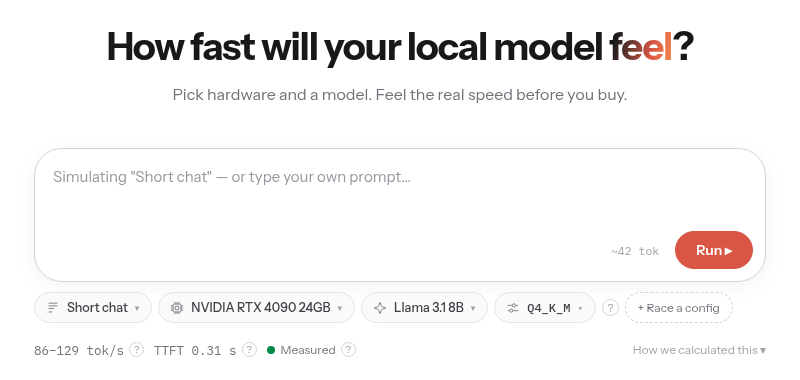
llmspeed is built for exactly that: pick a GPU or a Mac, pick a model, and it “types” out a response token by token at the estimated speed, including the wait before the first token. Spending two minutes on it before buying hardware is far more intuitive than staring at benchmark tables.
This post covers how to use it and how to read its numbers, then lays out a few typical setups I pulled from its data, and ends with its limitations. Information and data were checked on October 18, 2026 (Beijing time); the data file version was 2026-10-17.
What llmspeed is
- Website: llmspeed.dev. It works right in the browser, with no sign-up and nothing to install.
- Open source: the GitHub repo is nicorobinreal/llmspeed, MIT-licensed, with a little over 70 stars as I write this. It’s a brand-new small project that hit the Hacker News front page in the last couple of days.
- Coverage: 30 GPUs, Macs and CPUs and 15 popular open-weight models, across CUDA (NVIDIA), Metal (Mac), ROCm (AMD), Vulkan and CPU-only.
- What it does: simulates generation speed in real time, races two configurations side by side, tells you whether a model at a given quantization fits in memory, and generates share links.
Getting started in three steps
- Pick a prompt length. The first dropdown on the left has four presets: Short chat (about 42 tokens), Email draft (about 290 tokens), Code file (about 1,800 tokens) and 20-page doc (about 12,500 tokens). You can also type your own prompt into the box. The longer the prompt, the longer you wait for the first token, which matters a lot when comparing Macs with NVIDIA cards.
- Pick hardware, model and quantization. Think of quantization as compression: Q4_K_M is small and fast, Q8_0 is closer to the original, and FP16 is the uncompressed original. Once you’ve chosen, it shows tokens per second (tok/s), time to first token (TTFT) and how trustworthy that number is.
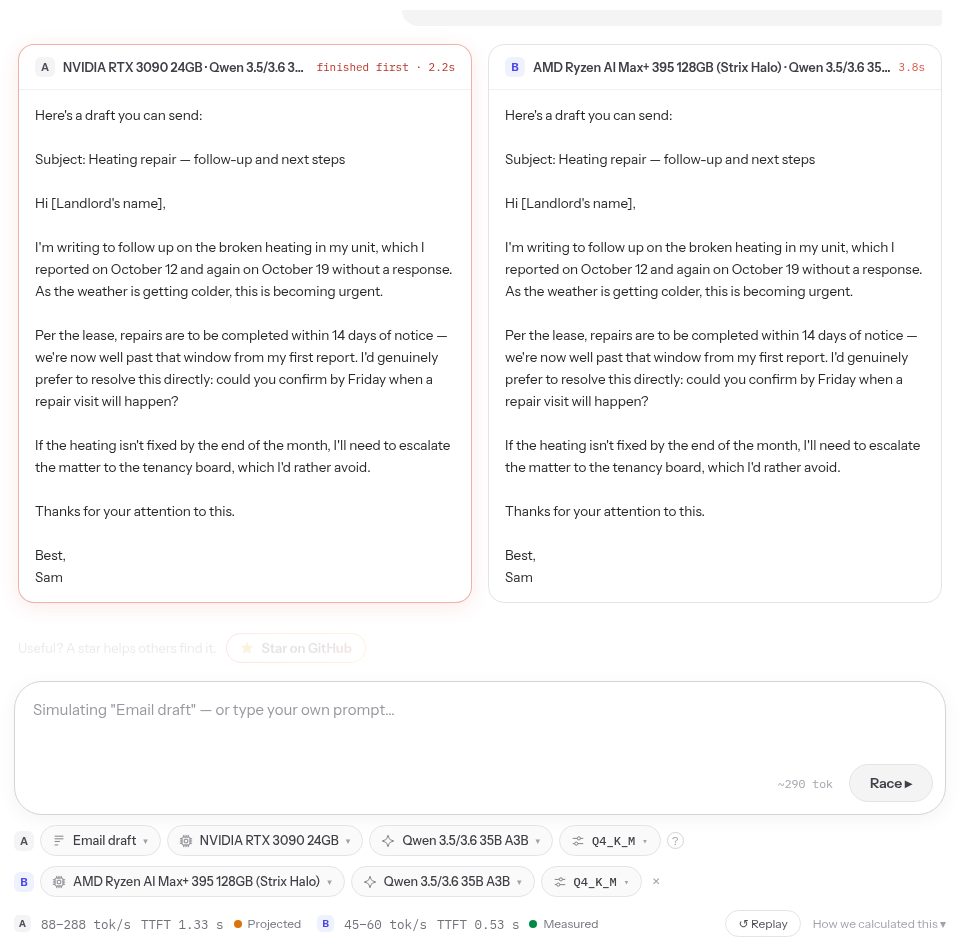
- Hit Run and watch. To compare two setups, click “+ Race a config” and both start generating at the same time, so you can see at a glance which finishes first. Click Share to copy a link to your setup and send it to someone.
First, understand the three labels
Every speed comes with a label telling you how reliable it is. This is my favorite part of llmspeed’s design:
- Measured: someone has actually run this model at this quantization on this hardware. The data comes from community reports on r/LocalLLaMA, localscore.ai, the llama.cpp discussions and similar places.
- Derived: there’s no exact measurement, so it’s extrapolated from measurements of similar setups.
- Projected: there’s no usable measurement, so it’s calculated from hardware specs. Examples are hardware that hasn’t shipped yet, or cases where the model doesn’t fit and part of it has to spill into system RAM.
Lean mainly on Measured. Derived ranges are often very wide (94–297 tok/s, for example), so treat them as ballpark figures.
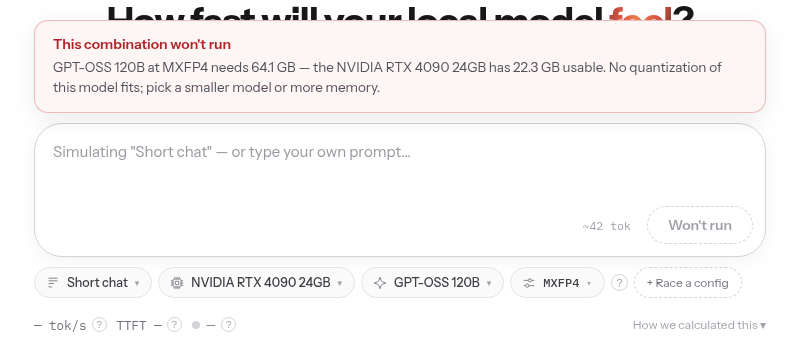
If a model simply won’t fit, it tells you by how much. GPT-OSS 120B, for example, needs about 64 GB, while an RTX 4090 has only 22.3 GB usable, so no quantization fits:
How it calculates
The README explains the method clearly. Roughly, it comes down to three rules:
- Generation speed depends on memory bandwidth. Every generated token requires reading the model’s weights from memory once, so more bandwidth means more speed. MoE models (the ones with A3B or A4B in the name) only use part of their parameters per token, so they’re calculated on active parameters only. That’s why a 35B MoE model can be faster than a regular 9B model.
- Time to first token depends on compute. Reading your prompt (prefill) mostly uses the GPU’s FP16 compute, so with long prompts, NVIDIA cards are much faster than Macs.
- Whether it fits: weights + KV cache + runtime overhead, compared with usable memory. It counts about 75% of a Mac’s unified memory and about 93% of a discrete GPU’s VRAM as usable. If a model doesn’t fit but is close, it estimates a split between VRAM and system RAM, and speed drops a lot.
Typical setups I pulled together
I worked out the numbers below from llmspeed’s data file using the calculation method on its site, and they match what the site shows (I spot-checked several). The label is in parentheses, units are tokens generated per second, and the prompt is a short chat.
Table 1: generation speed (tok/s)
| Hardware | Qwen 3.5 9B (Q4) | GPT-OSS 20B | Qwen 3.5/3.6 35B A3B (Q4) | GPT-OSS 120B |
|---|---|---|---|---|
| NVIDIA RTX 3060 12GB | 13–42 (derived) | 27–89 (projected), partly in RAM | 18–60 (projected), partly in RAM | Doesn’t fit |
| NVIDIA RTX 5060 Ti 16GB | 17–52 (derived) | 45–142 (derived) | 24–78 (projected), partly in RAM | Doesn’t fit |
| NVIDIA RTX 3090 24GB | 35–109 (derived) | 94–297 (derived) | 88–289 (projected), partly in RAM | Doesn’t fit |
| NVIDIA RTX 4090 24GB | 37–118 (derived) | 101–320 (derived) | 93–307 (projected), partly in RAM | Doesn’t fit |
| NVIDIA RTX 5090 32GB | 66–209 (derived) | 180–569 (derived) | 203–643 (derived) | 14–47 (projected), partly in RAM |
| MacBook M4 Pro 24GB | 15–37 (derived) | 40–100 (derived) | Doesn’t fit | Doesn’t fit |
| Mac mini M5 Pro 64GB | 16–41 (derived) | 44–113 (derived) | 50–127 (derived) | Doesn’t fit |
| MacBook Pro M5 Max 128GB | 33–83 (derived) | 123–154 (measured) | 84–105 (measured) | 67–170 (derived) |
| AMD Ryzen AI Max+ 395 128GB (Strix Halo) | 14–43 (derived) | 64–83 (measured) | 45–60 (measured) | 45–58 (measured) |
| CPU-only (Ryzen 9 9950X, 96GB DDR5) | 9.1–12 (derived) | 25–33 (derived) | 28–37 (derived) | 19–25 (derived) |
A few takeaways:
- 12 GB and 16 GB cards: models around 9B run smoothly. GPT-OSS 20B just fits on a 16 GB card, while the 12 GB 3060 has to spill part of it into system RAM.
- 24 GB cards (3090 / 4090) with models like 35B A3B: the Q4 quantization is about 22 GB, and with the cache it goes just over the limit, hence “partly in RAM”. In practice you can switch to a smaller quantization or use a shorter context.
- Big-memory machines (M5 Max 128GB, Ryzen AI Max+ 395 128GB): in raw speed they lose to top NVIDIA cards, but they can hold large models like GPT-OSS 120B. The Ryzen AI Max+ 395 has measured data for GPT-OSS 120B at 45–58 tokens per second, which is plenty for chat.
- CPU-only: 96 GB of RAM holds many models. MoE models at twenty to thirty-odd tokens per second are still usable, but regular dense models in the 27B or 31B range get very slow.
Table 2: time to first token (GPT-OSS 20B as the example)
| Hardware | Short chat (about 42 tokens) | Code file (about 1,800 tokens) | 20-page doc (about 12,500 tokens) |
|---|---|---|---|
| NVIDIA RTX 3060 12GB | 1.2 s | 3.1 s | 14.3 s |
| NVIDIA RTX 5060 Ti 16GB | 0.3 s | 0.7 s | 3.3 s |
| NVIDIA RTX 3090 24GB | 0.3 s | 0.6 s | 2.3 s |
| NVIDIA RTX 4090 24GB | 0.3 s | 0.4 s | 1.2 s |
| NVIDIA RTX 5090 32GB | 0.3 s | 0.4 s | 1.0 s |
| MacBook M4 Pro 24GB | 0.4 s | 3.0 s | 21.6 s |
| Mac mini M5 Pro 64GB | 0.3 s | 1.6 s | 10.6 s |
| MacBook Pro M5 Max 128GB | 0.3 s | 1.0 s | 5.8 s |
| AMD Ryzen AI Max+ 395 128GB (Strix Halo) | 0.3 s | 1.2 s | 6.7 s |
| CPU-only (Ryzen 9 9950X, 96GB DDR5) | 0.4 s | 3.9 s | 29.1 s |
This is the table I think matters most. With short questions everyone is about the same, but paste in a 20-page document and a 4090 starts answering in just over a second, an M4 Pro MacBook makes you wait more than 20 seconds, and CPU-only takes about half a minute. If you plan to have a local model read long documents or code repos, or serve as the backend for a coding agent, time to first token affects the experience more than generation speed.
Limitations and caveats
- Single device only. Multi-GPU setups (tensor parallelism, layer splitting) aren’t supported yet.
- It’s an estimate, not a guarantee. The README says so itself: drivers, engine versions, Flash Attention, power limits and cooling can all shift real-world speed by 10%–30%. Community measurements aren’t run under uniform conditions either, so you’ll occasionally see odd-looking numbers in the same table. For instance, the measured figure for an RTX 5090 running Llama 3.1 8B is actually lower than the 4090’s. When you see something like that, look at a few more data points.
- Models and hardware are incomplete. The 15 models are mostly from Qwen, Gemma, GPT-OSS, GLM and DeepSeek, and many common laptop GPUs (the laptop RTX 4060, for example) aren’t included.
- It only measures speed, not quality. Fast doesn’t mean good answers; you still have to try small models yourself.
You can contribute measurements too
If you own a GPU, run llama.cpp’s built-in benchmark tool and submit the results to benchmarks/submissions.csv in the repo:
llama-bench -m your-model.gguf -p 512 -n 128
The tg128 figure is generation speed and pp512 is prefill speed. Fill in hardware, model, quantization, backend, engine version and source link following the table in the README, and paste the full output into your PR description. Results from other engines such as MLX and vLLM are welcome too.
When to use it
- If you’re about to buy a GPU or Mac for local models: try the models you want against each piece of hardware in your budget, then compare them in race mode.
- If you already have hardware and are choosing a model: see which models and quantizations fit in your memory and whether the speed is acceptable.
- If you want to run very large models: first check whether they fit at all. AirLLM (our review is in Chinese) uses layer-by-layer loading to run big models on small VRAM, but it’s too slow for chat. Strata raises the bar to 12 GB+ of VRAM plus plenty of RAM in exchange for usable speed. And models like DeepSeek V4.1 Flash 1017, updated on October 17, are still hundreds of gigabytes after quantization; in llmspeed even an RTX 5090 shows “doesn’t fit”.
If the math says you’d need to spend thousands of dollars to run things comfortably and all you do is everyday chatting and writing, start with the free tiers from the big AI services instead.
Links
- Website: llmspeed.dev
- GitHub: nicorobinreal/llmspeed
- One of the data sources: localscore.ai


