


Claude Code, Codex and Cursor make it easier than ever to ship a working website or app. But “it works” and “it’s secure” are two different things. Can someone bypass the login? Can user A see user B’s data? Will the upload endpoint happily accept a script? For a lot of solo developers, nobody ever checks before launch.
In June, Cloudflare’s security team open-sourced a ready-made answer: the security-audit skill. Install it in your coding agent, say “security audit this codebase”, and it behaves like a small security team. It maps the project first, splits up the hunt for vulnerabilities, and then hands every finding to fresh sub-agents that have never seen the original clues and whose only job is to disprove it. Only the findings that survive make it into the report. This skill was the starting point for Cloudflare’s internal vulnerability-hunting system, which went on to scan more than a hundred Cloudflare repositories and surface 7,245 issues that were passed to teams to fix.
The repo is MIT-licensed, has about 34,000 stars, and skills.sh counts more than 40,000 installs. It showed up on GitHub Trending again today. We installed it on Linux, ran both of its bundled validator test suites, and read Cloudflare’s two write-ups. Research and testing done on October 21, 2026.
Quick answers first
Is it a scanner? No. It has no scanning engine of its own. It’s a methodology written for an AI: 15 Markdown files (five core files covering the overall workflow, reconnaissance, vulnerability hunting, an attack-class checklist, and validation plus reporting, along with ten topic files on web auth, AI and prompt injection, cloud deployment, supply chain, client-side code, memory safety and more), plus a JSON report schema and two zero-dependency Node.js validator scripts. Your own agent and model do the actual work.
Does it cost anything? The skill is free. What you pay for is model usage: a full audit spins up many parallel sub-agents and burns far more tokens than ordinary coding. On a Claude or ChatGPT subscription you’ll hit your usage limits sooner; on pay-as-you-go API billing, set a budget first.
Which agents does it work with? The README only asks for “a coding agent that supports tool calls and parallel sub-agents”. When you install with npx skills, the -a flag lets you target Claude Code, Codex, Cursor and others.
Will it rewrite my code or probe other people’s sites? Not according to the rules in the skill: the audit only reads source code and never modifies the target; it may not probe live services, production accounts or other people’s data; and output goes by default to ~/security-audit-skill/<project>/run-<N>, outside your project. But these are rules written for an AI, not enforced by the operating system, so below we cover how to add your own safety net.
Installation: one command
Run this in your project directory (Node.js required):
npx skills add https://github.com/cloudflare/security-audit-skill --skill security-audit
Add --global to install it in your user directory so every project can use it. We installed it non-interactively for both Claude Code and Codex at once:
npx skills add https://github.com/cloudflare/security-audit-skill \
  --skill security-audit -a claude-code -a codex -y
The result: the skill files land in the project’s .agents/skills/security-audit/ (Codex reads them from there), .claude/skills/security-audit is a symlink pointing to it, and a skills-lock.json records the source and hashes. We used version 1.5.18 of the skills CLI.
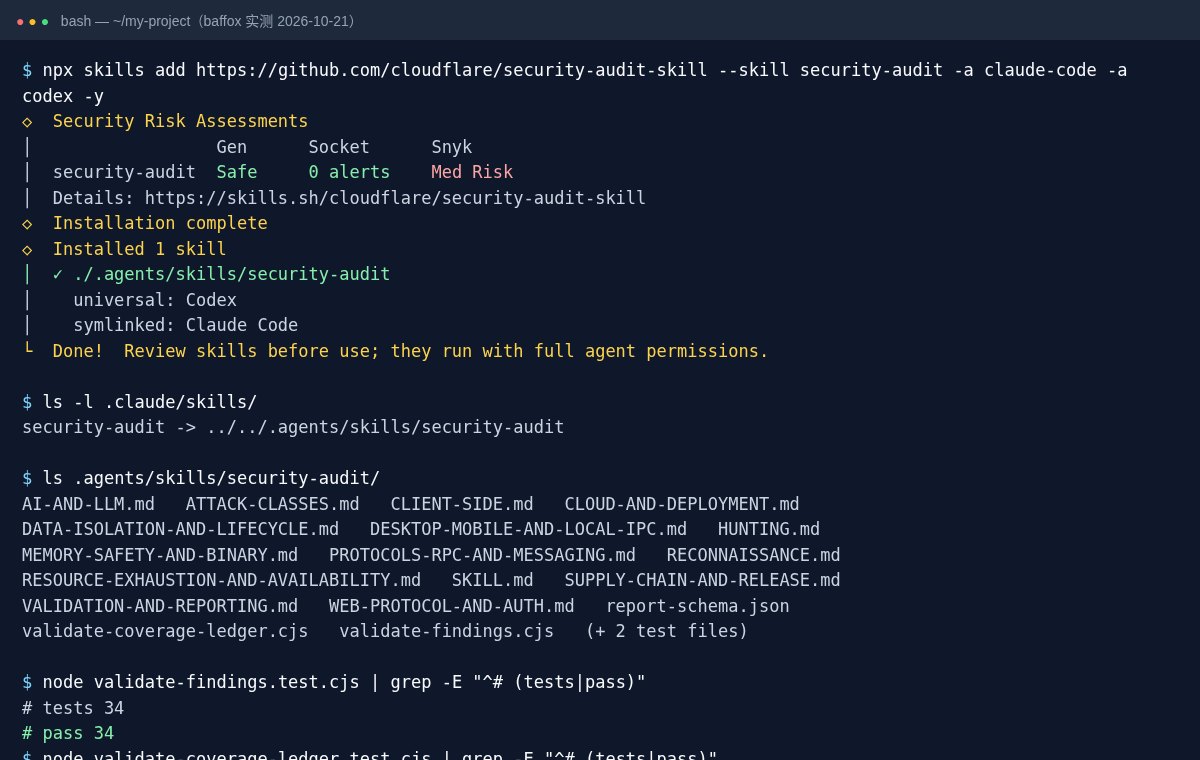
During installation, skills.sh shows security assessments from three vendors: Gen and Socket both pass it, while Snyk flags it as “Med Risk” without giving a reason on the page. A skill like this has the agent read your code and compile and run tests in a sandbox, so it carries real privileges. Spending ten minutes reading SKILL.md before you install is a good habit, and the CLI itself ends with a reminder that skills run with the agent’s full permissions and should be reviewed before use.
We also ran its bundled tests: all 34 for validate-findings and all 31 for validate-coverage-ledger passed. These two scripts are what the audit uses to check that the report format and the “coverage ledger” are valid, and they don’t depend on any npm packages.
How to use it: two modes
Open your agent in the project you want audited and say:
security audit this codebase
Or:
find security vulnerabilities in ./src
do a security review, output to ~/audits/my-project
The skill has two modes:
- Guidance mode (default): when you ask a specific security question, such as “can this login endpoint be abused to access other accounts?” or “take a look at this upload code”, it answers using only the relevant methodology. No directories, no full pipeline.
- Full audit mode: starts only when you explicitly ask to “audit” or “pentest the whole codebase” or want “a full report”, and then it follows all six phases strictly. If your wording is ambiguous, it asks which one you want.
Full audits come in three tiers: quick (small projects or a first pass, a single round), standard (the default) and deep (large or high-risk projects). You can also give it a budget, for example “at most 30 agent calls”. If the budget is too small, it proposes narrowing the scope or switching tiers instead of quietly checking less.
What the six phases do
| Phase | What happens | Output |
|---|---|---|
| 1 Reconnaissance | Several sub-agents map the architecture, trust boundaries and every input entry point in parallel | architecture.md, coverage-ledger.json (the coverage ledger) |
| 2 Hunting | Each “hunter” is assigned one slice from the ledger (a module × an attack class), then a “coverage reviewer” looks for gaps | Candidate findings |
| 3 Validation | Each candidate goes to a brand-new validator agent whose job is to disprove it | Confirmed / needs validation / rejected |
| 4 Structured output | Findings are written to findings.json and checked with the bundled script | findings.json |
| 5 Independent review | Yet another batch of fresh agents re-checks every conclusion against the source | Corrected records |
| 6 Report | The report is generated from the reviewed records | REPORT.md, FINDINGS-DETAIL.md, NEEDS-VALIDATION.md |
Every result ends up in one of three states: confirmed (a complete source path and an observed outcome; only these get a severity), needs_validation (a concrete suspicion missing one key fact, such as a production gateway config that isn’t in the repo; no severity), or rejected (disproved). Each confirmed issue comes with a “minimal effective fix”, but the skill only describes the change; it never touches your code.
Two principles in this workflow are worth borrowing: the agent that finds an issue is never the one that validates it, and a missing “best practice” is not a vulnerability: a finding has to spell out who, through which input, crossed which boundary, with what consequence. That’s exactly the cure for the most common problems with AI security reviews: a pile of generic advice like “consider adding a CSP header”, or an agent that changes the code and then “discovers” a bug.
Four things to know before you run it
1. One run finds only part of the problems. Cloudflare’s blog is blunt about it: a single run finds roughly half of what multiple runs find in total, and mostly the easier ones. Repeat runs read the previous ledger and results and focus on what wasn’t covered, so for important projects, run it a second and third time a few days apart.
2. Running code requires a sandbox. The skill requires that compiling, running tests or starting services happen inside an OS-level sandbox: no outbound network, a clean environment, read-only source, and limits on CPU, memory and time. If that isn’t available, it won’t execute anything and instead marks issues that need a run to confirm as needs_validation. The easy approach is to put a copy of the code in a Docker container or VM and audit that.
3. Move your secrets out first. The audit has the agent read the entire repo, so replace real API keys and database passwords in .env and config files with dummy values beforehand. If a key has already leaked, our API key leak checklist (in Chinese) walks through revoking keys, checking bills and setting spending caps provider by provider.
4. It takes real time and money. The full system Cloudflare later built from this skill takes three to four hours to scan a repo of about 30,000 lines, and its slowest run took more than 14 hours. The standalone skill won’t be that extreme on a personal project, but for your first try use the quick tier and audit only ./src or a single module to gauge the results and the usage.
Who it’s for
- Good fit: indie developers about to launch a website, SaaS or app backend they built with AI; freelancers who want to self-check before handing code to a client; developers who want to learn how AI-driven security audits are structured.
- Not a great fit: people who only have a live URL and no source code (it doesn’t do black-box scanning); anyone who wants results in minutes for almost no tokens; codebases full of production secrets that are hard to clean out.
It belongs to the agent skill pack category. For an earlier example of a skill that plugs into Claude Code, see Claudemy, and for shared memory across coding agents, see ai-memory.
Project info
- Name: security-audit (repo cloudflare/security-audit-skill)
- Developer: Cloudflare’s security team
- License: MIT
- Released: June 18, 2026 (open-sourced alongside a Cloudflare blog post); last updated September 14
- Stars: about 34,000 (October 21, 2026)
- Contents: 15 Markdown methodology docs + report-schema.json + 2 Node.js validator scripts (with tests)
- Install:
npx skills add https://github.com/cloudflare/security-audit-skill --skill security-audit - Requirements: a coding agent with tool calls and parallel sub-agents, plus Node.js; executing target code requires an OS-level sandbox
Sources
- cloudflare/security-audit-skill repo and README, SKILL.md
- Cloudflare blog: Build your own vulnerability harness (June 18, 2026)
- security-audit on skills.sh (install count and security assessments)


