


Evernote keeps getting heavier and its free plan keeps getting stricter. Obsidian is great, but syncing across devices means either paying or tinkering. What a lot of people actually want is simple: a notebook you can open and type into, that syncs between phone and computer in seconds, with the data in your own hands. EdgeEver is an open-source knowledge base built for exactly that. It keeps the classic three-pane layout (notebooks · note list · editor) and can run for free on Cloudflare’s free tier, or be installed with Docker on your own VPS, NAS or home server.
The project went open source at the end of June 2026 under AGPL-3.0 and had about 2,400 GitHub stars at the time of writing. It ships updates at a furious pace: between October 19 and 21 it went from v1.124 all the way to v2.0.3, released early on October 21 (Beijing time). We logged into the official no-signup demo, clicked through the main features, and checked the deployment steps against the repo docs and Cloudflare’s official free-tier limits. Researched on October 21, 2026.
The short version: who it’s for
| Your situation | Our take |
|---|---|
| Long-time Evernote user tired of the bloat who wants your data back | Worth trying; there’s an official Evernote (.enex) migration script |
| Obsidian user whose only problem is multi-device sync | Worth a look. EdgeEver has sync built in, but it isn’t a local folder of Markdown files and its plugin ecosystem is far smaller |
| Just want to jot things down and never touch deployment | Play with the demo first; for long-term use you’ll need to click through the Cloudflare setup at least once |
| You have a NAS, VPS or home server | The easiest route: one-command Docker install with automatic daily updates |
| Company data or strict compliance requirements | Self-host with HTTPS and regular backups, and never store anything in the public demo |
Spend five minutes in the demo first
Open demo.edgeever.org. The login form is pre-filled with a demo account, so just click to enter. The demo resets every day at 3:00 a.m. Beijing time (19:00 UTC), so don’t store anything private in it.
After clicking around, what stood out most is that it does a lot more than plain text:
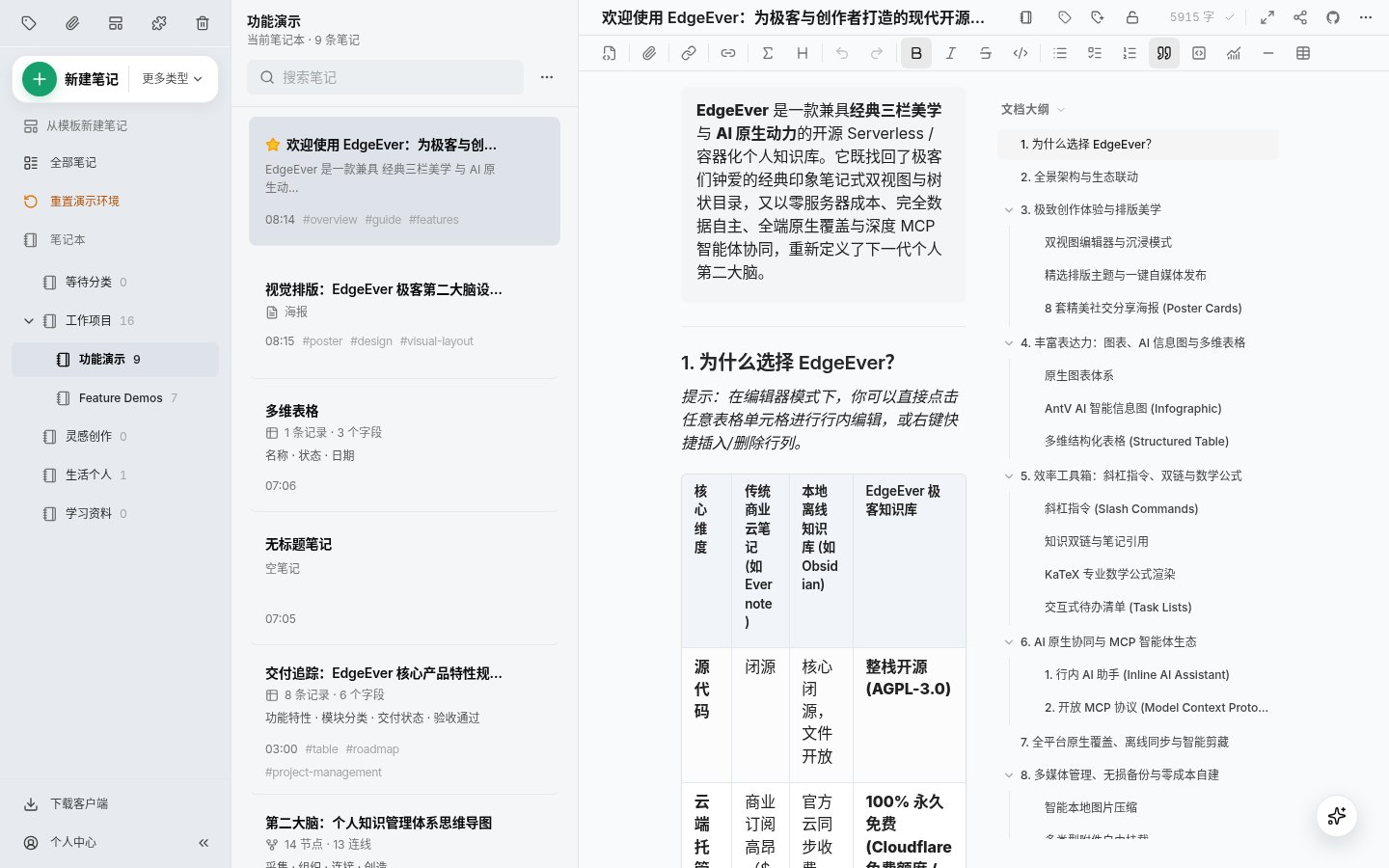
- Regular notes: switch between a WYSIWYG rich-text view and Markdown, with code highlighting, math formulas, task lists and version history, plus an auto-generated outline on the right.
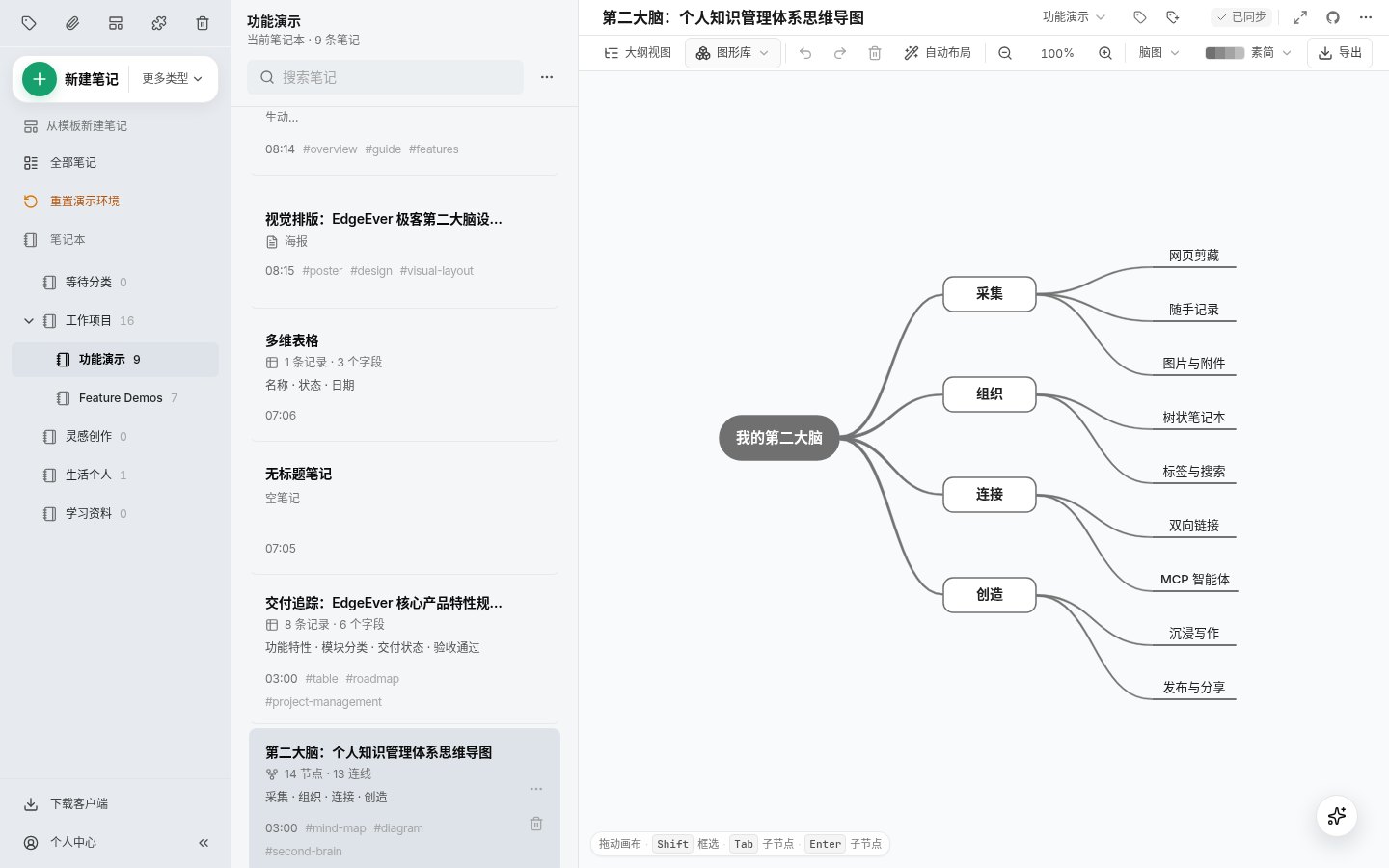
- Diagram notes: mind maps, flowcharts and architecture diagrams are their own note type, and you can drag and edit nodes directly without opening a separate tool like XMind.
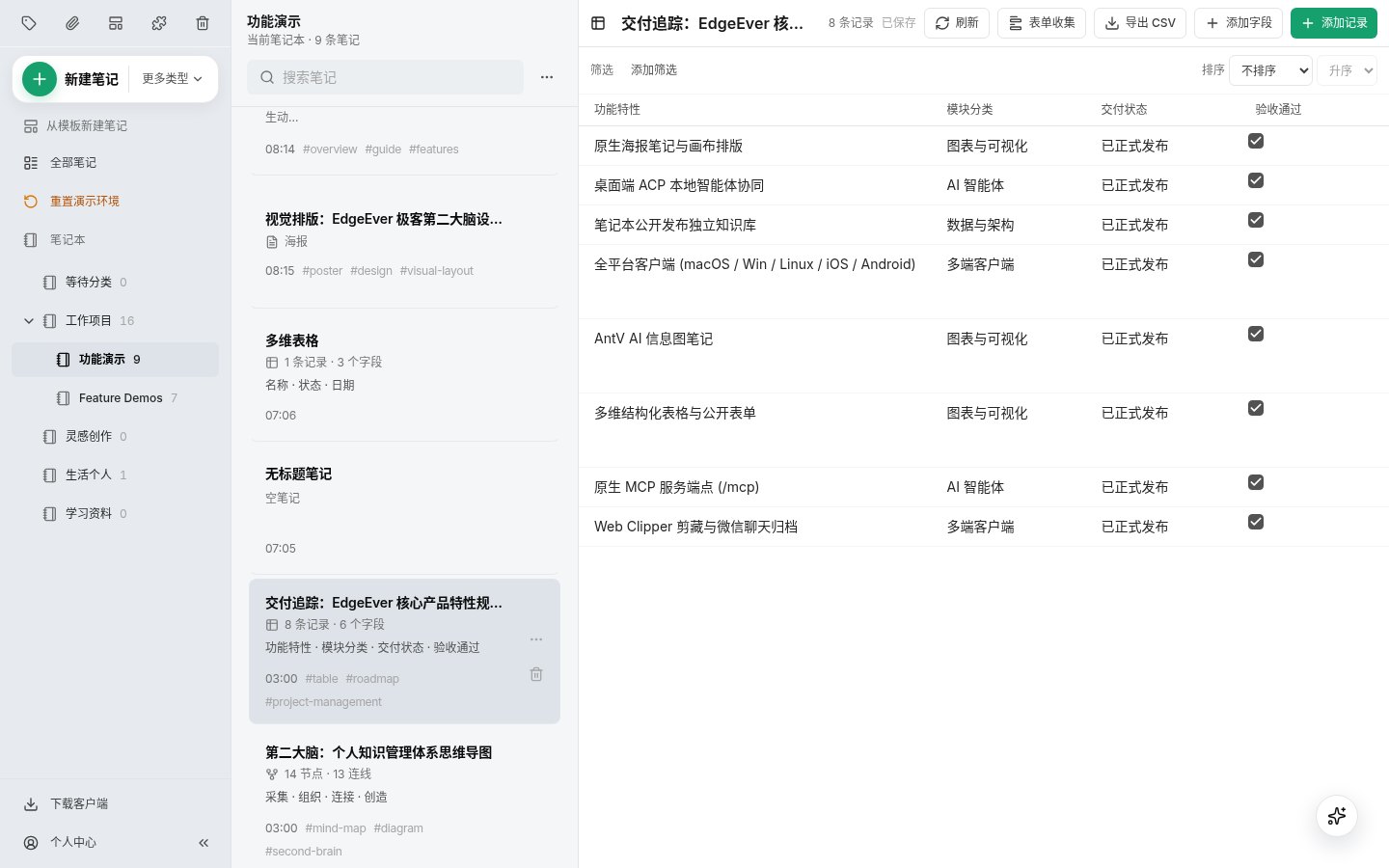
- Database tables: a simplified take on Airtable-style tables (in China the reference point is Feishu/Lark Base). AI can generate the fields from one sentence, and you can create a public form that collects entries without login.
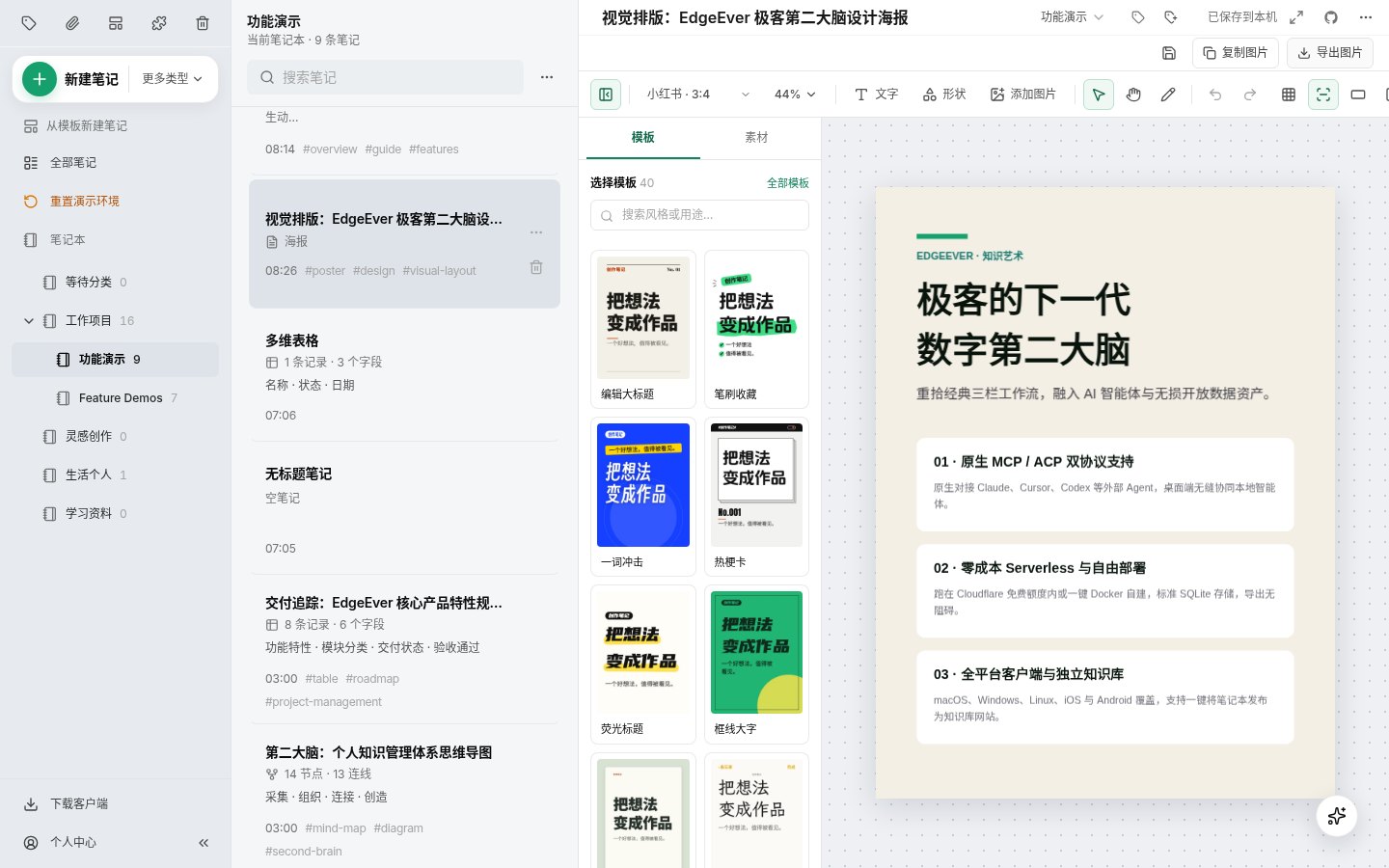
- Poster notes: lay out a piece of content as a vertical poster or card, handy for social media images. There’s also a one-click formatter for WeChat Official Account articles, which matters mainly if you publish on WeChat.
Two more practical features: browser clipper extensions (Chrome, Edge, Firefox) with structured clipping for more than 20 platforms, including X and GitHub as well as major Chinese sites such as Xiaohongshu, Zhihu, WeChat articles and Bilibili. On mobile, you can save articles and images straight from the system share sheet.
Three ways to deploy, and how to choose
All EdgeEver clients (Windows, macOS, Linux, iOS, Android) connect to an “instance”: at login you enter the instance URL, username and password. So before you can really start using it, you need an instance of your own. Pick one of the three options below.
| Cloudflare free tier | Self-hosted with Docker | Demo only | |
|---|---|---|---|
| Cost | $0, but enabling R2 requires a card or PayPal on file | Whatever your VPS or NAS costs | $0 |
| Difficulty | Six steps in the web dashboard, or hand the official prompt to an AI agent | One command | None |
| Capacity | Official estimate: about 150,000 short notes + 50,000 images | Limited by your disk | Wiped daily |
| Reachability | Fine in most of the world; the default workers.dev domain is unreliable in mainland China, so bind your own domain | Depends on where your server is | OK |
| Best for | No server and want to use it long-term for free | You have a NAS, home server or VPS | Just looking |
Option 1: Cloudflare’s free tier (no server)
The program runs on Workers, the database is D1 and attachments and images are stored in R2. According to Cloudflare’s official pricing pages (checked October 21, 2026), the free tier includes 100,000 Workers requests per day, 5 GB of total D1 storage and 10 GB of R2 storage per month, which is more than enough for personal notes.
Manual deployment takes roughly six steps (full parameters are in the repo’s deploy-cloudflare-button doc):
- Fork
tianma-if/edgeeveron GitHub. - In the Cloudflare dashboard, create a D1 database named
edgeeverand an R2 bucket namededgeever-resources(the names must match exactly). - Under Workers & Pages, create a Worker named
edgeeverfrom themainbranch of your fork, keep the default deploy command, and make sure the API token it uses has D1 read/write permission. - Add a runtime secret
EDGE_EVER_AUTH_PASSWORDto the Worker as the admin password (the docs recommend at least 32 characters). The default username isadmin. - Rebuild, then visit
your-url/api/health; a 200 response means it’s working. It’s normal for the very first build to fail because no password was set yet. - On your fork’s Actions page, enable workflows and run
Update deployed EdgeEveronce manually. From then on, stable releases sync over automatically.
If you’d rather not click through it, the README includes a ready-made prompt you can paste into an agent like Claude Code or Codex so it walks you through each authorization step.
Two caveats: R2 is free, but you have to activate an R2 subscription and add a payment method first (Cloudflare accepts major cards and PayPal). And if you or the people you share with are in mainland China, the default *.workers.dev domain is often unreachable there, so bind your own domain under the Worker’s Settings → Domains & Routes.
Option 2: Docker on a VPS or NAS
You need Docker Engine 24+ and Compose v2 on amd64 or arm64 Linux with kernel 5.6 or newer. One command:
curl -fsSL https://edgeever.org/install.sh | bash
The script creates the config in ~/edgeever, generates an admin password, pulls the official image from GHCR and starts it on port 8787 by default. Useful flags:
# Use a different port if 8787 is taken, e.g. 8790
curl -fsSL https://edgeever.org/install.sh | bash -s -- --port 8790
# Pin a version and disable auto-updates
curl -fsSL https://edgeever.org/install.sh | bash -s -- --version v2.0.3 --no-auto-update
A few details worth knowing:
- The install script adds an entry to the current user’s crontab that auto-updates every day at 04:17 (server time), logging to
~/edgeever/update.log. For production, the docs recommend pinning a version with--versioninstead of trackinglatest. - All data lives in the container’s
/data: the SQLite database, the encryption key fileedgeever-secrets.jsonand the attachments directory. To back up, rundocker compose stop edgeeverfirst, then copy the whole volume. - If the instance needs to be reachable from the internet, put an HTTPS reverse proxy such as Caddy or Nginx in front of it. Don’t expose port 8787 directly.
Running several self-hosted services at home? Adding an uptime monitor such as Uptime Kuma, so you get an alert when something goes down, is a good companion.
Option 3: Demo only
Only for trying it out: it resets daily, and anyone can see what’s in it.
Moving from Evernote, flomo or Notion
The repo’s docs folder has migration guides for Evernote, flomo, Memos and Notion. For Evernote: export your notebooks as .enex files, then import them through the MCP interface with the official import-evernote-enex-via-mcp.mjs script (requires Bun), or hand the guide to an AI agent and let it run the import for you.
For getting data out, EdgeEver can export a ZIP at any time under Profile → Import & Export. Unzip it and the notes/ folder contains plain Markdown files plus attachments that you can read without EdgeEver, which is more reassuring than many cloud note apps.
AI integration: MCP lets agents read and write your notes
Create a token under Profile → API / MCP and you can copy a remote MCP config. Add it to Claude Code, Cursor or similar tools, and the agent can search, create and edit your notes, mind maps and tables within the scope you grant. The editor also has an AI sidebar for summarizing, translating and polishing, using your own API key (OpenAI-, Anthropic- and Gemini-compatible protocols are supported).
All of this is optional; it works perfectly well as a plain notebook without any AI.
Things to know before you commit
- The Windows installer isn’t code-signed, so SmartScreen or antivirus software may block it. Only download from the official GitHub Releases. The Linux AppImage is also a preview build.
- The iOS app isn’t available in the mainland China App Store; elsewhere you can get it normally. Android is available on Google Play or as an APK.
- The release pace cuts both ways: features land fast, but a project that ships five versions in two days deserves regular ZIP backups if you rely on it.
- AGPL-3.0 doesn’t affect personal use. If you modify the code and offer it to others as an online service, the license requires you to publish your modified source.
- It’s maintained by an individual and the community and has nothing to do with Evernote the company.
Looking for other open-source note apps? AppFlowy and AFFiNE lean toward Notion, while EdgeEver feels more like an open-source Evernote.
Project info
- Name: EdgeEver
- Repo: github.com/tianma-if/edgeever
- License: AGPL-3.0
- Version: v2.0.3 (October 21, 2026, Beijing time)
- Stars: about 2,400 (October 21, 2026)
- Clients: Web/PWA, Windows x64, macOS (Apple silicon and Intel), Linux AppImage, iOS, Android; browser clipper for Chrome, Edge and Firefox
- Deployment: Cloudflare Workers + D1 + R2, or Docker (SQLite, with attachments stored locally or in S3-compatible storage)
- Live demo: demo.edgeever.org
Sources
- EdgeEver README, Docker deployment doc, Cloudflare deployment doc, Windows preview notes (docs in Chinese)
- EdgeEver Releases
- Cloudflare official pricing: Workers, D1, R2


