


On a Mac you drag an app to Trash, then months later “About This Mac” still feels wrong: containers, caches, login items and website data linger, and background services keep trying to launch software you already deleted. Full-suite cleaners are noisy, feature-heavy, and often want a network connection.
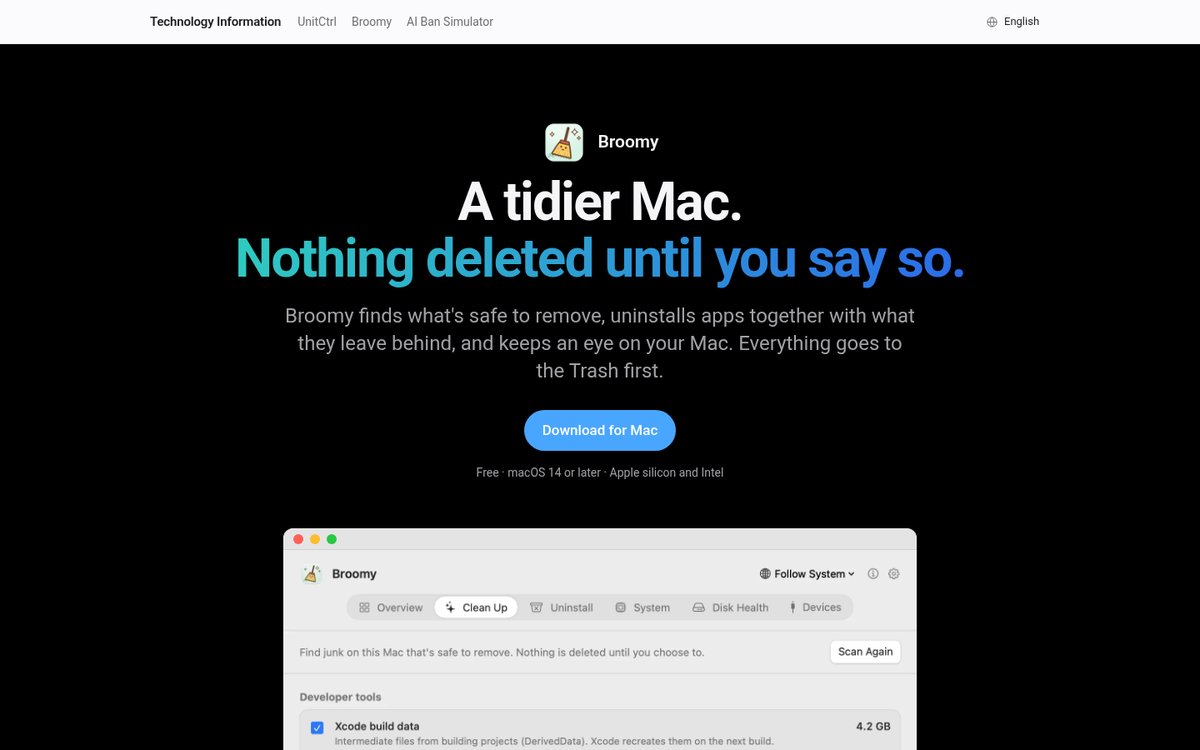
Broomy (Chinese product name 小扫帚, “little broom”) aims narrower and more honestly: free, no ads, and the author claims no network code at all. When you uninstall an app it lists leftovers with sizes and sends them to Trash with the app; it also cleans developer caches and shows system / disk health. Site: techinfo-apps.github.io/broomy; packages on GitHub Releases. Researched October 24, 2026.
At a glance
| Item | Details |
|---|---|
| Type | macOS desktop cleaner / uninstaller |
| Version | 1.0 (first release October 21, 2026; still latest when checked) |
| Price | Free forever — no ads, no subscription |
| Platform | macOS 14+, Apple silicon and Intel |
| Website | techinfo-apps.github.io/broomy |
| Download | Releases · Broomy-1.0.dmg (SHA-256 on the page) |
| Source | GitHub marks the repo Downloads only; README says source is not public — treat as free closed-source, not an “open-source cleaner” |
| UI languages | Nine, including Simplified Chinese |
| Notarization | Not Apple-notarized yet; first open needs right-click Open / “Open Anyway” |
Stars were about 5 when checked — very new. Features follow the site and Release notes.
What it actually does
The UI is one screen per job — swipe or press ⌘1…⌘6: Overview, Clean Up, Uninstall, System, Disk Health, Peripherals.
Uninstall: app and leftovers leave together
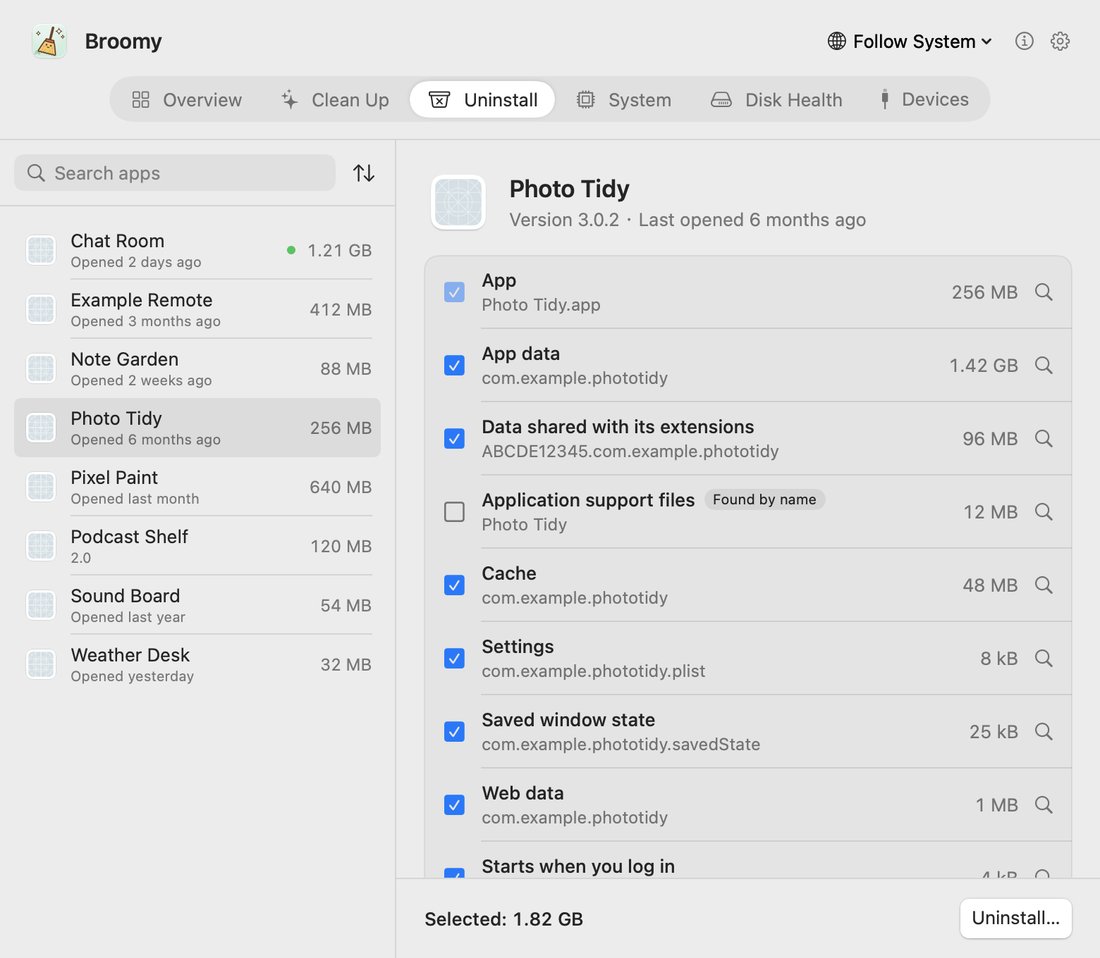
After you pick an app, Broomy matches related files by app identity (including internal helpers) and lists:
- Containers, caches, preferences, Application Support
- Saved window state, website data, login items
- Each row with a size; by default they go to Trash with the app
Conservative rules are explicit:
- Folders that only share a similar name are listed but unchecked by default;
- Built-in Apple apps are not listed;
- Running apps must be quit first;
- Files shared with other apps are left alone;
- If the app bundle itself cannot be moved, nothing else is moved either.
Clean Up: developer caches and leftovers from deleted apps
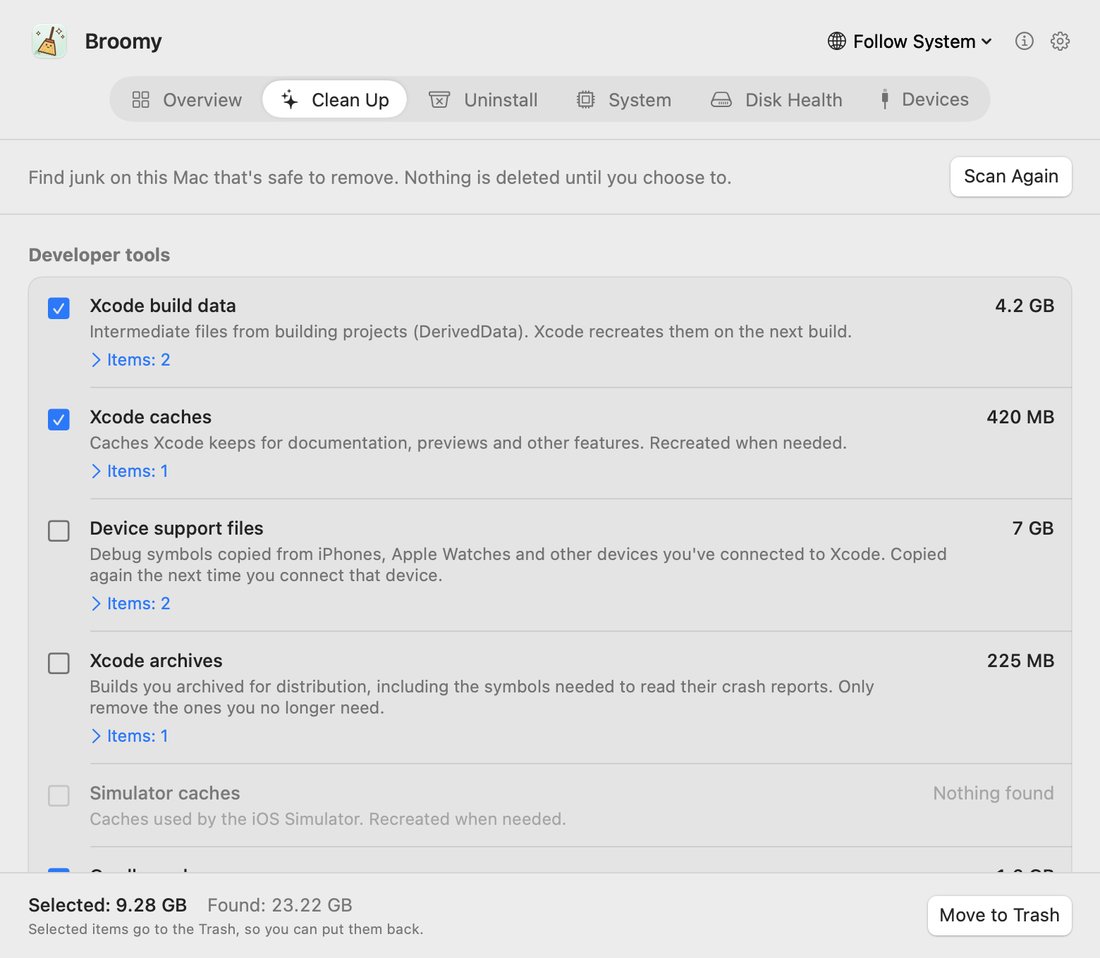
The Clean Up page scans:
- Developer tools: Xcode DerivedData / caches / device support / Archives / simulators; Gradle and Homebrew downloads; pip / npm / pnpm / Yarn / Bun / CocoaPods / SPM / Go / Cargo caches; plus
node_modules,.build,target,distand similar inside projects untouched for 30 days that sit next to markers likepackage.json/Cargo.toml(git-tracked items stay; these “look again” rows are unchecked by default). - App caches and logs; installers on Desktop / Downloads;
- Login items and background services left by apps you already deleted (system-directory cleanup uses the OS password prompt).
Everything goes to Trash first so you can restore before emptying.
System, disk health, peripherals
- System: per-core CPU, memory and pressure, boot-disk free space, temperature and fans;
- Disk health: built-in SSD bytes written, wear, error counts, plus ~30-day write / usage trends;
- Peripherals: display brightness and volume (including external DDC), with reasons when it cannot control them; also sound output, mouse scroll, external disks and USB/Thunderbolt devices.
The menu bar can optionally show reclaimable size or CPU temperature, plus one-click brightness / volume.
How it divides work with Cleanzo and Mole
We recently covered Cleanzo: it focuses on Crashpad crash dumps and Claude Code / Codex caches plus AI skills. Broomy barely touches that line:
| Broomy | Cleanzo | |
|---|---|---|
| Uninstall leftovers | Strong (containers / caches / login items by identity) | Has app uninstall, but that is not the selling point |
| Crashpad / AI caches | Not the focus | The focus |
| General developer caches | Very full (Xcode / Homebrew / npm, …) | Also has skills and space analysis |
| Network | No network code claimed | Read its privacy notes |
| Source | Not public | MIT open source |
| Platform | macOS 14+ (Intel + Apple) | Official builds lean Apple silicon; also has Windows |
If Windows is your main machine and you need C: cleanup plus uninstall leftovers, see Mole for Windows (no EN version yet). Three machines can split the jobs: Windows → Mole; Mac Crashpad / AI → Cleanzo; day-to-day uninstall + developer caches → Broomy.
Why the first open is blocked
The author still refuses notarization (as of our check). macOS blocks un-notarized apps:
- macOS 14: right-click Broomy → Open → Open;
- macOS 15 and later: try to open once, then System Settings → Privacy & Security → Open Anyway.
Download only from the official site or Releases and verify the SHA-256 on the page. It will also ask for Desktop & Downloads (to find installers and some leftovers) and Accessibility (brightness on the peripherals page) — the site FAQ explains; grant only what you need.
Privacy and safety boundaries
- No network: author claims zero network code; historical write stats stay on device.
- Does not touch external-disk contents and does not show serial numbers.
- Deletes go to Trash first — restore before emptying.
- Source is closed, so you cannot audit it like an MIT project; trust rests on “local, offline, Trash-first” plus SHA-256. Sensitive environments should still prefer auditable open-source tools.
Who it is for (and who should skip)
| Your situation | Our take |
|---|---|
| macOS 14+, tired of “drag to Trash but leftovers remain” | A strong fit |
| Local Xcode / Homebrew / Node caches to clear; do not want a suite that phones home | A good fit |
| Still on macOS 13 or older | No |
| Main pain is Codex Crashpad or Claude Code chat caches | Use Cleanzo instead |
| You must audit source before installing | Skip — closed source |
| You need a Windows build | None yet |
Download: latest Release. Features and package size follow the October 24, 2026 site and Release body; if notarization status changes later, trust the official notes.


