


C: suddenly turns red, and sorting by size in File Explorer is slow and wrong? WizTree reads the NTFS MFT (Master File Table) directly, scans a whole drive in seconds, then spreads the space hogs out in a treemap. Site diskanalyzer.com (Antibody Software). Researched October 28, 2026.
At a glance
| Item | Details |
|---|---|
| Type | Disk space analyzer (treemap / large files / duplicates) |
| Version | Windows 4.33 (2026-09-16); also WizTreeMac 1.00 (macOS 12+) |
| License | Free for personal use; commercial use needs a Supporter Code (Donate/Buy on the site) |
| Platform | Windows XP–11 / Server; also a universal macOS build |
| Price | Personal free; Individual Supporter about $25 USD when checked (upgrades for versions within one year; the license itself does not expire monthly); enterprise tiers separate |
| Site | diskanalyzer.com (do not download from mirror / fake sites) |
| Install | Site installer / portable; or winget install -e --id AntibodySoftware.WizTree |
Why it is fast, and how to read the space
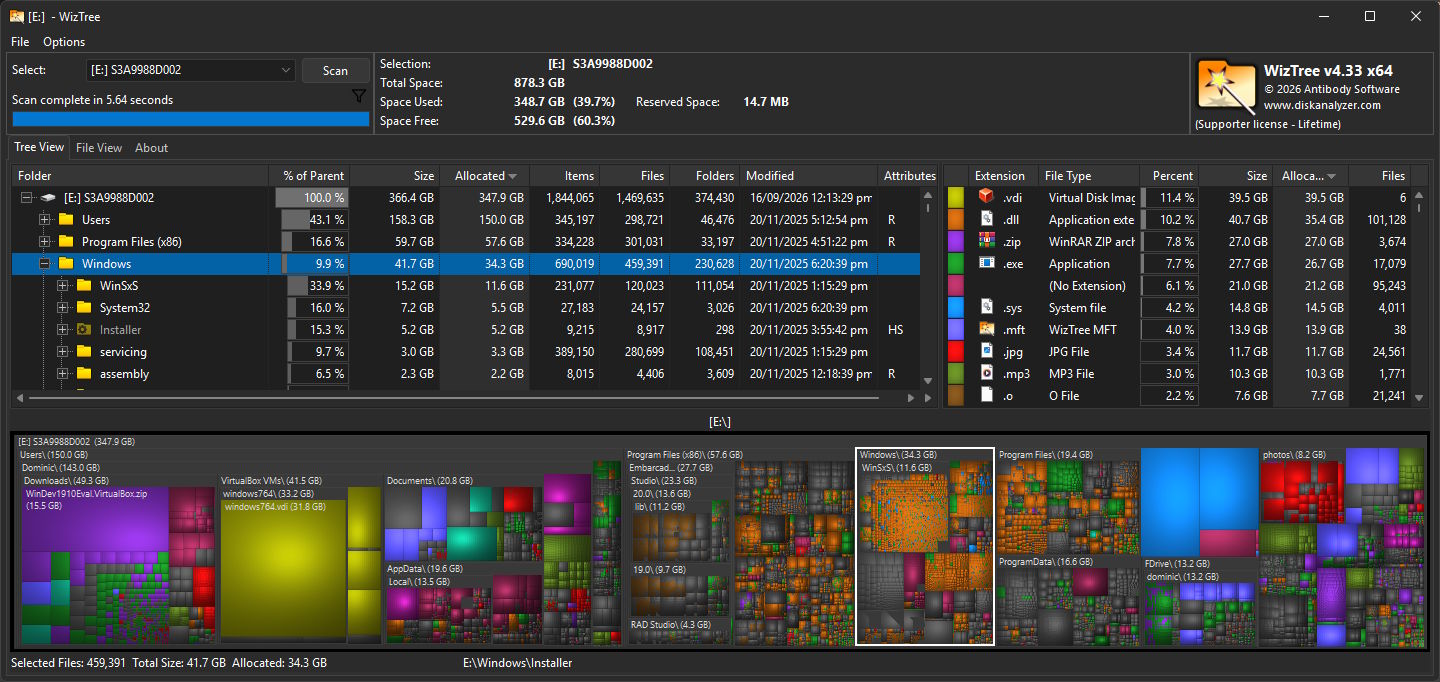
On NTFS volumes, WizTree does not walk folders one by one — like Everything, it reads the on-disk MFT, so large drives often finish in a few seconds. Non-NTFS and network shares can be scanned too, just usually not as dramatically fast. Site copy claims “about 46× faster than WinDirStat” — real numbers vary with disk speed and cache, but the order-of-magnitude gap is a common feel.
- Treemap: bigger color blocks = more space; lock onto video caches, installers, old VM images at a glance.
- Largest files list: sort by size — good for deleting obvious big files first.
- Duplicates: help find spare copies (verify before delete).
- CSV export: take results out for reports or scripts.
- Hard links: official note — hard links are not double-counted, so totals feel closer to the system’s “allocated” view.
How it sits next to other clean / find tools on this site
| Need | Better fit |
|---|---|
| Instant search by filename, size does not matter | Everything |
| All-in-one clean / uninstall leftovers, glance at the disk | Mole (EN pending) |
| Microsoft’s official utilities pack | PowerToys (EN pending) |
| What to install on a new PC | 2026 Windows essentials (EN pending) |
| Focus on “who ate the disk” with a visual map | WizTree |
Everything answers “I know the name, find it”; WizTree answers “I don’t know the name, but I know it is huge.” Complementary, not either/or.
Download, license, safety
Download only from diskanalyzer.com/download (or the official winget ID). Fake domains and bundled installers show up in search ads — do not click them for convenience.
Personal use is free; company machines need a site Supporter Code (Individual about $25 USD when checked, priced by seats/sites; PayPal / Stripe / AliPay). Buying a code removes the donate button and covers versions released within one year of purchase.
Think before delete: system folders, pagefile, and restore-related paths also look huge in the treemap — if you are unsure what they are, do not delete. Confirm user downloads, caches, and installers first.
Good fit: Windows drive full and you need large files fast; like treemaps; personal PC and no desire for a cleaner subscription.
Skip for now: must have fully open-source auditable core (WizTree itself is not open source); macOS-only and not ready for the new WizTreeMac; only want a “safe whitelist” cleaner that deletes for you — prefer a rule-based cleaner.
Download: diskanalyzer.com/download. Version and license follow the October 28, 2026 site check.


