


If you need to stitch several chat screenshots, or screenshots of a page you scrolled, into one long image to send to someone, a typical online tool either watermarks the result or uploads the pictures to someone else’s server. On November 20, 2026, in desktop Chrome, we opened the Chinese page of QuoteStitch. We did not create an account. We stitched four homemade, fictional “chat log” scrolling screenshots. Each image is labeled “PINE HALL CHAT (fictional)” with line numbers L01 through L23; neighboring images overlap by three lines; the content is all fake, and we did not use anyone’s real chat. We exported PNGs with auto strip, with the strip sliders adjusted by hand, and with “full frames,” then checked the file sizes, looked for a watermark, and verified whether those line numbers were still there.
The Chinese page title is “截图拼接 — 多张截图拼成一张长图” (“Screenshot stitcher — stitch several screenshots into one long image”), and the page language is zh-CN. The English version is at the site root, quotestitch.app, with the title “Screenshot Stitcher — Stitch Screenshots into One Long Image.” A path of /en/ returned 404, so do not add /en out of habit. When the Chinese page opened, there was no login wall, and we did not see a paid entry or a listed price. On-page tags said no sign-up, no watermark, stays on this device, can work offline, and supports video. At the bottom there was a Google Analytics consent bar, which said that whether you agree or not, the images will not leave the device; the buttons were “不用了” (No thanks) and “允许统计” (Allow analytics). We clicked No thanks. On the page we could see Auto strip / Full frames, start and height sliders for the detected strip, re-run auto detection, spacing, output width (original / 720 / 1080 / 1440 px), export at 1x (fastest) / 2x (high quality), an optional timestamp, Sort by filename, Clear all, and Download PNG. The drop zone said you can drag files in, choose files, or paste with a shortcut, in PNG, JPG, WEBP, and MP4, MOV, or WEBM.
Who it is for, and how we tested it
It is a good fit if you already have a set of scrolling screenshots and want to stitch them into one long image in the browser, without signing up first or accepting a watermark. It is not the operating system’s own scrolling screenshot, and it will not stitch a PDF page by page. If what you care about is “the image is processed in this computer’s browser, without being sent to someone else’s server,” a related but different approach is keeplocal, which strips location data from photos. Stitching on an iPhone with Shortcuts is a different path from this web tool.
The test images were four fictional chat screenshots, each 720×1000: each had the same top bar and a message-input bar at the bottom, with eight bubble lines in the middle. Image 1 was L01–L08, image 2 was L06–L13, image 3 was L11–L18, and image 4 was L16–L23, so neighboring images overlapped by three lines. We imported the four images at once through the page’s hidden file picker. We did not test drag-and-drop or paste from the clipboard, and we did not test video.
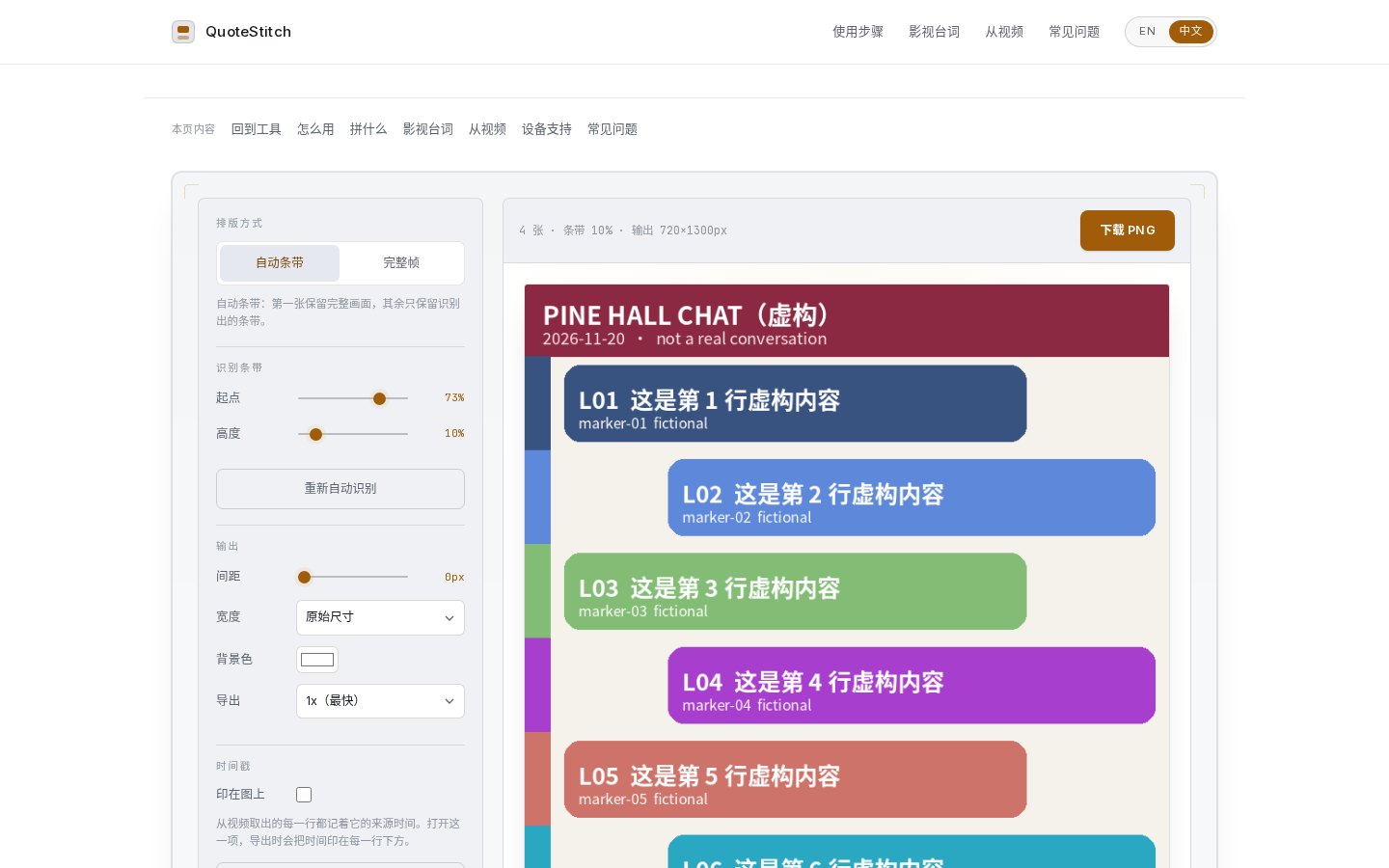
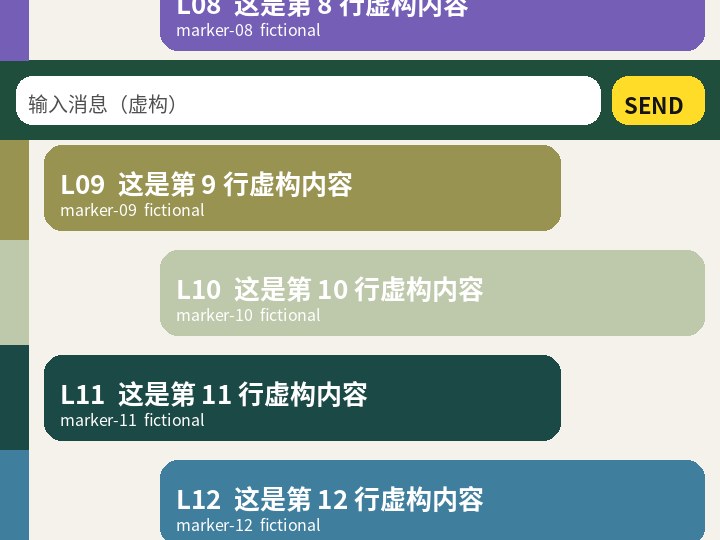
What auto strip, adjusted sliders, and full frames each produced
After import, the default was Auto strip. The explanation says the first image is kept in full, and only the detected strip is kept from the rest. This time it set the strip to a start of 73% and a height of 10%. Both the preview and the download button read “4 images · strip 10% · output 720×1300px.” After we clicked Download PNG, the browser received the file directly. The suggested filename was like quotestitch-数字.png (a number), 159,236 bytes, and the dimensions were exactly 720×1300. We opened the PNG and checked: the top was the first image in full (the top bar, L01–L08, and the “输入消息” message-input bar at the bottom), and after that only about one new line was appended. L12, L17, and L22 could be read clearly; L09–L11, L14–L16, and L19–L21 were all missing. The height of 1300 also matches: the first image is 1,000 pixels, plus about 10% (100 pixels) from each of the next three. We did not see the word QuoteStitch or any other watermark on the image.
In other words, on this set of chat screenshots — each with a top bar and an input bar, and new bubbles only in the middle — the automatically detected strip was too short. It only caught a thin band near the bottom, and it did not append every newly appeared line. Because the first image is kept in full, that first image’s input bar appears in the middle of the long image, and the later strips are appended after it. That matches the page’s note that the first frame is kept whole, but when you stitch a chat log, an input bar can end up sitting in the middle of the conversation.
We did not change the mode. We only moved the start to 40% and the height to 52% (roughly from where the overlap ends to just above the input bar). The preview immediately changed to “4 images · strip 52% · output 720×2560px.” The next exported PNG was 312,462 bytes, 720×2560. In this file, L01 through L23 were all present, with no repeated line numbers, and the top bar appeared only once. The input bar was still stuck between L08 and L09 — because the first image is still kept in full, widening the strip does not remove that bar. Again, we did not see a watermark on the image.
We then switched the same four images to Full frames. The exported PNG was 482,831 bytes, 720×4000, exactly four 1,000-pixel images stacked. The top bar and the input bar each appeared four times, and the overlapping lines L06–L08, L11–L13, and L16–L18 were also repeated. That confirms that after you turn auto strip off, the result changes with it, becoming a straight join with no cropping. If you only want several images placed end to end, this mode is more direct; it will not remove repeated top bars for you.
We also ran two comparison sets. One had almost no content overlap (three images of L01–L08, L31–L38, and L61–L68, still with the same top bar and input bar). Auto strip again kept the first image in full and appended only a thin strip from each of the others, exporting 720×1160. Only lines near the bottom, such as L34 and L64, were clearly visible; most of the new content in the middle did not come through. Another set used different widths (fictional notebook pages at 720, 800, and 640 pixels). The tool still exported one image, 800 pixels wide and 1,162 pixels tall, but the seams and the content lined up fairly poorly. When we imported the original four chat images out of order, the line numbers in the long image were also out of order; after we clicked Sort by filename, the order went back to chat-01 through chat-04, but with the default 10% strip, the missing lines were not filled in just because we sorted.
The page also has 1x / 2x and width options. The exports we actually made used the default 1x and the original width. We did try switching to 2x, but this time we did not succeed in making the exported pixels double, so 2x and the 720 / 1080 / 1440 presets are not written up here as verified results.
What we saw on the network while generating the files
The page’s description is that cropping, detection, and stitching are all done in the browser with Canvas, and the images do not leave this device. That is its statement, not an audit conclusion.
While we opened the Chinese page, declined analytics, imported images several times, and downloaded files, we did not see the pictures POSTed to a server. After we clicked No thanks, we also did not see requests to Google Analytics or googletagmanager. When the page loaded there were GETs to quotestitch.app and static.cloudflareinsights.com; during import, mode changes, slider adjustments, and several downloads, no new requests to the host appeared. The download was received directly by the browser as a PNG. We are not writing this as proof that it never goes online.
If you want to check a screenshot for information that should not be left in the file, you can look at keeplocal. If what you need to handle is text in a PDF rather than a long stitched image, you can look at AnyRedact.
Common failures and limits
- On our fictional chat screenshots, auto strip was too short (about a 73% start and a 10% height by default) and dropped a number of new lines in the middle. Before you export, check whether the line numbers in the preview are complete, and drag the start and height yourself if needed.
- “Keep the first image in full” means the first image’s bottom bar is also carried into the long image. In chat screenshots, the input bar will often appear in the middle of the conversation. Full-frames mode does not remove repeated top or bottom bars at all.
- We did not see a watermark or the site’s name in the PNG files we exported. That is only a result for these files, not a guarantee under every export setting.
- We did not test drag-and-drop, clipboard paste, a phone layout, pulling frames from video, the timestamp switch, or a real WeChat or WhatsApp chat, and we did not import dozens of images at once.
- We did not see a paid entry. For 2x and the fixed output widths, we did not obtain export files we could check.


