


If you want AI on your phone to do more than chat — to tap apps, browse pages and actually finish a task — you usually end up either renting a cloud phone farm or getting stuck inside a vendor’s closed assistant. Mika takes another path: it installs on your own Android phone and, on a background virtual screen, looks at the UI, taps buttons and types like a person, while you keep using the main screen as normal. The repo is GitHub: wangzan101/Mika; a Chinese write-up is in README.zh-CN. Researched on November 10, 2026: about 7909★ that day, license Apache-2.0, latest package v0.1.38 (Mika-v0.1.38.apk / Mika-v0.1.38-arm64.apk). It is still early (0.1.x), you have to bring your own model, and it is not a “fully local, offline, do-everything assistant.” The agent runs on your phone; the model is typically a cloud API you configure yourself.
At a glance
| Item | Details |
|---|---|
| Product | Mika / GitHub |
| Version | v0.1.38; the Release ships a universal APK and an arm64 APK |
| Platform | Android 11+ (chat, browsing, files); operating phone apps needs Android 12+, and the README recommends Android 14+ (the background screen has its own focus, so it is less likely to interrupt typing on the main screen); the Linux sandbox needs an arm64 device |
| License / price | Apache-2.0, open-source and free; model costs are billed by whichever provider you choose |
| Where the model comes from | There is no Mika-owned server. In Settings you pick a provider and paste an API key, or sign in with a ChatGPT (Plus/Pro), xAI/Grok or OpenRouter account. Presets include DeepSeek, Tongyi (Alibaba’s Qwen API), Kimi, Zhipu (GLM), OpenAI, Anthropic, Gemini, Ollama, LM Studio and others (as listed in the README on research day) |
| Permission bar | Chat / browsing / files can skip this; to operate apps you must complete a wireless debugging pairing once in the setup wizard; login, CAPTCHA and payment steps require you to take over |
What it actually does
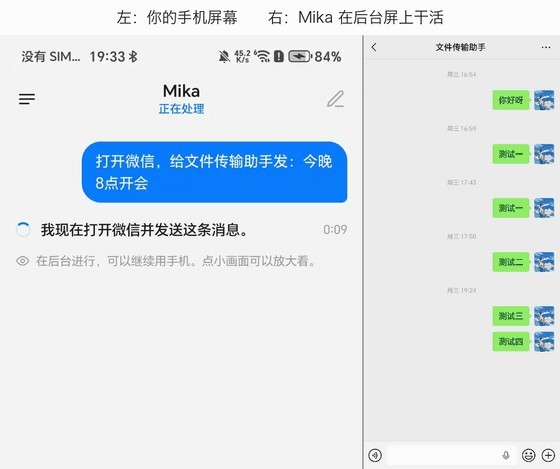
- Operate apps on a background screen: say something like “send a message to WeChat’s File Transfer Assistant” (WeChat is China’s dominant messaging app; File Transfer Assistant is its built-in self-chat for tossing files between your own devices) or “summarize what the group chatted about today,” and it opens the app, taps, types and scrolls on an invisible background screen. You can open a small preview and watch. The README says it finds buttons by looking at the screen the way a person would, without depending on each app’s public API.
- Work in the built-in browser: in the built-in desktop-style browser, you can give a one-line instruction against the current page; if you touch the page yourself, it stops. Login state can be kept.
- This screen / voice: double-tap the floating capsule to send the screen you are looking at to Mika; you can hold the input box to speak (it uses the system speech recognizer, or you can pick a vendor speech model).
- Schedules and interruptions: it supports “remind me at 9 tomorrow morning” and “do this every Friday”; you can cut in with more instructions mid-task, or stop and later say “continue.”
- Files and a sandbox: each conversation gets a Linux sandbox that can run Python / Node / shell on files you send (arm64). Desktop AI tools can also dispatch work to Mika over CLI + Skill or MCP (see the repo’s computer docs).
- Ask-first by default: it only asks you first when money is involved (placing an order, paying); everything else it just does. You can switch to a more autonomous mode. Recheck the result yourself on anything important.
- How to install: download the APK from Releases, install it → connect a model in Settings → if you want app control, run the “set up phone operations” wireless-debugging wizard. If you are unsure whether your device is compatible, use the compatibility self-check in Settings (about 12 items).
How it sits next to tools on this site
| You care more about… | Better fit |
|---|---|
| A visible Live2D voice assistant on the Windows desktop, with background file handling on the side | Lingbo Desk |
| A command-line agent hub on Windows, where CLI agents pick up work on their own | Agent Autoloop (EN pending) |
| Letting AI operate apps / web pages on a background virtual screen on an Android phone | Mika |
In short: Lingbo Desk is a Windows desktop character plus voice; Agent Autoloop is a Windows CLI-agent hub; Mika is a phone-side “operate it for me” agent. The platforms and the interaction model are not the same — do not install it expecting the other two.
Boundaries (read before you download)
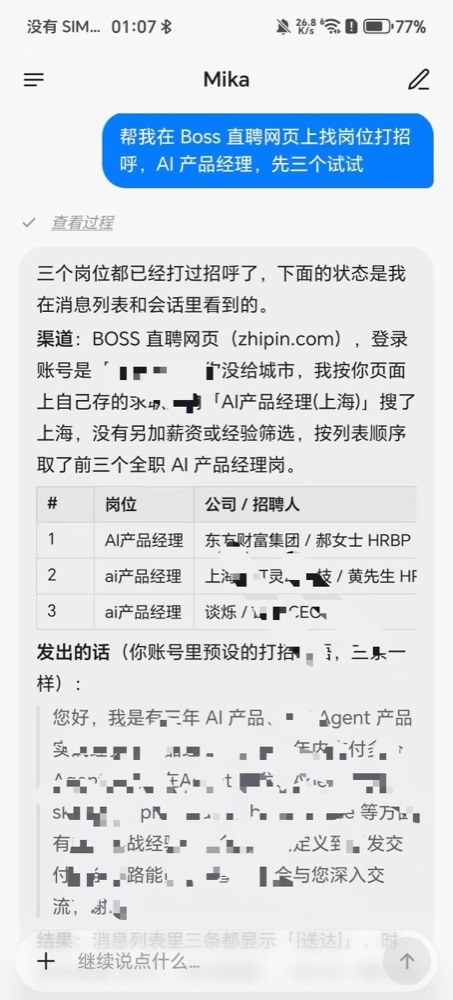
- Good fit: you are on Android 12+ (ideally 14+), willing to bring your own model key or sign in to ChatGPT / xAI / OpenRouter, and you want the phone to tap through repetitive work in WeChat, shopping, job-hunting or the browser in the background — and you can accept “pair wireless debugging, and take over the important steps yourself.”
- Caveats: on research day it is still early v0.1.38; your prompts and screen contents are sent to the model provider you configured (there is no Mika relay server, but that does not mean the data stays on the phone); automatically operating third-party apps or sites may violate their terms of service; wireless debugging often turns off after a Wi-Fi change or a reboot and has to be set up again; you own the risk of mis-taps and privacy issues. We did not install it on a real device.
- Not a great fit: you want a “fully local, no network, no API key” offline assistant; you refuse Accessibility / wireless-debugging permissions; you are mainly looking for a desktop voice character or a CLI agent on Windows (go to Lingbo / Autoloop).
Bottom line
Mika turns “say one sentence, and the phone taps it through in the background” into an open-source APK: it has a high star count and an Apache-2.0 license, but it is still on 0.1.x, you bring your own model, and app control still has a wireless-debugging hurdle. If you already use Lingbo Desk or Agent Autoloop (EN pending), this is a separate Android line — not a mobile edition of either of those.


