


Anyone who has installed Internet Download Manager (IDM) probably remembers the nag screen after the trial ends, and the simple fact that staying on it means paying. Mister Download Manager (MDM) is an open-source download manager written from scratch in Rust, aimed at being a free, ad-free, no-signup IDM alternative: multi-connection downloads, browser handoff, Torrent/magnet support, and in-page video capture. The repo is GitHub: anefzaoui/misterdownloadmanager. Researched on November 10, 2026: about 3980★ that day, license GPL-3.0, latest official package v0.5.2 (released 2026-11-09). The speed figures below come from the project’s own benchmarks, not from tests on this site; we did not install or run it ourselves.
At a glance
| Item | Details |
|---|---|
| Product | Mister Download Manager (MDM) / GitHub repository |
| Version | v0.5.2 (2026-11-09). Windows: MisterDownloadManager-0.5.2-setup.exe (~16.3 MB), …-portable.zip, …-x64.zip; Linux: …-linux-x86_64.AppImage / .deb / .rpm / .tar.gz; macOS: …-macos-arm64-experimental.dmg, …-macos-x86_64-experimental.dmg (filenames marked experimental); plus Chromium / Firefox extension packs and a zip for the Chrome Web Store |
| Platform | Windows 10/11; Linux (the README says it has been tried on Ubuntu 24.04, Debian 12, Fedora and others, with GNOME/KDE/Xfce/Cinnamon, X11 and Wayland); macOS (Apple silicon / Intel) ships as experimental builds — the author notes they have not fully tried it on a Mac themselves |
| License / price | GPL-3.0, free; the README stresses no ads, no trial and no registration |
| Languages | 86 UI languages (including Simplified and Traditional Chinese); you can choose on first launch, then change it later under View → Language |
| Browser integration | Firefox extension and a Chrome Web Store extension (also usable in Edge / Brave / Opera / Vivaldi); the experimental macOS packages also include a Safari extension path (unsigned-extension allowances and other caveats are in the official docs) |
What it actually does
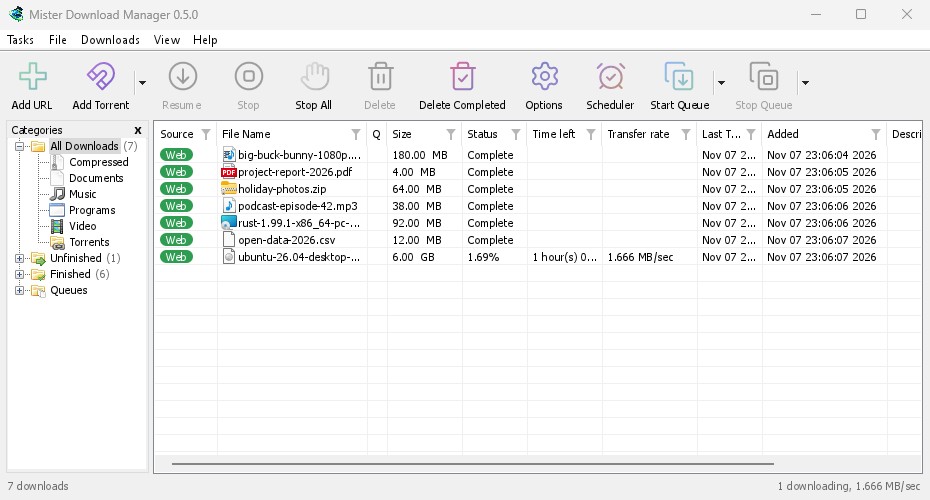
- Multi-connection downloads, queues and scheduling: the main window is deliberately laid out like a familiar downloader — categories on the left, a toolbar, a download list and a progress pane. You can add a URL, add in bulk, queue jobs, cap speed and use a scheduler; closing the main window can drop it to the tray so transfers keep going.
- Torrent / magnet: the toolbar has “Add Torrent”; the installer can optionally associate
.torrentfiles and magnet links with MDM; seeding-related features are available as of the current UI and docs. - Browser download handoff: after you install the extension, clicking a download link can hand the URL, Referer, cookies and User-Agent to MDM, so files behind a logged-in session can keep downloading. You can auto-handoff by file type or exclude certain sites; small files can be left to the browser.
- In-page video button: the extension can show a “Download video” (or similar) button on a video; under the hood it uses the project’s bundled yt-dlp (plus helpers such as ffmpeg, which may download about 100 MB in the background the first time). This is “web media grabbing,” and it overlaps with Awesome Downloader (EN pending) on this site, which sniffs webpage video inside the browser. MDM is first and foremost a general download manager (large files, installers, ISOs, model weights and so on), not a video-only tool. Only download content you have the right to obtain; do not expect it to “crack” copyrighted sites, paywalls or DRM.
- Speed figures from the project’s own write-up (versus IDM 6.42, same machine, same file, default settings): a 1 GB large file about 1 second vs 5.5 seconds (about 5×); small files about instant vs 3.1 seconds; an unstable network about 1.6 seconds vs 5.4 seconds. These are all the project’s own benchmarks. Different environments and routes will change the result; do not treat them as measurements from this site.
- How to install: on Windows, pick
setup.exeif you are unsure (it can also set up browser integration); use the portable / x64 zip if you want no installer. On Linux, choose deb/rpm/AppImage for your distro. On macOS, drag it into Applications; the experimental build may need a right-click Open the first time. Windows packages are not code-signed yet, so SmartScreen may say “Windows protected your PC” — use your own judgment, then More info › Run anyway.

How it sits next to tools on this site
| You care more about… | Better fit |
|---|---|
| Mostly sniffing and grabbing webpage video inside the browser, in a video-first workflow | Awesome Downloader (EN pending) |
| A single roundup of “open-source stand-ins for paid software” (including downloaders) | the free open-source alternatives collection (EN pending) |
| A general download manager: multi-connection, queues, Torrent/magnet, with in-page video as a bonus, open-source and free as an IDM alternative | Mister Download Manager |
In short: Awesome Downloader leans toward “download video from the browser”; MDM is a full downloader whose main job is torrents and ordinary large files, with video as an extra. The alternatives collection helps you scan across categories; this article is the closer look at MDM itself.
Boundaries (read before you download)
- Good fit: you are tired of IDM’s trial and paywall prompts and want an open-source, free multi-connection downloader; you often pull ISOs, installers, datasets or model files; you need Torrent/magnet support; you are willing to install a browser extension.
- Caveats: on research day it is still 0.5.x; the macOS packages are explicitly marked experimental; the unsigned Windows build may trip SmartScreen; Flatpak browsers on Linux may not hook up to the integration; video features depend on yt-dlp, so site changes can break them, and there is a compliance risk — we mention this only as a boundary: do not use it to bypass copyright or paywalls. We did not measure speed or compatibility ourselves.
- Not a great fit: you only want “one-click webpage video” and do not need a general downloader (start with Awesome Downloader); you refuse unsigned software and do not want to deal with SmartScreen; you plan to treat the experimental macOS build as a production daily driver.
Bottom line
Mister Download Manager turns “a free, ad-free IDM alternative” into an open-source project: official packages for Windows and Linux, still experimental on macOS, and from v0.5.2 it already ships a browser extension and Torrent support. Claims that it is “several times faster than IDM” come from the project’s own benchmark table and should be treated as a reference only. If you already use Awesome Downloader (EN pending) specifically for webpage video, MDM fills in a more complete download-management story; if you are browsing the open-source alternatives collection (EN pending), you can file this one under downloaders.


