


You come across a short video and want to know whether it was shot for real, generated by AI, or built with code — and you want a path you can actually follow. That is the job rea-video is trying to do. It is an open-source tool for an AI agent that can run commands, not an online generator where you upload a file and get a finished video back. The repo is GitHub: JuneYaooo/rea-video; a Chinese write-up is in README_zh.md. On research day, www.reavideo.ai redirected to reavideo.ai/en/, and the Chinese page is reavideo.ai/zh/; both returned HTTP 200. Researched on November 10, 2026: about 5856★ that day, license Apache-2.0. There are no GitHub Releases (/releases/latest returned 404). The README badge says it runs in Claude Code | Codex, and it needs Python 3.10+. The official site is clear: it currently offers analysis and a production plan, and does not generate a finished video itself. The site is for cases and tutorials; there is no web upload box for analysis.

At a glance
| Item | Details |
|---|---|
| Product | rea-video / GitHub / official site |
| Version and install | No GitHub Release package on research day. Per the README and the site: have an agent that can run commands, such as Claude Code or Codex, install the repo, or git clone it yourself and run scripts/install_skill.sh |
| Dependencies | Python ≥3.10 and ffmpeg on your machine; optionally, a model that can look at video or images (the docs mention Gemini and Doubao, ByteDance’s model API). Heavily compressed platform videos need that more |
| License and cost | Apache-2.0; the core is open source and free to obtain. The AI assistant or model service you use may bill separately, depending on what you pick |
| Hosted site | The official site is for cases and tutorials; you cannot upload a video there for analysis. You need a local video file and an AI assistant that can run command-line tools |
| How it differs from other write-ups on this site | a2md (EN pending) turns a video into timestamped notes and a mind map; LookRecipe (EN pending) pulls a photography recipe from a still on the web and then generates a similar look from your own photo; My Fancy Cafe (EN pending) drops a photo into a fixed “first time at a fancy café” meme template. rea-video judges, shot by shot, how a video was made, and then gives a path to shoot, generate, or rebuild it in code |
What it actually does
- Shot-by-shot breakdown: for each shot in a video, it judges whether it is live action, AI-generated, or made with code, then offers a shooting plan, prompts, or a code approach. It analyzes structure and method. It does not turn someone else’s finished video into your work.
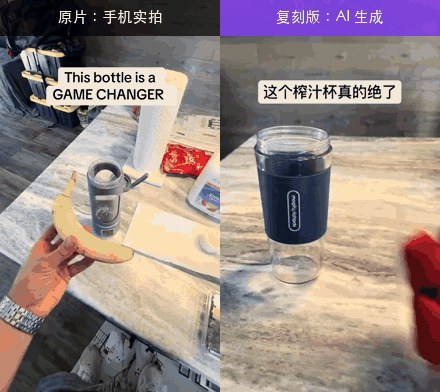
- A project demo (from the README, not a test on this site): on the left, a phone-shot original from TikTok; on the right, a version that swapped the product and redid it with AI. The project’s own judgment: the left side is all live action, one scene, two camera positions; the right side is all AI, eight shots in three generation passes. Those figures are as stated in the repo on research day.
- What you get when a run finishes: a one-line conclusion (which parts are AI, code, or live action), a recreation plan split by production method, and a full
report.html(per-shot stills, the reasons for each judgment, prompts, how it was shot, and a breakdown of the sound). You can also export subtitles. Treat the fields in the report you actually get as the source of truth. - What kinds of video it can break down: the README lists live action, AI video, digital presenters, 3D / animation, code or templates, screen recordings / screenshots, and mixed videos that put those methods on one timeline. Besides the picture, it also breaks down captions and on-screen type, stickers, editing rhythm, and sound (voice, music, effects).
- How to install and use it: first have ffmpeg and Python 3.10+ on the computer, then tell Claude Code or Codex something like: “Install https://github.com/JuneYaooo/rea-video, then break down this video: /path/to/video.mp4.” You can also install it by hand:
brew install ffmpegorsudo apt install ffmpeg, thengit clonethe repo and runbash scripts/install_skill.sh. It can run without a vision model; the project says original files are often enough with tools alone, and recommends a model — or a second look from an agent that can already see images — for platform-compressed video. - Does it output a finished video? The official FAQ says not at present. rea-video gives you a production plan; shooting, generating assets, and editing are still yours to do in the right tools. The repo also mentions a companion project, capsule-cinema, for “swap-the-elements recreation.” That is a separate toolchain, not a one-click render on this official site.
- Copyright: use it to learn a video’s structure, pacing, and method, then remake it with assets you have the right to use. Do not lift someone else’s picture, music, character, or likeness, and do not treat this as a hotlink-download or watermark-removal guide. When you publish, follow the platform’s rules and local requirements for labeling AI-generated content.
How it sits next to tools on this site
| You care more about… | Better fit |
|---|---|
| Turning a Bilibili / YouTube (or similar) link into timestamped notes and a mind map | a2md (EN pending) |
| Pulling a photography recipe from a still on the web, then generating a similar look from your own photo | LookRecipe (EN pending) |
| Dropping a photo into a fixed 15-second “first time at a fancy café” meme video | My Fancy Cafe (EN pending) |
| Judging, shot by shot, how a video was made, and getting a shooting / generation / code path | rea-video |
| Studying how a website or a piece of software works, then building your own version | Craft Anything (EN pending) |
In short: a2md is about “understanding the content”; LookRecipe is about still-photo style; My Fancy Cafe is about a fixed meme template; rea-video is about “how each shot in this video was made.” It is also not the same kind of “rebuild” as Craft Anything: one breaks down video shots, the other studies a product or a site and then rebuilds it.
Boundaries (read before you install)
- Good fit: you already use Claude Code or Codex, you have a local reference video you have the right to use, and you want to understand the shooting method, a generation path, or a code approach before making your own version.
- Caveats: there was no official Release package on research day; the judgments are inferences from visible clues, and the official site also says it cannot guarantee recovery of the original author’s project files or original prompts; platform transcoding can interfere with the judgment, and the project’s own evaluation set mentions this — those accuracy numbers were not re-tested here. We did not actually run a full breakdown on this machine.
- Not a great fit: you want to upload on a web page and get an analysis or a finished video; you only want a video turned into study notes (see a2md); you want it to download other people’s videos, strip watermarks, or copy a finished video outright.
Bottom line
rea-video turns “look at a video shot by shot, tell live action from AI from code, and get a production path you can follow” into an open-source tool: about 5856★ on research day, Apache-2.0, running in Claude Code or Codex. The core is free, but you bring the agent and the local environment. The official site currently has no upload box and does not render a finished video. If you already use a2md (EN pending) for video notes, or LookRecipe (EN pending) for still-photo recipes, this fills in the “how the shots were made” step. Install steps and limits should be checked against the README and official site as of the research day.


