


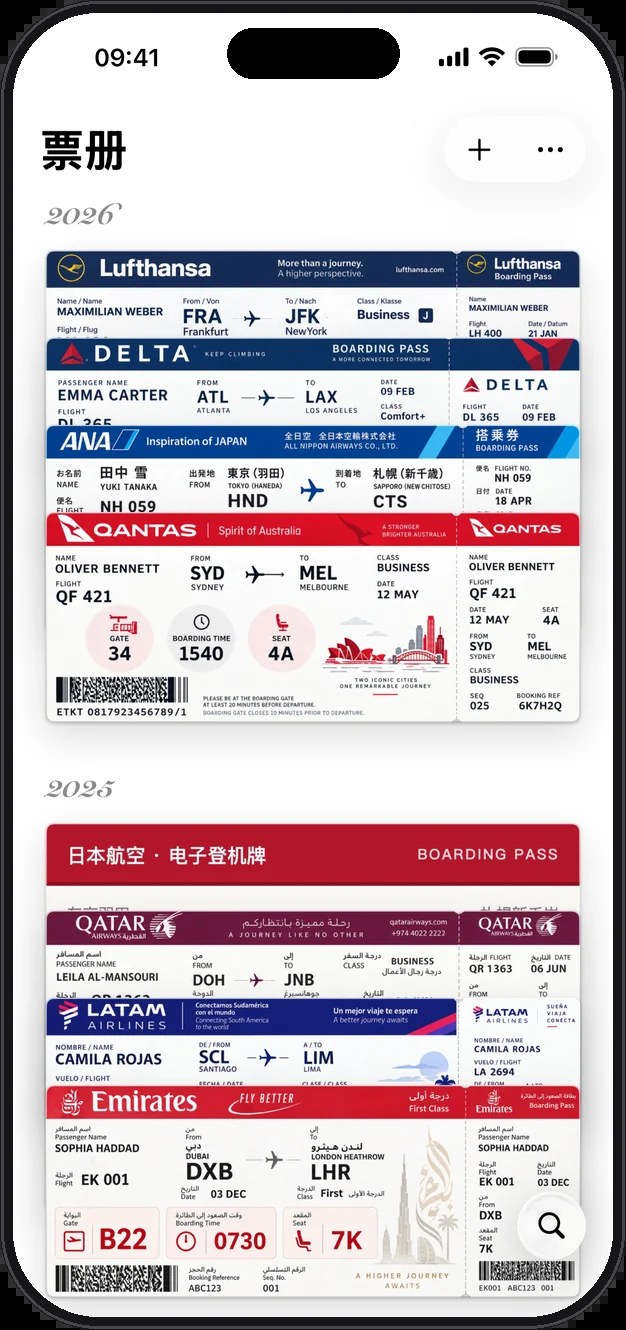
Paper boarding passes in a drawer crease, catch the light, and fade if you leave them long enough. When you want to remember a trip, you are often left with one blurry scrap of paper. Passory (票册 in Chinese) is an iPhone app that photographs boarding passes and ticket stubs, corrects creases and shadows, redraws them as a clean ticket face, and stacks them by year so you can flip through them the way you flip through Apple Wallet. Tear off the stub and you can get back to the photos you took at the destination that day; the route is also drawn on a map. The website is albu.me (the Chinese site; the English site is at /en/). In the US App Store the name is Passory: Boarding Pass Album. The notes below were checked on November 9, 2026, against the Chinese and English sites, the FAQ, and App Store lookups for the US, Hong Kong, Taiwan, and mainland China stores, among others.
Two points should be clear up front. You currently cannot download it from the mainland China App Store — the official FAQ states that it is listed in regions such as Hong Kong, Taiwan, and the United States, and is not yet listed in mainland China or the EU. When we rechecked the lookups, the app was found in the US, Hong Kong, Taiwan, UK, Japan, Singapore, Australia, and Canada stores; lookups for mainland China, as well as Germany, France, Italy, and Spain (EU), all returned a resultCount of 0. It had also only just appeared in the US store: on the day we checked, the US rating was 0 (0 reviews). The Hong Kong lookup showed one 5-star review, which is too small a sample to treat as a reputation. Do not read this as “search the mainland store and you will find it, already with a pile of ratings.”

What it is, at a glance
| Item | Details |
|---|---|
| Product name | Passory: Boarding Pass Album in English (票册 in Chinese) / site albu.me |
| Developer | Listed in the store as 诗鹏 陈; bundleId me.albu.ticketalbum; App ID 6823020311 |
| Version | 1.0.1 (this version was released at 09:03 on 2026-11-07, Asia/Shanghai; first listed on 2026-11-04). The package is about 21.3 MB (store fileSizeBytes 22,330,368) |
| Platform | iOS 18.0 or later; the site says it is for iPhone. Store categories are Travel and Photo & Video; the language codes are English and Chinese (Simplified / Traditional) |
| Availability | Found in the US, Hong Kong, Taiwan, UK, Japan, Singapore, Australia, and Canada stores, among others; not yet listed in mainland China or the EU (the official FAQ and the lookups agree) |
| Price | The app itself is free to download. You can keep 10 of your own stubs for free (built-in samples do not count), with every feature available, and 2 free AI redraws a day. The full version is listed on the site as a US$2.99 one-time purchase, with no ticket limit, and is not a subscription; the Hong Kong store shows HK$23, and other regions follow the App Store. After you change phones, tap Restore Purchases with the same Apple ID |
| Ratings | US store on the day we checked: 0 stars / 0 reviews; Hong Kong: one 5-star review. It is still a newly listed app overall |
| Privacy | No account, no ads, and no tracking. Stubs are stored on the device; if you turn on iCloud sync, they go only into your own iCloud. The photo wall reads the library only on the device. A stub image is sent out only when you agree to an AI redraw, and it is discarded after use and not kept |
The full-version price comes from the pricing section on the official site. The iTunes lookup only shows the app download as Free and does not list an in-app purchase amount. Before you pay, go by the live price on the App Store product page for your region.
What it actually does
The following is compiled from the official site and the US store listing. We did not install or run the app on an iPhone.
- Photograph a paper ticket and get a clean ticket face: tap the “+” at the top right and use the camera on a creased, crooked, or reflective boarding pass or stub. Passory finds the edges, straightens the ticket, removes shadows, and redraws it as a clean ticket face. For an electronic boarding pass, you can pick a screenshot from the photo library.
- Stacked by year: tickets are stacked by year like Apple Wallet. Scrolling down moves from one year’s trips to the next; tap a ticket and it flies out of the stack.
- Tear off the stub to see that day’s photos: tear along the perforation and the app finds the photos you took at the destination on that trip, and lays them out as a photo wall. The 1.0.1 release notes also say the stub tears along the ticket’s actual perforation, and that you can move the tear line from the ticket menu.
- Map and mileage: each trip is drawn on a map. It counts how many flights you have taken, how far, and how many cities and countries you have visited, with the longest routes listed first.
- You can collect a trip even without a stub: fill in the flight by hand and pick a ticket-face template. The Chinese site mentions boarding-pass, wallet, Swiss, 1990s, and comic-book styles, among others; the US store listing also mentions 1960s, holographic, and travel-poster styles. You can also import a trip list exported from UMETRIP (航旅纵横, a popular flight-itinerary app in China) as
.xls, or from Flighty as.csv, in one go. - A paper-airplane easter egg: double-tap an electronic boarding pass to flip it over; it folds into a paper airplane and flies back to the photo wall from that trip.
- Sensitive details are blurred before you share: the US store listing says that when you share a ticket face, the app helps blur the name, ticket number, and barcode, and that you can adjust this further.
- How it divides work with Flighty: the official FAQ is explicit — Flighty tracks a flight’s live status; Passory does not track flights. It collects the trips you have already taken into an album. The two can be used together, and a trip list exported from Flighty can be imported directly.
Version 1.0.1 also fixed some problems from the first days after launch. For example: if you leave the app midway through a redraw and come back, the ticket face is ready and the attempt is counted only once; swiping away a ticket that is still being redrawn continues the job in the background instead of dropping it; a repeated “redraw service refused the request” prompt on some iPhones has been fixed; and Nantong Xingdong Airport can now be found in search. Go by the store release notes for the exact list.
The contact address on the US store page is [email protected]. The privacy policy and terms are provided on the official site.
How it sits next to other options on this site
| If you care more about… | A better place to start |
|---|---|
| Swiping through the iPhone library by month to delete duplicate or space-hungry everyday photos | Photo Cleaner (EN pending) |
| Picking a moment out of a concert or travel video and turning it into a Live Photo, a GIF, or a full-quality still | Beavery (EN pending) |
| Collecting paper boarding passes and stubs into a travel album you can flip through by year, and seeing the routes on a map | Passory |
In short: Photo Cleaner is about which photos in the library should go. Beavery is about which frame in a video is worth keeping. Passory is a different job: it turns a boarding pass that will crease and fade into a stub you can keep flipping through, and it gathers that day’s photos and the routes you flew along with it.
Limits to read before you download
- A good fit if you like keeping paper boarding passes or stubs, you want a clean ticket face after you take a photo, and you want years, a map, and photos to string the trips together; you can use an iPhone on iOS 18 or later; and you are in a region where the app is already listed (or you can use an Apple ID for one of those regions).
- Watch for: it is not yet in the mainland China store, and it is not in the EU either. The US store had no user ratings on the day we checked, and the product is only at 1.0.1 — it is a newly listed app. The free tier caps you at 10 of your own stubs and 2 AI redraws a day. The full version is listed on the site as about US$2.99 one-time, but check the store in your region. We did not install it on a real iPhone, so whether photographing, redrawing, and the photo wall are accurate is something you will have to try yourself. When you agree to an AI redraw, that one ticket face leaves the phone and is sent to the redraw service.
- A poor fit if you only want to search and download it in the mainland China App Store; if the system is below iOS 18; if what you mainly need is live status for a flight that is about to depart (that is Flighty’s job); or if you want to tidy everyday photos that should be deleted (see Photo Cleaner) or cut a video into a Live Photo (see Beavery).
Bottom line
Passory turns “photograph a creased boarding pass → redraw it as a clean ticket face → stack it by year → tear off the stub to see that day’s photos → look back at the places you have flown on a map” into a small iPhone app that does not require an account. The free tier already includes every feature for 10 of your own tickets, plus 2 free redraws a day. If you want no ticket limit, the site lists a one-time purchase of about US$2.99, not a subscription. It is still very new: it is not in the mainland China or EU stores, and the US store had no ratings yet. If you are in a region where it is already listed, and you happen to like keeping stubs, start with the official site and the App Store page for your region, then decide whether to install it.
If you only want to count the days until a trip, or make a countdown card you can forward, without installing an app first, see the QuietDays Web days calculator on this site (no account required; the card content lives in the link. Check the QuietDays app and store listing yourself; this article is not a substitute for installing and trying it).


